AI for business is often discussed in extremes.
One side promises that artificial intelligence will automate an entire company. The other treats AI as a slightly faster writing tool.
The useful reality sits between those positions.
AI can already help businesses research markets, organize knowledge, prepare decisions, document processes, support customers, train employees, analyze feedback, create reports, draft proposals, and automate repeatable work. But results depend on choosing the right workflow, supplying reliable context, and keeping people responsible for important decisions.
The best starting point is rarely “adopt AI everywhere.”
It is:
- find a repeated business problem;
- measure the current process;
- give an AI model the right evidence;
- define what requires human review;
- test the workflow on a limited scale;
- expand only when the result is useful and reliable.
This guide covers 30 practical AI business use cases, explains which tasks are good candidates, shows how Neurohelper modules can work together, and provides a straightforward implementation plan for small businesses and larger teams.
What does AI for business mean?
AI for business means using artificial intelligence to improve a commercial or operational process.
That may involve:
- generating a first draft;
- summarizing information;
- extracting structured data;
- comparing options;
- identifying patterns;
- creating visual or audio content;
- preparing a recommendation;
- routing a task;
- answering questions from an approved knowledge base;
- connecting several steps into a reusable workflow.
The word “AI” covers different model types.
Text and reasoning models can analyze, write, plan, and structure information. Image models can generate and edit visual assets. Video models can turn concepts and images into motion. Audio models can create voiceovers, transcribe speech, or support localization. Smart Assistants can package instructions and business context into a reusable role.
In Neurohelper, these capabilities are organized around Chat Master, Image Master, Video Master, Audio Master, Smart Assistants, and connected Workflows. A business can use one module for a quick task or combine several modules into a complete process.
Which business tasks are best suited to AI?
Good first use cases usually have five characteristics:
| Characteristic | What it means |
|---|---|
| Repeated | The task happens regularly |
| Context-based | The result improves when supplied with company information |
| Reviewable | A person can check whether the output is useful |
| Measurable | Time, quality, cost, or conversion can be compared |
| Reversible | An imperfect draft does not immediately create serious harm |
Examples include weekly summaries, meeting notes, first drafts, research organization, internal FAQs, content repurposing, and support-response suggestions.
Higher-risk decisions require more control. Legal conclusions, financial decisions, hiring outcomes, medical information, security actions, and binding customer commitments should not be delegated to an AI model without appropriate expertise and review.
30 practical AI use cases for business
Strategy and decision support
1. Market research
AI can organize reports, articles, customer discussions, reviews, and interview notes into a structured view of a market.
Ask it to identify segments, recurring needs, buying triggers, alternatives, risks, and unanswered questions. Require source references and separate evidence from interpretation.
2. Competitor analysis
Provide competitor websites, product pages, public pricing, reviews, and campaign examples.
AI can compare positioning, features, target audiences, proof, offers, and common customer objections. It should not invent private competitor data or present assumptions as facts.
3. Customer insight synthesis
Upload interviews, surveys, support tickets, sales notes, and reviews.
Chat Master can group recurring customer situations, pains, desired outcomes, objections, and language patterns. The result can inform product, marketing, support, and sales teams. For deeper evidence-gathering methods, explore Research Use Cases.
4. Scenario planning
AI can help a team examine several possible futures.
For example:
- What happens if acquisition costs rise?
- What if a major supplier becomes unavailable?
- What if a competitor lowers its price?
- What if demand grows faster than the support team?
The output is not a forecast. It is a structured way to surface assumptions, risks, dependencies, and possible responses.
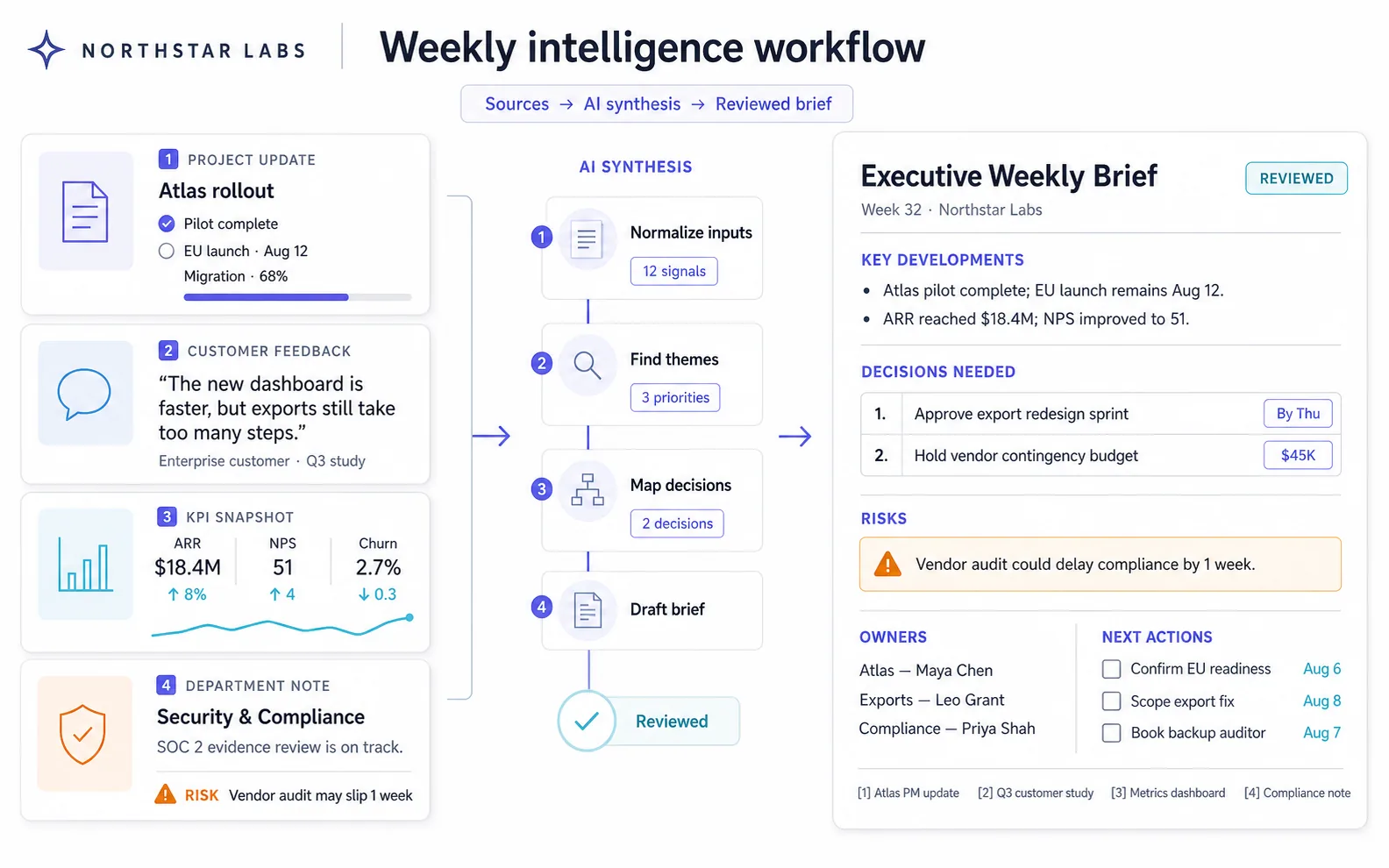
5. Executive weekly briefs
Instead of manually combining updates from several departments, use AI to prepare a concise weekly brief.
The brief may include:
- progress;
- key metrics;
- decisions required;
- risks;
- blockers;
- customer signals;
- priorities for the next week.
Every number and commitment should link back to the original source.
Operations and process improvement
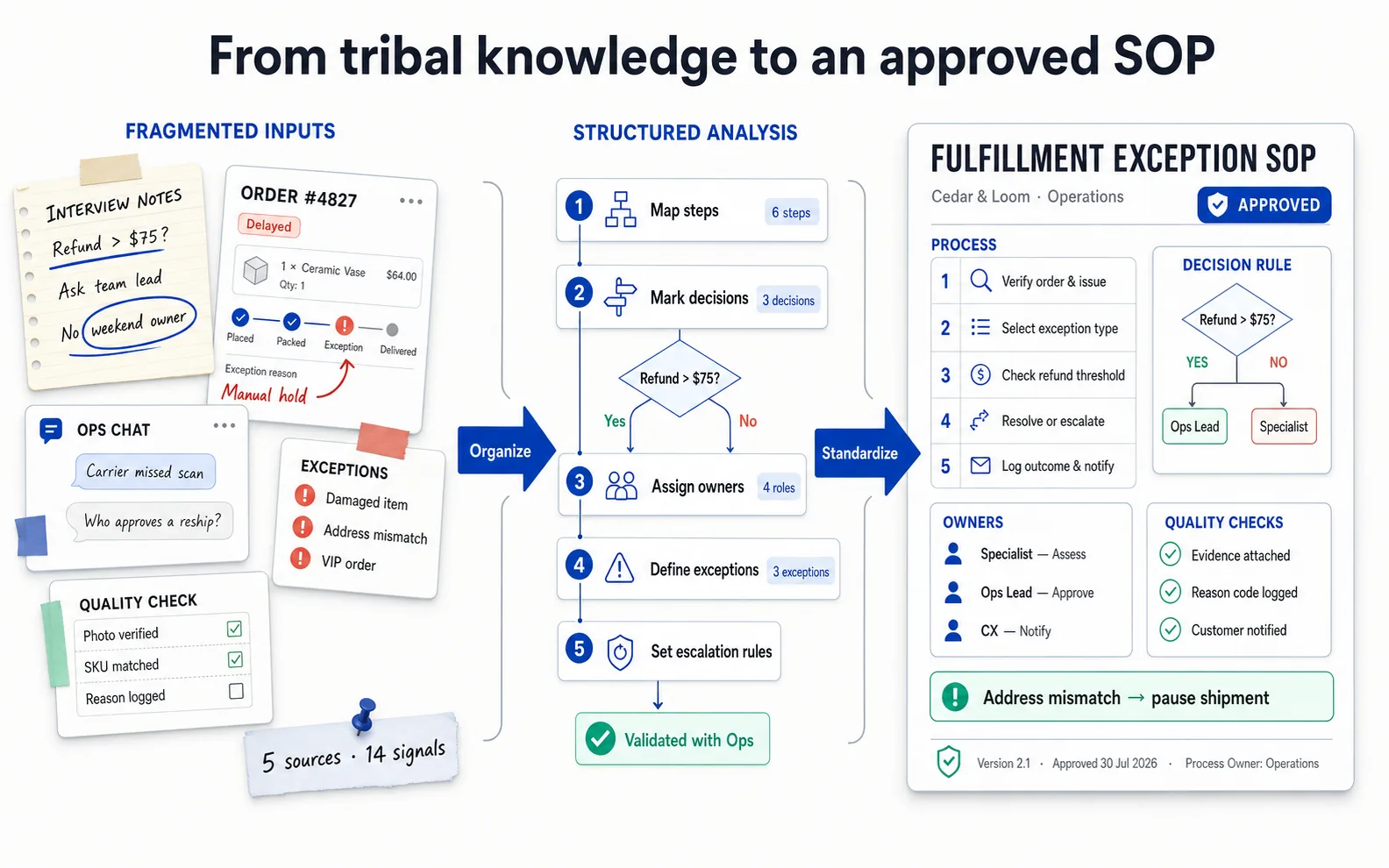
6. Standard operating procedures
Turn interview notes, screen recordings, checklists, and existing documentation into a structured SOP.
A useful SOP includes:
- purpose;
- owner;
- prerequisites;
- step-by-step actions;
- decision points;
- exceptions;
- quality checks;
- escalation path;
- revision date.
The employee who performs the process should verify the final document.
7. Process mapping
AI can convert a description of how work currently happens into a process map.
Ask it to identify inputs, outputs, handoffs, waiting time, repeated data entry, approval points, exceptions, and unclear ownership.
This helps reveal where automation may be useful and where the underlying process should be simplified first.
8. Project planning
Use AI to transform a goal into:
- milestones;
- workstreams;
- deliverables;
- dependencies;
- risks;
- roles;
- review points;
- launch checklist.
The project owner should approve estimates and dependencies rather than accepting generated dates automatically.
9. Meeting preparation
Provide the agenda, previous notes, open decisions, project status, and participant roles.
AI can create a focused briefing with discussion questions, decisions required, missing information, and a proposed agenda.
10. Meeting notes and action items
With appropriate permission, AI can turn a transcript into:
- summary;
- decisions;
- tasks;
- owners;
- deadlines;
- unresolved questions;
- risks;
- next meeting agenda.
Names, dates, numbers, and commitments still require verification.
11. Vendor and software comparison
Create a requirements matrix before comparing tools or suppliers.
AI can organize:
- capabilities;
- pricing;
- contract terms;
- integration requirements;
- implementation effort;
- support;
- security documentation;
- switching risk.
Use authoritative vendor information and mark missing answers clearly.
12. Recurring operational reports
AI can turn structured weekly inputs into consistent operational reports.
Instead of asking it to “write a report,” define the exact sections, metrics, comparison periods, exceptions, and audience. This reduces formatting work and makes changes easier to spot.
Knowledge and administration
13. Document summarization
AI can summarize long policies, reports, proposals, manuals, and research documents for different audiences.
Ask for:
- key points;
- decisions;
- obligations;
- risks;
- open questions;
- source sections;
- terms that require expert interpretation.
14. Information extraction
Convert unstructured documents into tables.
Examples include extracting:
- dates;
- parties;
- product specifications;
- deliverables;
- prices;
- renewal conditions;
- customer requests;
- survey answers.
Always validate critical fields against the source.
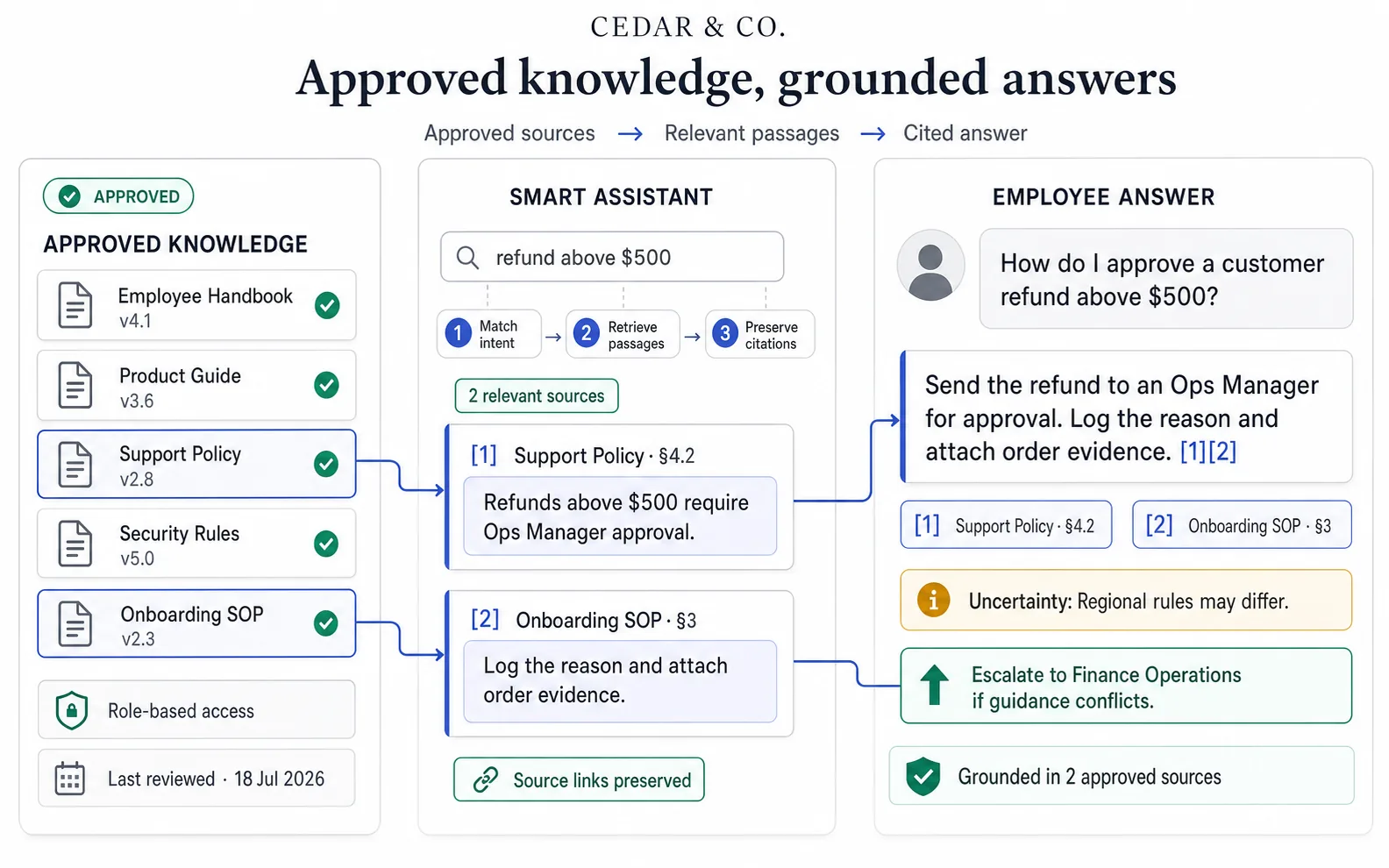
15. Internal knowledge assistant
A Smart Assistant can answer employee questions using approved company materials.
It might help people find:
- policies;
- onboarding guidance;
- product information;
- process instructions;
- templates;
- internal terminology;
- escalation contacts.
The assistant should cite its source and admit when the knowledge base does not contain an answer.
16. Template and document creation
AI can create consistent first drafts for:
- briefs;
- proposals;
- reports;
- agendas;
- checklists;
- project updates;
- internal announcements;
- customer summaries.
Approved templates reduce variation and help teams use the correct structure.
17. Translation and internal localization
Translate internal communications, training materials, product information, and process documents.
Audio Master can support narration and transcription, while Image Master can help adapt visual material. Important terminology and regulated language should be reviewed by a qualified person.
Customer service
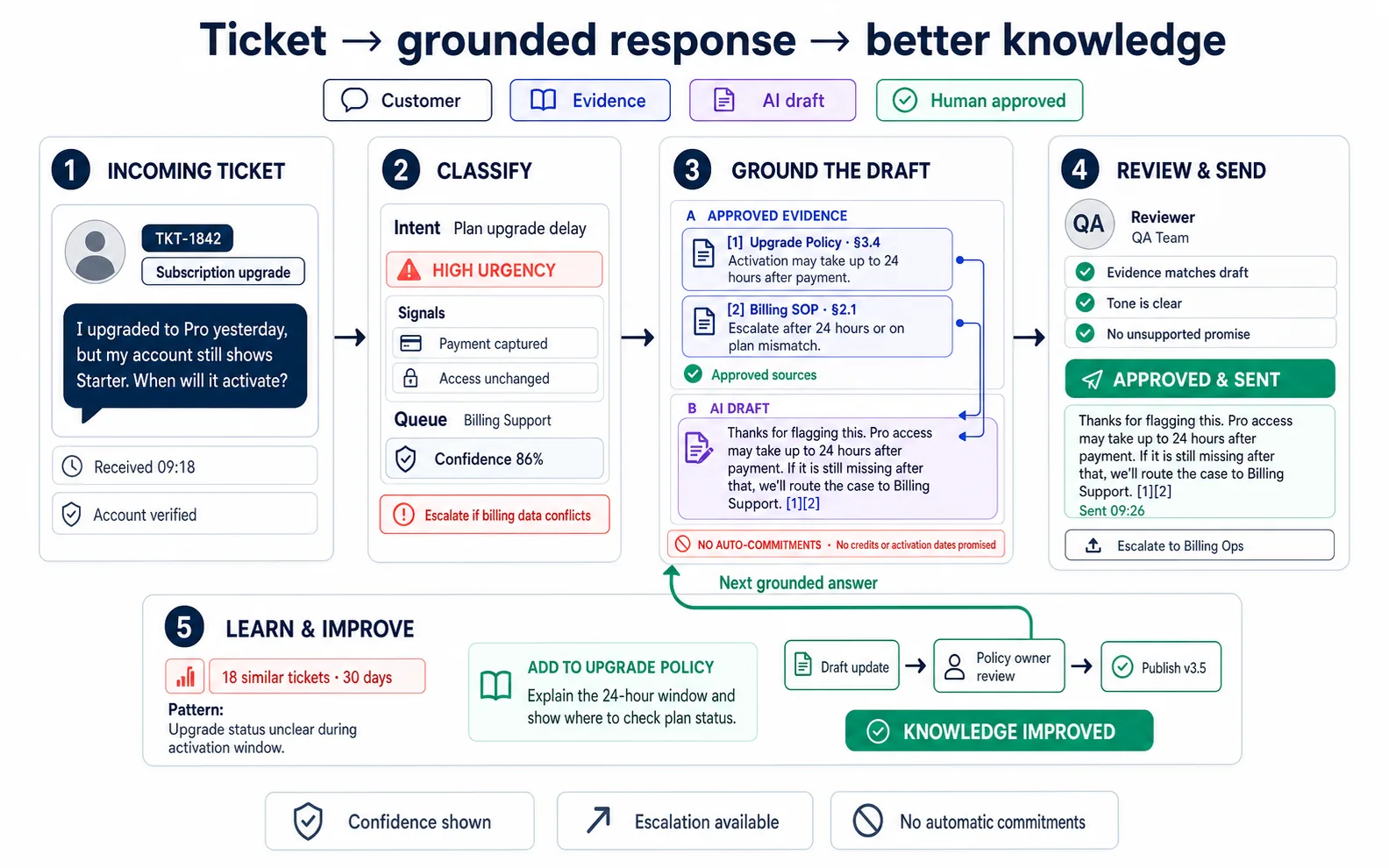
18. Support ticket classification
AI can categorize incoming requests by topic, urgency, language, product area, and required team.
Use clear routing rules and keep human escalation for sensitive, angry, high-value, safety-related, or unusual cases.
19. Drafting customer responses
Provide the assistant with approved product information, support policies, tone, and examples.
It can draft a reply that an agent reviews before sending. This is especially useful for repeated questions where the correct answer is already documented.
20. Customer support knowledge bases
AI can turn resolved tickets and product documentation into draft help-center articles.
Ask it to identify prerequisites, steps, screenshots needed, common mistakes, expected result, and escalation options.
21. Support quality review
Analyze a sample of support interactions against an approved rubric.
The model can flag:
- unanswered questions;
- unsupported statements;
- tone problems;
- missing verification;
- unclear next steps;
- opportunities to improve documentation.
AI should support coaching, not make unreviewed employment decisions.
People, onboarding, and training
22. Employee onboarding
Create role-specific onboarding plans from approved company materials.
The plan may include:
- first-week goals;
- required accounts;
- essential policies;
- people to meet;
- product knowledge;
- process training;
- example tasks;
- check-in questions.
23. Training content
Chat Master can prepare lesson structure, scripts, exercises, and knowledge checks.
Image Master can create diagrams and visual examples. Video Master can produce explainers or avatar-led training. Audio Master can add narration and localized versions.
24. Role-play and practice
A Smart Assistant can simulate a customer, manager, interviewer, or stakeholder for training.
Employees can practice:
- support conversations;
- sales discovery;
- objection handling;
- difficult feedback;
- product explanations;
- incident communication.
The assistant should follow an approved scenario and provide transparent feedback criteria.
Marketing and sales support
25. Proposal and presentation drafts
Combine customer requirements, approved proof, scope, timeline, and pricing rules into a proposal structure.
AI can prepare the first draft and highlight missing information. A responsible owner must confirm commercial commitments before the proposal is shared.
26. Account and sales-call preparation
Use public company information and approved CRM context to create an account brief.
Separate:
- verified facts;
- hypotheses;
- questions to ask;
- potential fit;
- disqualifying signals;
- relevant proof.
For a complete process, see How to Build an AI Marketing and Sales Funnel.
27. Content repurposing
Turn one approved source into several formats.
A webinar may become:
- article;
- email;
- social posts;
- carousel;
- short-video scripts;
- clips;
- narrated summary;
- internal sales resource.
Product and technical operations
28. Customer feedback analysis
Combine reviews, support requests, interviews, surveys, and churn notes.
AI can group feature requests, recurring frustrations, desired outcomes, affected segments, and evidence. Product managers should review the clusters and return to original sources.
29. Product requirements drafts
Turn approved research and a product decision into a first requirements document.
Include:
- problem;
- target user;
- desired outcome;
- scope;
- non-goals;
- user stories;
- acceptance criteria;
- risks;
- analytics;
- open questions.
Technical feasibility and estimates remain the responsibility of the team.
30. Technical documentation and release communication
Use AI to draft internal release notes, customer announcements, migration guidance, FAQs, and support preparation from approved engineering information.
For coding and technical implementation workflows, explore Development Use Cases.
How Neurohelper modules work together for business
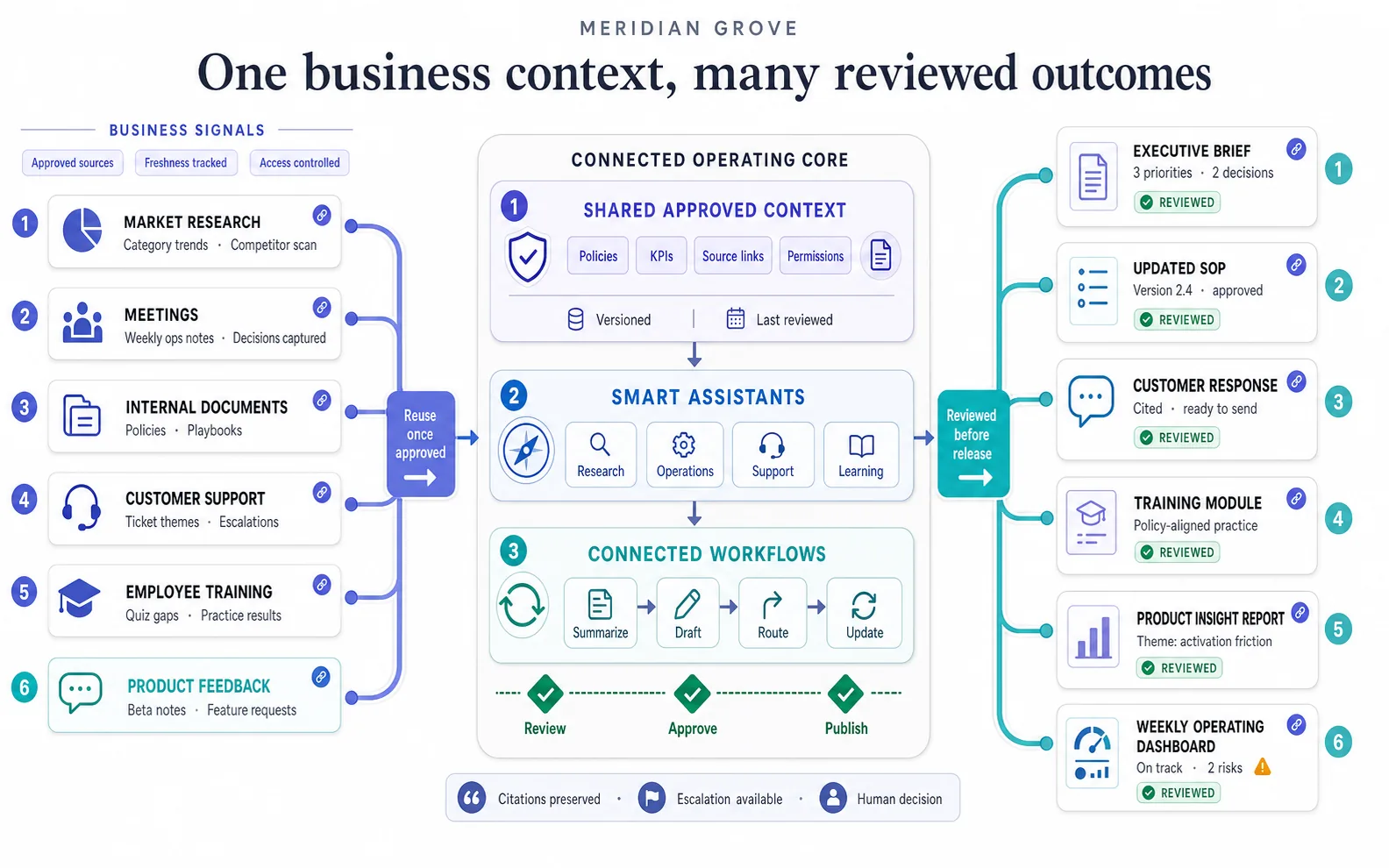
Chat Master
Use Chat Master for research, analysis, writing, planning, extraction, summarization, comparison, and decision preparation.
Different models may perform differently on long documents, structured reasoning, concise writing, multilingual tasks, or difficult analysis. Comparing models on the same business brief is often more useful than selecting one model for every task.
Image Master
Use Image Master for diagrams, product visuals, presentations, training illustrations, process graphics, internal communication, and campaign assets.
It can also edit reference images, adapt formats, preserve products or characters, and create visual alternatives.
Video Master
Use Video Master for product demonstrations, training clips, internal communication, social videos, advertising concepts, and visual explanations.
Approved images from Image Master can become video keyframes.
Audio Master
Use Audio Master for voiceovers, transcription, narration, multilingual audio, dubbing, and sound workflows.
This is useful for meetings, training, customer education, marketing, and accessibility.
Smart Assistants
Use Smart Assistants when the same role, instructions, knowledge, or process is needed repeatedly.
Examples include:
- internal policy assistant;
- customer-support assistant;
- proposal assistant;
- research assistant;
- onboarding assistant;
- content operations assistant;
- project update assistant.
Workflows and automations
Use a workflow when several approved steps should run in a consistent order.
For example:
Meeting transcript → summary → decisions → action items → project update → weekly executive brief.
Or:
Customer feedback → classification → product theme → evidence table → product brief → release communication.
How to implement AI in a business
Step 1: Select one repeated problem
Choose a workflow that consumes time, produces inconsistent results, or makes information difficult to find.
Do not begin with the most sensitive process in the company.
Step 2: Record the baseline
Measure the current process:
- time required;
- number of handoffs;
- cost;
- error rate;
- rework;
- response time;
- output quality;
- employee or customer satisfaction.
Without a baseline, it is difficult to know whether AI improved anything.
Step 3: Build a source package
Collect approved examples, policies, terminology, templates, product information, and evaluation rules.
Mark:
- verified facts;
- assumptions;
- prohibited claims;
- confidential information;
- required sources;
- situations that require escalation.
Step 4: Define the role of AI
Decide whether AI will:
- suggest;
- draft;
- summarize;
- extract;
- classify;
- recommend;
- generate;
- route;
- answer from approved sources.
Also decide what AI must never do without approval.
Step 5: Create a review rubric
Do not review outputs only by asking whether they “look good.”
Score:
- accuracy;
- completeness;
- relevance;
- source support;
- tone;
- format;
- compliance with instructions;
- usefulness to the next person.
Step 6: Run a limited pilot
Test real examples with a small group.
Include easy, normal, difficult, incomplete, and unusual cases. Record where the workflow fails.
Step 7: Improve and standardize
Refine prompts, source materials, templates, escalation rules, and review steps.
When the process becomes reliable, package it as a Smart Assistant or connected Workflow.
How to calculate the value of business AI
AI ROI should include more than subscription cost.
Measure:
| Value area | Example metric |
|---|---|
| Time | Minutes saved per report |
| Capacity | Additional tickets handled |
| Speed | Faster response or project delivery |
| Quality | Fewer missing fields or corrections |
| Consistency | Higher compliance with an approved template |
| Revenue support | More qualified opportunities or faster proposals |
| Knowledge | Less time spent searching for information |
| Employee experience | Less repetitive administrative work |
A simple estimate:
Monthly value =
(time saved × hourly cost × monthly volume)
+ measurable quality or revenue benefit
- model, software, setup, and review costs
Include review time. A workflow that generates quickly but requires extensive correction may not create real savings.
AI for small business
Small businesses often benefit from AI because one person performs several roles.
Practical starting points include:
- customer-research summaries;
- proposal drafts;
- weekly planning;
- support-response suggestions;
- content repurposing;
- document templates;
- meeting follow-up;
- simple reports;
- onboarding checklists;
- product images and social content.
The advantage of an all-in-one platform is that the business can use several model types without purchasing and learning a separate product for every task.
AI for growing teams
As the team grows, the challenge changes from personal productivity to consistency and governance.
Priorities may include:
- shared templates;
- approved knowledge sources;
- role-based assistants;
- common terminology;
- review workflows;
- usage policies;
- team access;
- repeatable reporting;
- automation;
- measurement.
The goal is not to maximize the number of AI requests. It is to create reliable processes that employees can understand and improve.
Security, privacy, and responsible use
Before using AI with business information:
- classify the data;
- understand which provider or model processes the request;
- avoid unnecessary sensitive information;
- restrict access appropriately;
- review retention and sharing requirements;
- establish human approval for important outputs;
- keep source records;
- test for unsupported statements;
- define escalation rules.
AI-generated output may be confident and still be wrong. Important legal, financial, medical, security, employment, and compliance decisions require qualified human review.
For more specialized scenarios, use the dedicated Finance Use Cases and Legal Use Cases sections.
Common AI implementation mistakes
Starting with the tool instead of the problem
The business buys software but never defines the workflow it wants to improve.
Using poor source material
AI cannot create reliable business knowledge from incomplete, contradictory, or outdated documentation.
Automating a broken process
Automation can make unnecessary work happen faster.
Removing review too early
Begin with assisted work, measure quality, and reduce review only when evidence supports the change.
Trying to use one model for everything
Research, concise writing, image generation, video, voice, and automation are different tasks.
Measuring activity instead of value
The number of prompts or generated documents is not a business outcome.
Ignoring employee adoption
A technically strong workflow fails when people do not trust it, understand it, or know when to escalate.
A practical 90-day AI adoption plan
Days 1–30: identify and test
- choose three candidate workflows;
- select one low-risk pilot;
- record the baseline;
- prepare approved source material;
- compare models;
- define a review rubric;
- run real examples.
Days 31–60: improve and document
- analyze failures;
- improve prompts and sources;
- create an SOP;
- define ownership;
- train the pilot group;
- measure time and quality;
- decide whether to continue.
Days 61–90: standardize and expand
- package the workflow as a Smart Assistant or automation;
- add monitoring and escalation;
- document access and data rules;
- onboard additional users;
- select the next workflow;
- report the measured outcome.
Final verdict
AI for business is most valuable when it improves a real process.
Start with repeated work that has clear inputs, a reviewable output, and a measurable baseline. Use Chat Master for analysis and structured work, Image Master for visuals, Video Master for motion, Audio Master for voice and transcription, and Smart Assistants for repeatable roles.
Then connect the modules when the business outcome requires more than one type of content or reasoning.
The winning approach is not “AI everywhere.” It is a growing library of useful, controlled workflows that save time, improve consistency, and help people make better-informed decisions.
Frequently asked questions
How can AI be used in business?
AI can support research, writing, analysis, reporting, process documentation, meetings, knowledge management, customer support, training, proposals, product feedback, content creation, and repeatable workflows.
What are the best AI use cases for small business?
Good starting points include research summaries, proposal drafts, customer-response suggestions, meeting follow-up, content repurposing, document templates, product visuals, and simple operational reports.
How do I choose the first AI workflow?
Choose a repeated, low-risk task with clear inputs, a reviewable output, and a measurable baseline. Avoid beginning with sensitive or irreversible decisions.
Can AI automate business operations?
Yes, but automation should follow process design and testing. Begin with AI-assisted drafts or recommendations, validate quality, define exceptions, and automate only stable steps.
What is a business AI assistant?
A business AI assistant is a reusable model configuration with a defined role, instructions, context, knowledge, output format, and escalation rules. It helps employees perform a recurring task consistently.
Is AI useful for customer support?
AI can classify tickets, retrieve approved information, draft responses, create knowledge-base content, and review support quality. Sensitive or unusual cases should be escalated to people.
How can AI help with business documents?
It can summarize, extract fields, compare versions, draft templates, identify missing information, and adapt documents for different audiences. Important details must be checked against the source.
How do I measure AI ROI?
Compare the new workflow with the previous baseline. Include time saved, output volume, speed, quality, rework, review time, software cost, setup effort, and measurable commercial outcomes.
Is business data safe in AI tools?
Security depends on the platform, selected provider, configuration, data, and company policies. Classify information, limit sensitive inputs, control access, understand processing terms, and use appropriate review and governance.
Can Neurohelper support several business departments?
Yes. Chat Master, Image Master, Video Master, Audio Master, Smart Assistants, and Workflows can support different functions while keeping access to leading models and tools within one platform. Features and limits depend on the selected plan.