AI productivity is often presented as a race to complete more tasks in less time.
That is a narrow definition.
The more useful goal is to reduce unnecessary effort, remember what matters, make clearer decisions, protect attention, and create enough space for work, learning, relationships, rest, and health.
AI can help with that. It can turn a chaotic brain dump into a realistic plan, summarize information, prepare a difficult conversation, organize a trip, create a learning program, suggest questions for a medical appointment, or help you reflect on patterns in your week.
But AI should support your judgment—not take control of your calendar, define your values, diagnose health conditions, or replace human connection.
This guide covers 35 practical AI use cases for productivity and wellness, with concrete examples, reusable workflows, safety boundaries, and a simple way to build a personal AI system in Neurohelper.
What does AI for productivity and wellness mean?
AI for productivity means using artificial intelligence to reduce friction between an intention and a useful result.
Sometimes that result is professional: a project plan, meeting agenda, concise summary, clear email, or organized research file. Sometimes it is personal: a weekly routine, travel checklist, meal-preparation plan, journal reflection, or list of questions to discuss with a qualified professional.
The most useful personal AI systems usually perform one or more of these roles:
- Capture: turn scattered thoughts, voice notes, and messages into structured information;
- Clarify: identify the actual problem, desired outcome, constraints, and next decision;
- Plan: break work into realistic steps and place those steps into available time;
- Create: draft text, visuals, audio, study materials, and other useful assets;
- Review: compare what happened with what was planned and identify improvements;
- Support: provide reminders, reflection questions, preparation, and encouragement without pretending to be a clinician.
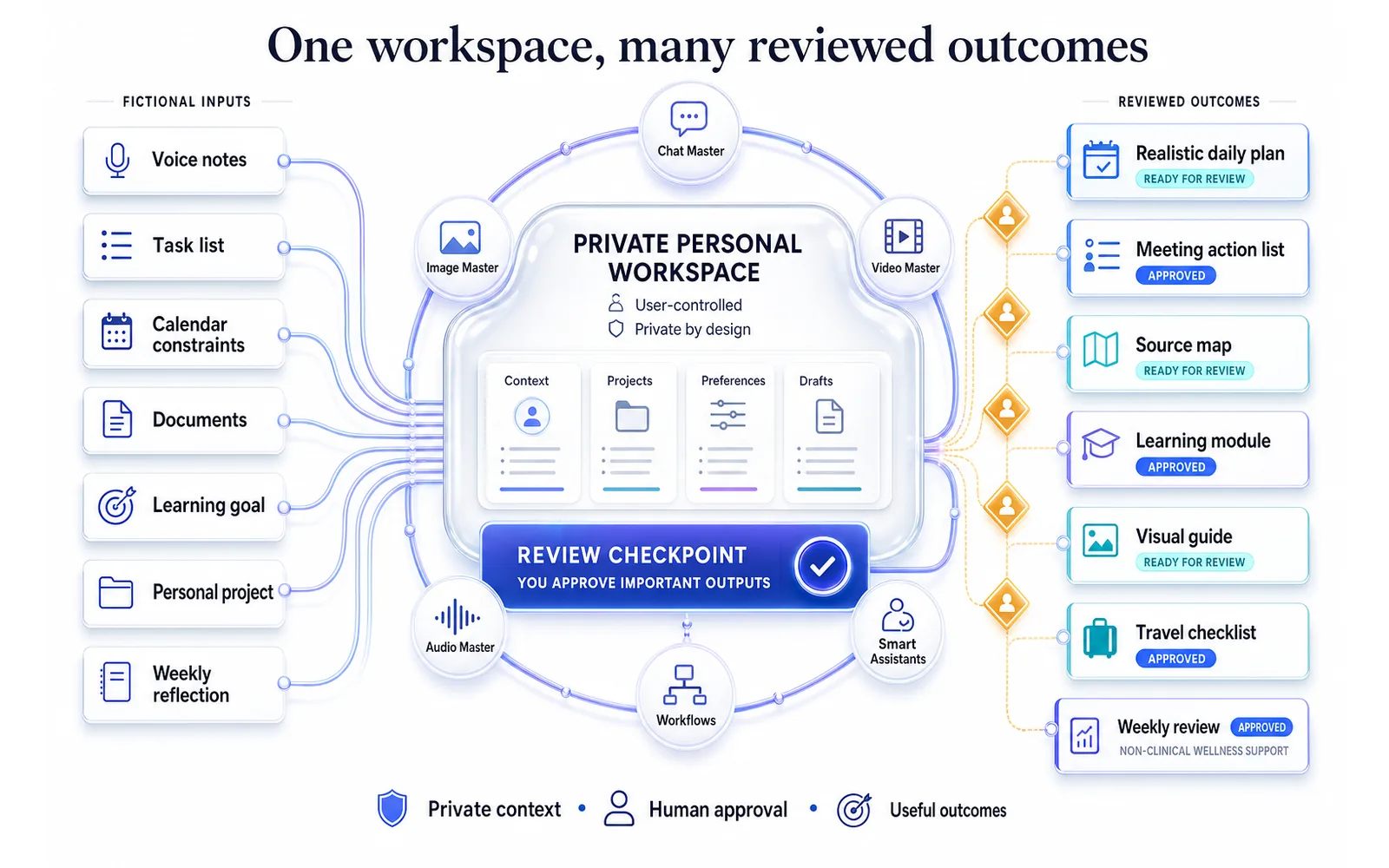
In Neurohelper, Chat Master can reason, organize, draft, and compare. Image Master can create visual plans, diagrams, reference cards, and motivational assets. Video Master and Audio Master can turn a lesson or routine into a format that is easier to consume. Smart Assistants can preserve a preferred planning method, communication style, learning goal, or review checklist. Connected Workflows can move information between those stages.
You can use one tool for a five-minute task or connect several modules into an ongoing system—all within one Neurohelper subscription.
What AI is good at—and what it should not decide
AI is especially useful when a task is repetitive, information-heavy, easy to review, or difficult mainly because the starting point is unclear.
| Good uses of AI | Keep under human control |
|---|---|
| Organizing notes and tasks | Personal values and life priorities |
| Drafting plans and checklists | Medical or mental-health diagnosis |
| Summarizing supplied information | Treatment, medication, or emergency decisions |
| Generating options | Major financial and legal commitments |
| Preparing questions | Important relationship decisions |
| Tracking non-sensitive patterns | Sharing private or sensitive personal data |
The distinction matters. An AI daily planner can suggest a more realistic schedule. It cannot know whether an hour with your family is more important than another hour of work. An AI wellness assistant can help you prepare questions or record observations. It should not tell you that a symptom is harmless or replace a licensed professional.
35 practical AI use cases for productivity and wellness
Planning, focus, and time management
1. Turn a brain dump into an action plan
When everything feels urgent, start by describing the situation without organizing it.
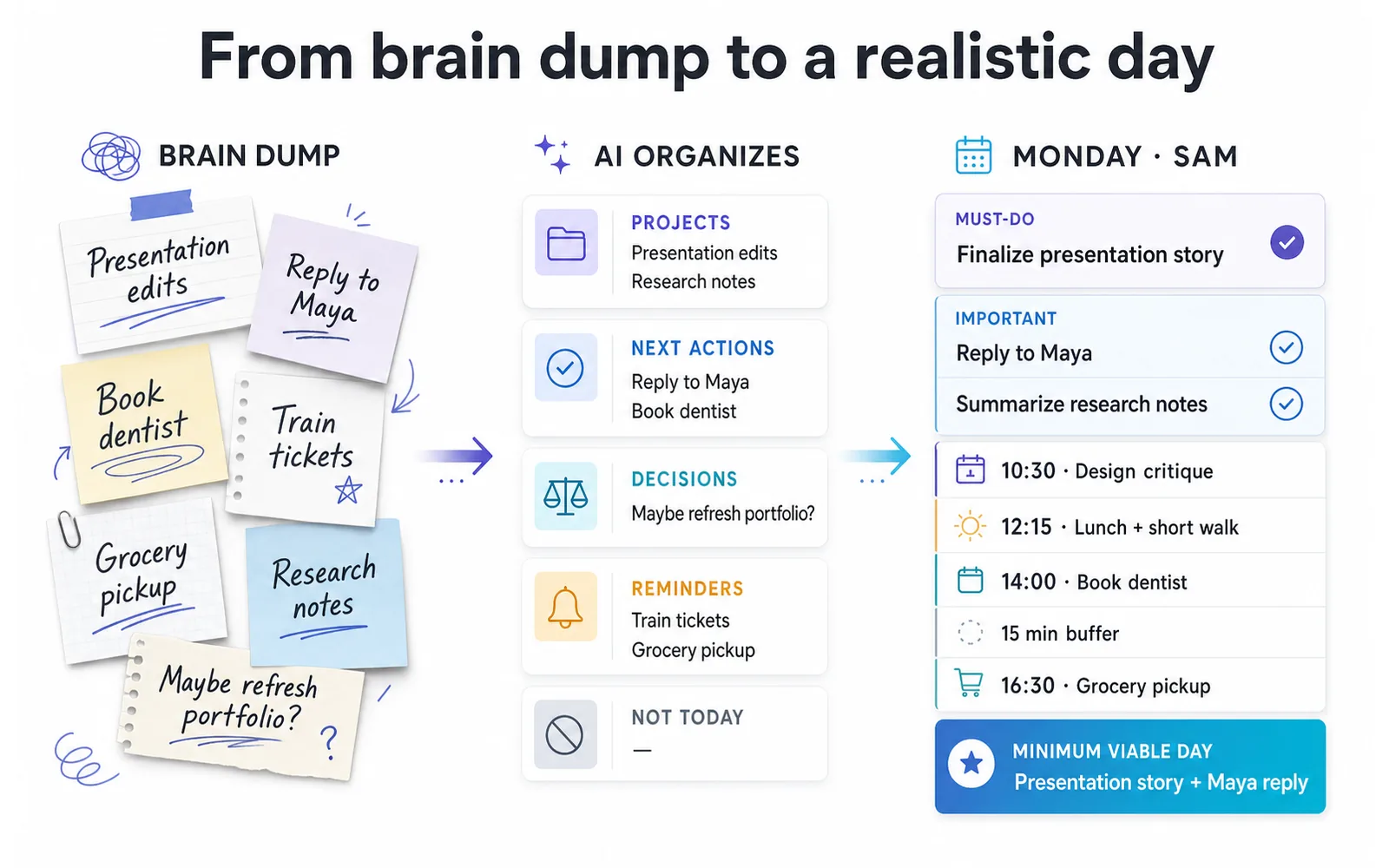
Give Chat Master your tasks, concerns, deadlines, waiting items, and unfinished ideas. Ask it to separate them into projects, next actions, decisions, reminders, and items that can be ignored for now.
For example, “finish presentation, book dentist, answer Alex, new portfolio idea, tax document, buy train tickets” can become a short plan with personal errands separated from deep work. The value is not the list itself—it is removing the need to hold every open loop in working memory.
2. Choose the real priorities
A long task list is not a plan.
Ask AI to evaluate tasks by impact, urgency, effort, dependency, and consequence of delay. Then review the ranking yourself. A useful output might contain one must-do task, two important tasks, several optional tasks, and a clear “not this week” list.
Add constraints such as available hours, current energy, fixed commitments, and what success means. This prevents a generic productivity plan from assuming unlimited time.
3. Build a realistic daily plan
AI can turn priorities into a schedule that includes focus blocks, communication, administration, breaks, travel time, and buffers.
The word “realistic” is essential. If your day contains four hours of meetings, do not ask for eight additional hours of deep work. Tell the model when you work best, how long tasks usually take, and what interruptions are likely.
A good AI daily planner should produce a minimum viable day as well as an ideal one. If the schedule slips, you still know which result matters most.
4. Run a weekly review
A weekly review helps close unfinished loops before they become background stress.
Provide completed tasks, calendar events, notes, delays, wins, and unresolved decisions. Ask AI to create five sections: completed, carried forward, blocked, learned, and next week.
Over time, a Smart Assistant can keep the same review format and ask consistent follow-up questions. The purpose is not to judge whether the week was “productive enough.” It is to restore clarity.
5. Create time blocks around energy, not only availability
Two free hours are not always two useful hours.
AI can help match demanding work to periods when you usually concentrate well and place routine work into lower-energy windows. Supply your normal pattern rather than asking the model to invent one.
For example, a writer might reserve mornings for drafting, early afternoon for calls, and late afternoon for editing and administration. Someone with an unpredictable schedule may use flexible blocks: focus, maintenance, recovery, and overflow.
6. Break an intimidating project into the next three actions
“Launch a portfolio” or “change careers” is too large to act on directly.
Ask AI to define the desired outcome, identify unknowns, map major phases, and then show only the next three actions. Those actions should be small enough to begin without another planning session.
7. Protect focus from predictable distractions
AI can help create a distraction plan based on your actual environment.
Describe when focus breaks, what usually interrupts you, and which distractions are avoidable. Ask for environmental changes, communication boundaries, a parking list for intrusive thoughts, and a recovery step for when concentration is lost.
Avoid asking AI for a perfect “dopamine detox” or rigid universal routine. The useful result is a small experiment you can observe and adjust.
Knowledge, decisions, and personal organization
8. Build a personal knowledge system
Notes become useful when you can retrieve and apply them.
Use AI to classify reading notes, meeting notes, ideas, bookmarks, and project documents by topic, source, status, and possible use. Ask it to preserve links and distinguish direct evidence from interpretation.
A Smart Assistant can then answer questions from an approved set of materials: “What did I learn about onboarding?” or “Which ideas did I save for the website redesign?” It should cite the underlying note rather than presenting everything as certain.
9. Summarize long documents without losing the source
AI can produce an executive summary, key arguments, glossary, action list, or section-by-section explanation from a document you provide.
For important material, request source references, unresolved questions, and statements that require verification. A summary is a navigation aid, not proof that the original document has been fully understood.
This workflow works well for reports, policies, manuals, course materials, research papers, and long email threads.
10. Compare options with a decision matrix
Choosing software, a course, a destination, or a service becomes easier when criteria are explicit.
Tell AI what you are comparing, which factors matter, which are non-negotiable, and where information came from. Ask it to create a weighted matrix and show how the result changes if priorities change.
The model can structure the decision; you remain responsible for the criteria and final choice. Verify prices, availability, rules, and specifications from current primary sources.
11. Create reusable checklists
Ask AI to turn experience into a repeatable checklist: packing for a work trip, publishing an article, preparing a workshop, closing the house before vacation, or reviewing a freelance deliverable.
Improve the first version after every real use. Add missed steps, remove unnecessary ones, and label which items are conditional. The checklist gradually becomes a personal operating procedure rather than a generic template.
12. Organize recurring personal administration
Bills, renewals, appointments, document expiry dates, household maintenance, and subscriptions create many small mental commitments.
AI can help create a monthly, quarterly, and annual administration checklist. Use placeholders instead of account numbers or sensitive records, and store private information only in systems appropriate for it.
The output should tell you what to review—not expose confidential data to make the checklist look complete.
13. Prepare a clear decision brief for yourself
For a significant but non-emergency decision, ask AI to create a one-page brief containing the question, context, options, evidence, uncertainties, risks, reversible steps, and decision date.
This is particularly useful when thoughts have been circling for weeks. A concise brief makes it easier to discuss the decision with a partner, mentor, manager, adviser, or specialist.
Communication and meetings
14. Draft and triage messages
AI can turn rough intent into a concise email or message while preserving your voice.
Provide the recipient, relationship, desired outcome, necessary context, and tone. Ask for a short version first. For sensitive communication, review every implication before sending and remove private information that the model does not need.
AI is especially useful for messages you are postponing because the first sentence feels difficult.
15. Prepare a meeting agenda
Provide the purpose, participants, current state, decisions required, and available time. Ask AI to create a timed agenda with preparation items and an explicit definition of success.
This prevents status updates from consuming a meeting that should produce a decision. It also reveals when a meeting could be replaced by a short written update.
16. Convert meeting notes into accountable actions
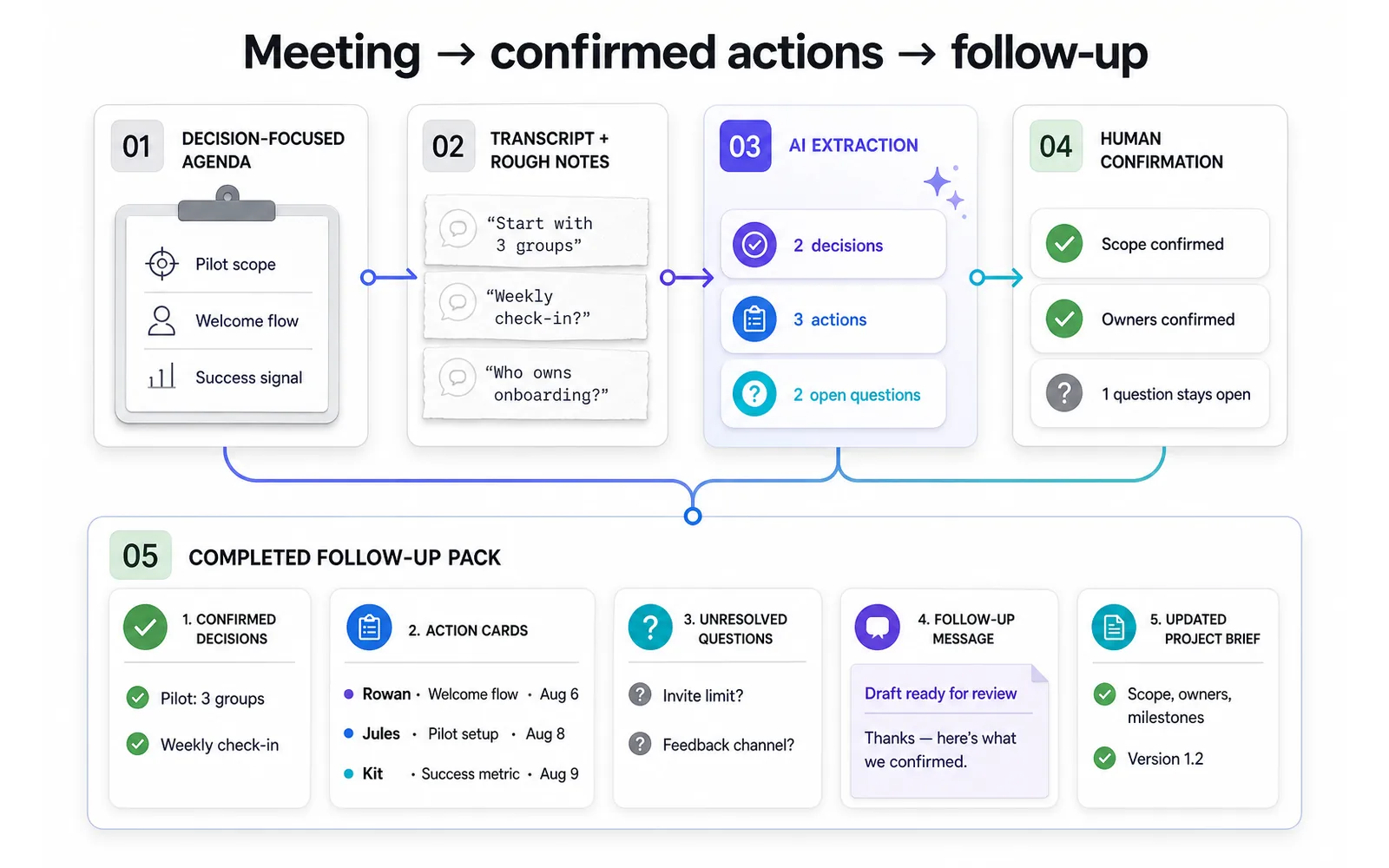
After a meeting, AI can extract decisions, action items, owners, deadlines, dependencies, and unresolved questions.
The responsible person should confirm the result before it becomes the official record. Names, dates, and commitments are easy to misinterpret when the source transcript is incomplete.
17. Prepare for a difficult conversation
AI can help separate observations from assumptions and draft a calm structure for a conversation with a colleague, client, friend, or family member.
Ask for neutral opening language, questions that invite clarification, likely misunderstandings, and boundaries you may need to communicate. Do not use a model to manipulate the other person or predict their private motives.
18. Rewrite unclear text in your own voice
Give AI a rough draft and ask it to improve structure, clarity, tone, and length without adding facts.
You can request alternatives: direct, warm, formal, diplomatic, or conversational. A reusable Smart Assistant can preserve preferences such as short paragraphs, plain language, and minimal jargon.
19. Translate and adapt communication
AI can translate a message, explain cultural ambiguities, and create a simpler version for non-native speakers.
For legal, medical, financial, or high-stakes communication, use an appropriately qualified human translator or reviewer. The goal is accessible communication, not false certainty.
Learning, research, and creativity
20. Create a personalized learning plan
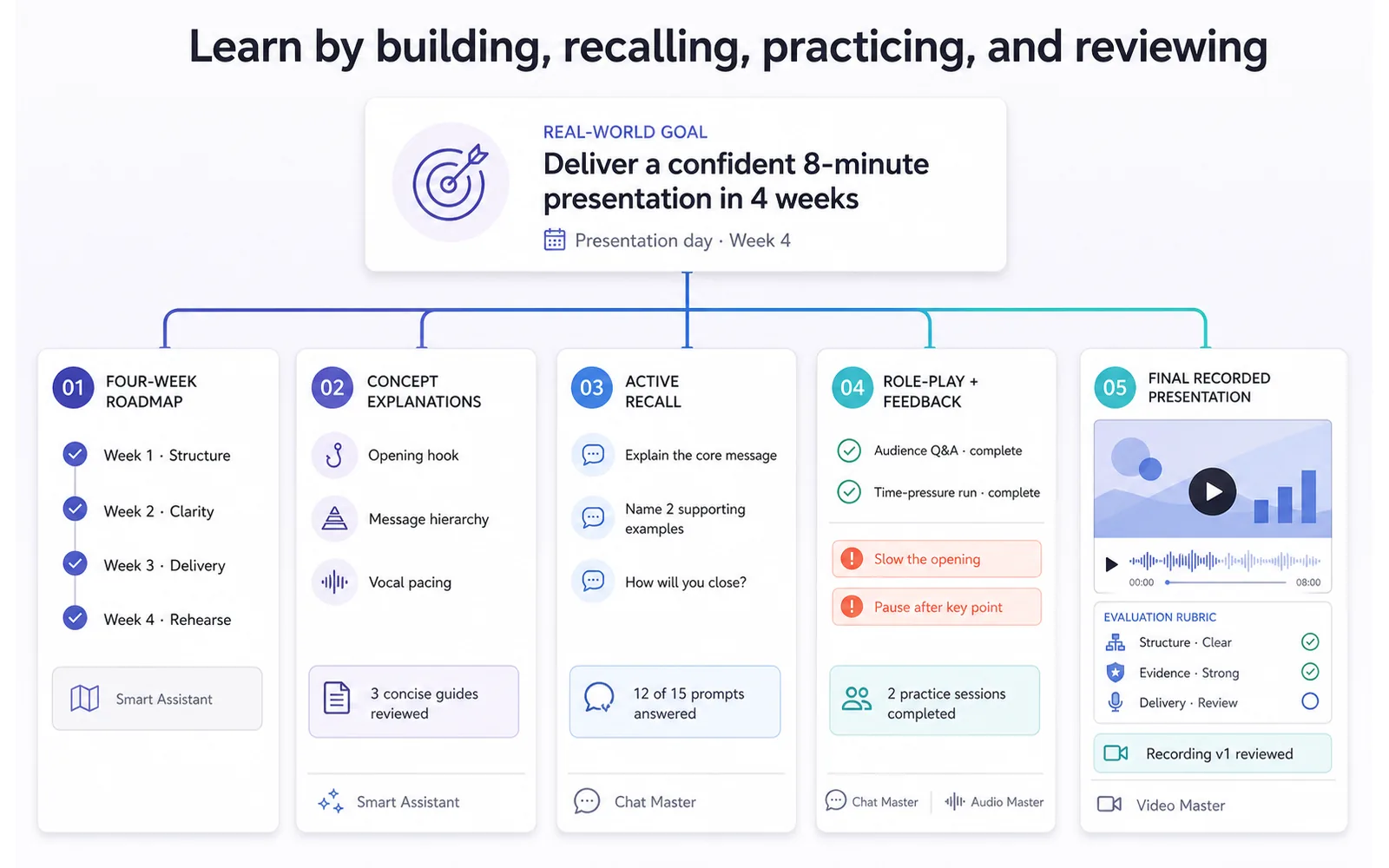
Tell AI what you want to learn, why it matters, your current level, available time, preferred formats, and a real project where the skill can be applied.
Ask for milestones, practice tasks, review intervals, and evidence that would demonstrate progress. A useful plan spends less time consuming explanations and more time doing increasingly difficult work.
For classroom and study workflows, explore Education Use Cases.
21. Explain a difficult concept at several levels
Ask Chat Master for a plain-language explanation, an analogy, a technical explanation, a worked example, and a short self-test.
Comparing explanations from different leading models can be useful when one framing does not click. Neurohelper keeps those model choices in one workspace, so you can change the teacher without rebuilding the entire conversation elsewhere.
22. Generate active-recall questions
Upload your own notes and ask AI to create questions that require recall, application, comparison, and error correction—not only recognition.
Answer before revealing the explanation. Then ask the model to identify weak areas from your responses and create a second round. Verify any generated answer key against the source material.
23. Turn research into a source map
AI can organize documents by claim, source, date, method, relevance, disagreement, and unanswered question.
This is more useful than asking for a confident paragraph about a broad topic. It creates a visible trail from source to conclusion and makes gaps easier to notice. Explore deeper evidence workflows in Research Use Cases.
24. Practice a skill through role-play
A Smart Assistant can act as a fictional interviewer, customer, language partner, presentation audience, or negotiation counterpart.
Define the role, difficulty, success criteria, and feedback format. After each round, request specific observations and one improvement target. Role-play is preparation; it does not reproduce every human reaction.
25. Develop a creative personal project
AI can help move a podcast, photo series, newsletter, short film, family history, illustration project, or hobby from vague interest to a finished artifact.
Everyday life and household organization
26. Plan meals around real constraints
AI can suggest a weekly meal structure based on time, budget, available ingredients, cooking equipment, household size, preferences, and leftovers.
Treat the result as organizational help—not personalized medical nutrition advice. Allergies, medical conditions, pregnancy, eating disorders, medication interactions, and therapeutic diets require qualified guidance.
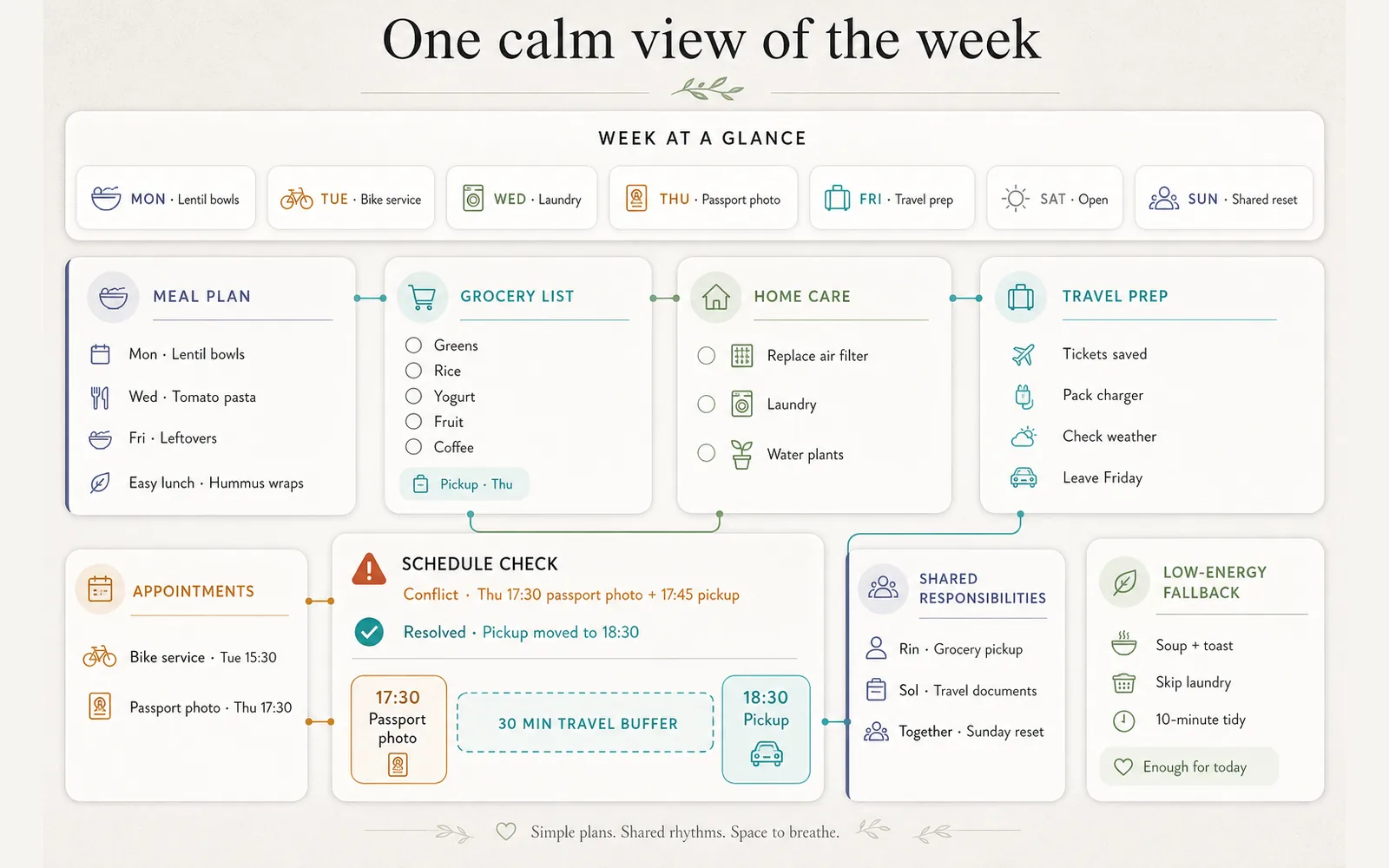
A practical output includes a flexible menu, preparation sequence, grocery list, substitutions, and a low-energy backup option.
27. Create a household maintenance system
Ask AI to organize cleaning, maintenance, seasonal checks, supplies, and recurring responsibilities into daily, weekly, monthly, and annual views.
Include the type of home, climate, household members, pets, and tasks that require a professional. Verify safety-critical maintenance against manufacturer instructions and local requirements.
28. Build a travel plan that survives change
AI can structure destinations, transport, accommodation options, opening hours, reservations, packing, accessibility needs, and fallback plans.
Use current primary sources to verify prices, schedules, visa rules, weather alerts, and entry requirements. Ask for a modular itinerary rather than scheduling every minute.
Image Master can turn the final route into a visual guide, while Audio Master can create pronunciation practice or a compact language phrase pack.
29. Organize personal finances without outsourcing judgment
AI can categorize a fictionalized or safely prepared spending summary, create budget scenarios, explain financial terminology, and generate questions for an accountant or adviser.
It should not be trusted to make investment decisions, predict returns, or handle sensitive credentials. For specialized workflows and stronger risk boundaries, use Finance Use Cases.
30. Coordinate a shared family or household week
Combine schedules, school events, appointments, meals, errands, and responsibilities into one weekly overview.
Ask AI to identify conflicts, missing preparation, unfair workload distribution, and tasks that can be batched. Keep the source data minimal and avoid unnecessary details about children or other household members.
Wellness, reflection, and sustainable routines
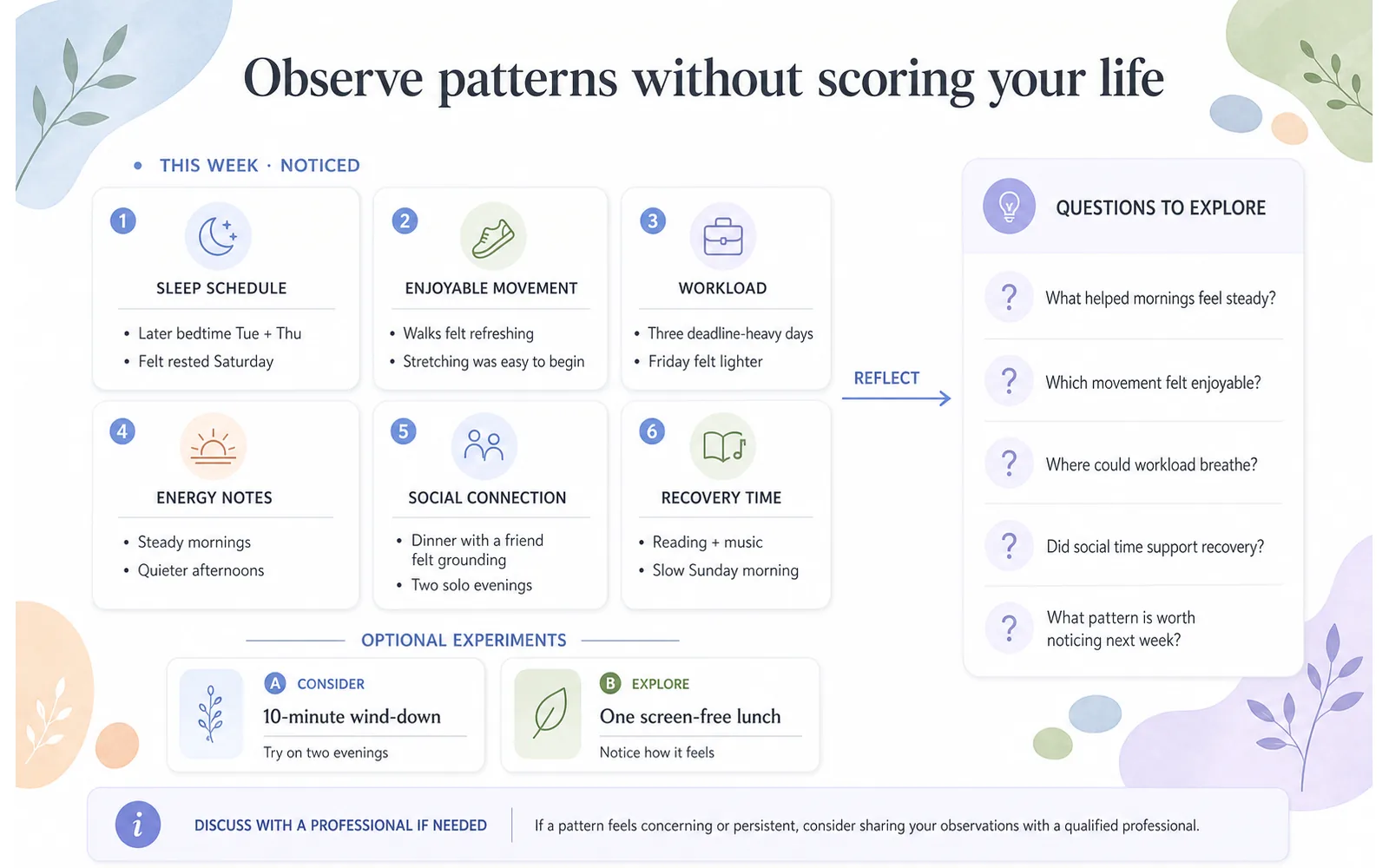
31. Track habits without turning life into a score
AI can help review a simple habit log and identify patterns worth exploring: which routines happen reliably, what conditions make them easier, and where goals may be too ambitious.
Avoid building a system that labels every day a success or failure. Use qualitative context—energy, workload, environment, and enjoyment—alongside counts.
The output should suggest a small experiment, not a verdict about your discipline or health.
32. Plan movement that fits the week
AI can help turn preferred activities, schedule constraints, access, and current habits into a practical movement plan. It can also create packing reminders, walking-route ideas, or questions to ask a trainer or clinician.
The World Health Organization notes that regular physical activity benefits physical and mental health, but an AI model cannot determine what is safe for your body. Pain, injury, pregnancy, disability, chronic conditions, or a major change in activity should be discussed with an appropriate professional.
33. Design a more consistent sleep routine
Use AI to review non-sensitive observations about bedtime, wake time, evening commitments, caffeine timing, light exposure, interruptions, and how rested you feel. Ask for environmental and scheduling experiments rather than a diagnosis.
The CDC states that the recommended amount of sleep for adults is at least seven hours, while individual circumstances differ. Persistent sleep problems, severe daytime sleepiness, breathing interruptions, or other concerning symptoms require professional evaluation.
34. Use structured reflection for stress and work-life balance
AI can guide a short check-in: What is taking energy? What is within control? What can be postponed, delegated, discussed, or approached differently? What recovery time is already protected?
This can make journaling more actionable, but it is not therapy. The National Institute of Mental Health explains that self-care can support mental health and also describes when professional help may be needed.
If you or someone else may be in immediate danger or experiencing a mental-health crisis, contact local emergency services or an appropriate crisis service in your country. Do not wait for an AI response.
35. Prepare for a health or wellness appointment
AI can help organize a timeline of observations, medications you already take, questions, previous recommendations, and practical concerns to discuss with a licensed professional.
Do not ask it to choose a diagnosis or conceal uncertainty. Review the summary for accuracy and protect sensitive health information. The most useful outcome is a clearer conversation with a professional—not a substitute for that conversation.
Five complete AI productivity workflows
Individual use cases become more valuable when connected into a repeatable sequence.
Workflow 1: The overloaded Monday reset
- Record a two-minute voice note containing everything on your mind.
- Transcribe it in Audio Master.
- Use Chat Master to identify projects, next actions, deadlines, and worries that are not actionable.
- Create a minimum viable day and an ideal day.
- Save unfinished items for the weekly review instead of repeatedly replanning them.
The result is not a motivational speech. It is a credible first action.
Workflow 2: Meeting to completed follow-up
- Draft a decision-focused agenda.
- Transcribe the meeting.
- Extract decisions, actions, owners, and unresolved points.
- Review the extraction against the source.
- Draft follow-up messages and update the project brief.
For team-wide systems, reporting, SOPs, and governance, see AI for Business: 30 Practical Use Cases.
Workflow 3: Learn a useful skill through a real project
- Define a project that requires the skill.
- Ask Chat Master for a staged learning path.
- Turn source material into explanations and active-recall questions.
- Practice with a role-play Smart Assistant.
- Create a visual, video, or audio artifact that demonstrates the skill.
- Review the result using a clear rubric.
Workflow 4: Plan a trip without planning every minute
- Define dates, budget, interests, pace, accessibility needs, and fixed reservations.
- Research current transport and opening information from primary sources.
- Ask AI to group activities geographically and create flexible day modules.
- Generate packing, reservation, and document checklists.
- Create a visual route and an audio phrase pack.
- Keep a low-energy and bad-weather alternative for each day.
Workflow 5: Build a sustainable weekly rhythm
- Review fixed commitments and true available time.
- Select three meaningful outcomes for the week.
- Protect focus, maintenance, relationships, movement, and recovery.
- Create fallback versions for high- and low-energy days.
- Run a short reflection at the end of the week.
- Change one variable rather than redesigning your entire life.
A reusable prompt for personal productivity
Good personal productivity prompts provide context without surrendering the decision.
Use this structure:
Act as a planning partner, not as an authority over my priorities.

Goal:
[What I want to accomplish]

Why it matters:
[The practical reason]

Current situation:
[What is already true]

Constraints:
[Time, energy, budget, access, deadlines, responsibilities]

Available information:
[Tasks, notes, calendar items, source documents]

What I want from you:
[Plan, checklist, comparison, questions, summary, or options]

Requirements:
- separate facts from assumptions;
- flag missing information;
- keep the plan realistic;
- identify the smallest useful next action;
- show what requires verification or professional advice;
- do not invent personal, medical, financial, or legal facts.
For recurring use, save the structure in a Smart Assistant and update only the goal, context, and source material.
How to build a personal AI assistant responsibly
A personal AI assistant becomes useful when it knows your process—not when it collects every detail about your life.
Give it a narrow role
“Help me run a weekly review” is safer and more testable than “manage my life.” Other useful roles include study planner, writing editor, meeting-preparation assistant, travel organizer, or personal project coach.
Store preferences, not unnecessary secrets
Useful context may include preferred working hours, planning format, tone, recurring review questions, learning goals, and accessibility preferences.
Avoid uploading passwords, authentication codes, complete financial records, private medical files, confidential employer information, or details about other people unless the environment and purpose clearly justify it.
Require uncertainty and source labels
Ask the assistant to distinguish supplied facts, retrieved information, assumptions, and suggestions. When current information matters, verify it using primary sources.
Define escalation boundaries
State what the assistant must not decide. Examples include medical diagnosis, crisis response, legal conclusions, investment choices, and irreversible commitments.
The World Health Organization has specifically called for caution and appropriate governance when large language models are used for health-related purposes. This is why Neurohelper productivity workflows should keep people and qualified professionals responsible for consequential decisions.
How to measure whether AI is improving your life
Do not measure success only by the number of generated outputs.
Track a small set of practical signals:
| Signal | Useful question |
|---|---|
| Time saved | Did this reduce preparation or administration time? |
| Completion | Did more important tasks reach a finished state? |
| Rework | Did the output create errors or extra checking? |
| Clarity | Was the next action easier to identify? |
| Mental load | Did I stop repeatedly thinking about the same open loop? |
| Consistency | Could I repeat the process next week? |
| Wellbeing | Did the system protect rest and relationships or crowd them out? |
Run the workflow for two to four weeks before drawing conclusions. Compare it with the previous method. If a sophisticated system creates more maintenance than value, simplify it.
Common mistakes with AI productivity tools
Optimizing every minute
A fully packed calendar is fragile. Leave buffers, transitions, unscheduled time, and space for relationships and recovery.
Asking for a universal perfect routine
The model does not live in your body, home, workplace, culture, or responsibilities. Give it real constraints and treat the result as a draft.
Planning repeatedly instead of doing
AI makes it easy to create new plans. Limit replanning and ask for the next visible action.
Collecting more information than you can use
Summaries, saved links, and generated notes are not knowledge until they support a decision, explanation, or completed project.
Sharing excessive personal data
Use the minimum context required. Remove names, identifiers, private records, and information belonging to other people whenever possible.
Treating wellness suggestions as healthcare
AI can support reflection, organization, and appointment preparation. It cannot examine you, understand your full history, or assume clinical responsibility.
Replacing people with an always-available chatbot
Convenience is not the same as human connection. Keep friends, family, colleagues, communities, teachers, coaches, and qualified professionals in the parts of life where relationships and accountability matter.
A practical 30-day starting plan
Week 1: remove one source of friction
Choose one repeated problem: chaotic mornings, unclear priorities, meeting follow-up, scattered notes, or study planning. Record the current process and what a useful improvement would look like.
Week 2: create one reusable workflow
Build a prompt or Smart Assistant with a narrow role, clear inputs, desired output, and review checklist. Use it several times with real tasks.
Week 3: connect one additional module
Add Audio Master for voice capture, Image Master for a visual guide, or another model for a second perspective. Connect only what improves the result.
Week 4: review and simplify
Compare time, completion, quality, rework, mental load, and sustainability. Keep the useful parts, remove decorative complexity, and document the final workflow.
Final verdict
The best AI productivity system does not make every moment efficient.
It helps you spend less attention on avoidable friction and more attention on work, learning, creativity, relationships, and wellbeing that actually matter.
Start with one repeated problem. Give AI enough context to help, retain control over priorities and sensitive decisions, and review whether the workflow produces a calmer and more useful result.
With Chat Master, Image Master, Video Master, Audio Master, Smart Assistants, leading AI models, and connected Workflows available in one Neurohelper subscription, that system can grow naturally—from a five-minute planning task into a complete personal workspace.
Frequently asked questions
How can AI improve personal productivity?
AI can organize tasks, prioritize work, create realistic schedules, summarize information, prepare communication, generate checklists, and support weekly reviews. It works best as a planning and drafting partner whose output you review.
What are the best AI productivity use cases for beginners?
Start with a brain-dump organizer, daily plan, document summary, email draft, meeting action list, or weekly review. These tasks are frequent, easy to evaluate, and unlikely to create serious consequences when reviewed.
Can AI help with time management?
Yes. AI can estimate sequences, identify dependencies, create time blocks, protect buffers, and generate fallback plans. Give it your real calendar, constraints, energy patterns, and priorities rather than asking for a generic ideal schedule.
What is an AI wellness assistant?
An AI wellness assistant is a limited tool for reflection, routine planning, information organization, and appointment preparation. It is not a doctor, therapist, emergency service, or substitute for qualified care.
Can AI create a personalized daily routine?
AI can draft a routine based on your schedule, responsibilities, goals, preferences, and energy. Treat it as an experiment, observe what works, and adjust it rather than following the output rigidly.
Is it safe to share health information with AI?
Health data is sensitive. Minimize what you share, remove identifying details when possible, understand the platform's privacy terms, and use an appropriate secure channel for any necessary medical communication. Do not share credentials or other people's private information.
Can AI replace a productivity coach or therapist?
No. AI may support planning and reflection, but it does not provide the judgment, accountability, relationship, professional qualification, or duty of care of a human coach or licensed mental-health professional.
Which Neurohelper modules are useful for productivity?
Chat Master supports planning, writing, reasoning, and summaries. Audio Master can capture and transcribe thoughts. Image Master can create diagrams and visual guides. Video Master can produce learning materials. Smart Assistants preserve reusable methods, while Workflows connect multiple stages.
Can I use different AI models for the same productivity task?
Yes. One model may produce a concise plan while another is better at deeper analysis, alternative explanations, or writing style. Neurohelper provides access to leading models in one subscription, making it easier to compare outputs without maintaining separate tools.
How do I know whether an AI productivity workflow is worth keeping?
Compare it with your previous method. Keep it if it saves time, improves completion or clarity, reduces rework or mental load, and remains easy to repeat. Simplify or remove it if maintaining the system becomes another burden.
What should I do if a wellness concern feels serious?
Contact a qualified healthcare or mental-health professional. If there is immediate danger or a crisis, use local emergency services or an appropriate crisis service in your country rather than relying on an AI conversation.