

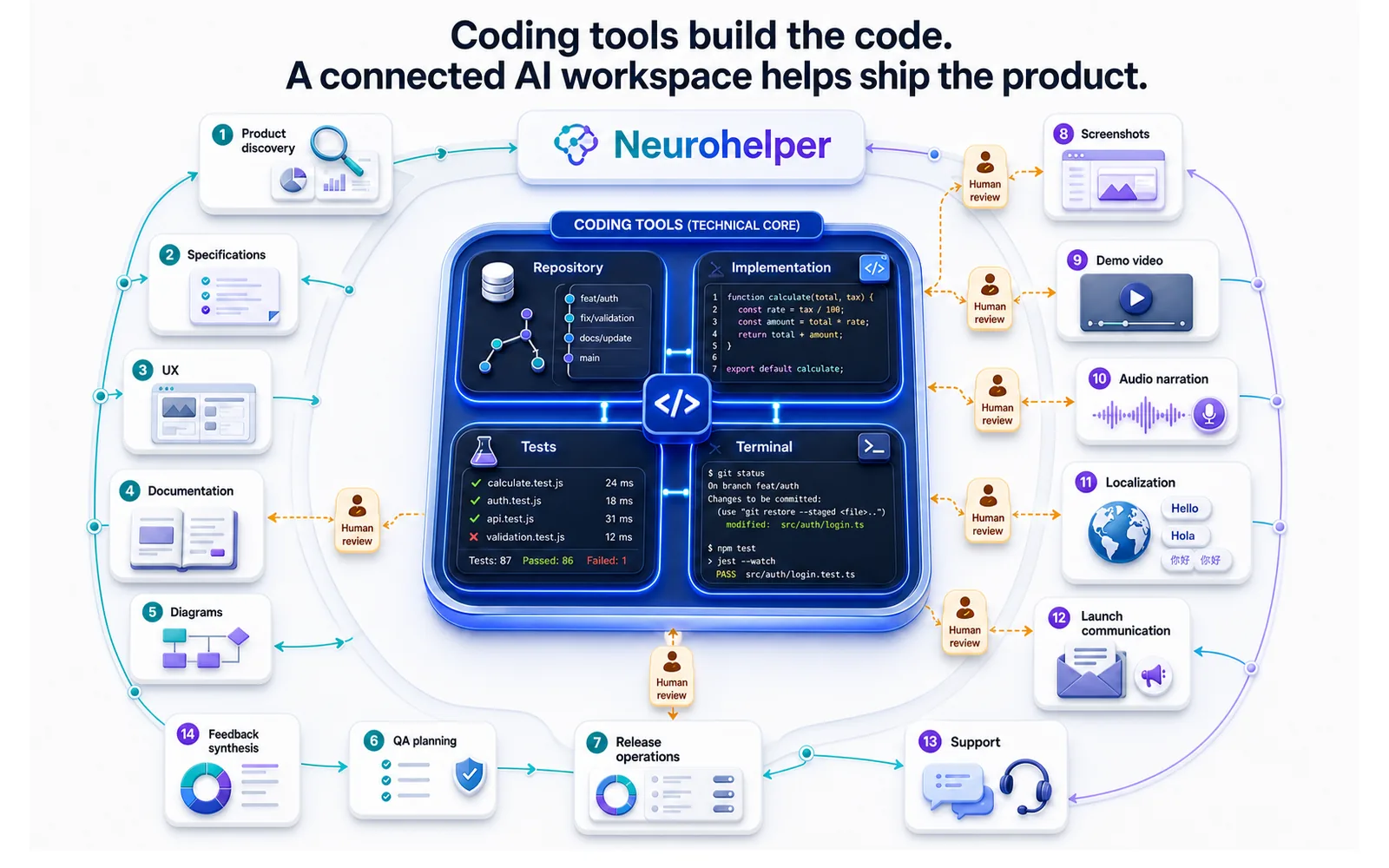
Most conversations about AI for software development begin and end with code generation.
That makes sense. Dedicated coding agents, IDE extensions, repository-aware assistants, terminal tools, and automated review systems can already help developers write, change, test, and understand code.
But shipping a useful software product involves much more than source files.
Teams also need to understand users, define requirements, map flows, explain architecture, prepare documentation, create screenshots, produce demo videos, write release notes, localize onboarding, organize feedback, communicate incidents, train support teams, and package every release so people understand why it matters.
This is where Neurohelper can be especially valuable.
It is not positioned as a replacement for a developer's primary coding environment. It is a complementary AI workspace for the many text, reasoning, image, video, audio, and communication tasks that surround development.
This guide covers 40 practical AI use cases across the complete software product lifecycle and shows how Chat Master, Image Master, Video Master, Audio Master, Smart Assistants, leading AI models, and connected Workflows can turn technical work into a product that is easier to build, explain, launch, and support.
Where AI fits in a modern software development workflow
A software team rarely struggles because nobody can produce another paragraph of code.
The larger bottlenecks are often unclear requirements, fragmented knowledge, inconsistent documentation, missing visual assets, slow reviews, weak release communication, and gaps between engineering, product, design, marketing, and support.
AI can help close those gaps by performing six supporting roles:
- Research partner: organize customer evidence, alternatives, constraints, and open questions;
- Product analyst: turn evidence into requirements, scenarios, priorities, and decision briefs;
- Documentation assistant: create and maintain explanations for different audiences;
- Creative production workspace: generate diagrams, screenshots, launch visuals, storyboards, audio, and video;
- Release coordinator: prepare checklists, release notes, migration guidance, and stakeholder communication;
- Knowledge connector: transform approved product information into reusable Smart Assistants and workflows.
Neurohelper is strongest when several of these roles need to work together. A single approved product brief can become UX copy, a diagram, a demo storyboard, release notes, a help-center article, localized onboarding, a voiceover, and social assets without rebuilding the context in six unrelated services.
Neurohelper versus dedicated coding tools
The right question is not whether one tool can replace every other tool. It is which environment fits each stage of work.
| Task | Best primary environment |
|---|---|
| Repository-wide code changes | A repository-aware coding agent or IDE assistant |
| Running commands and tests continuously | A development environment or terminal agent |
| Inline completion and refactoring | An IDE-integrated coding tool |
| Comparing product ideas and requirements | Chat Master with selected reasoning models |
| Creating diagrams and product visuals | Image Master |
| Producing demos and onboarding videos | Video Master and Audio Master |
| Turning product context into reusable roles | Smart Assistants |
| Connecting research, documentation, media, and launch assets | Neurohelper Workflows |
Chat Master can still explain code, draft a small example, review an error message, or help reason about an implementation. But a developer should use specialized coding tools when the task requires persistent repository context, coordinated multi-file edits, repeated terminal operations, or direct verification against a running codebase.
The goal is a complementary stack: strong coding tools for code, and Neurohelper for the product system around it.
40 AI use cases across the software product lifecycle
Product discovery and planning
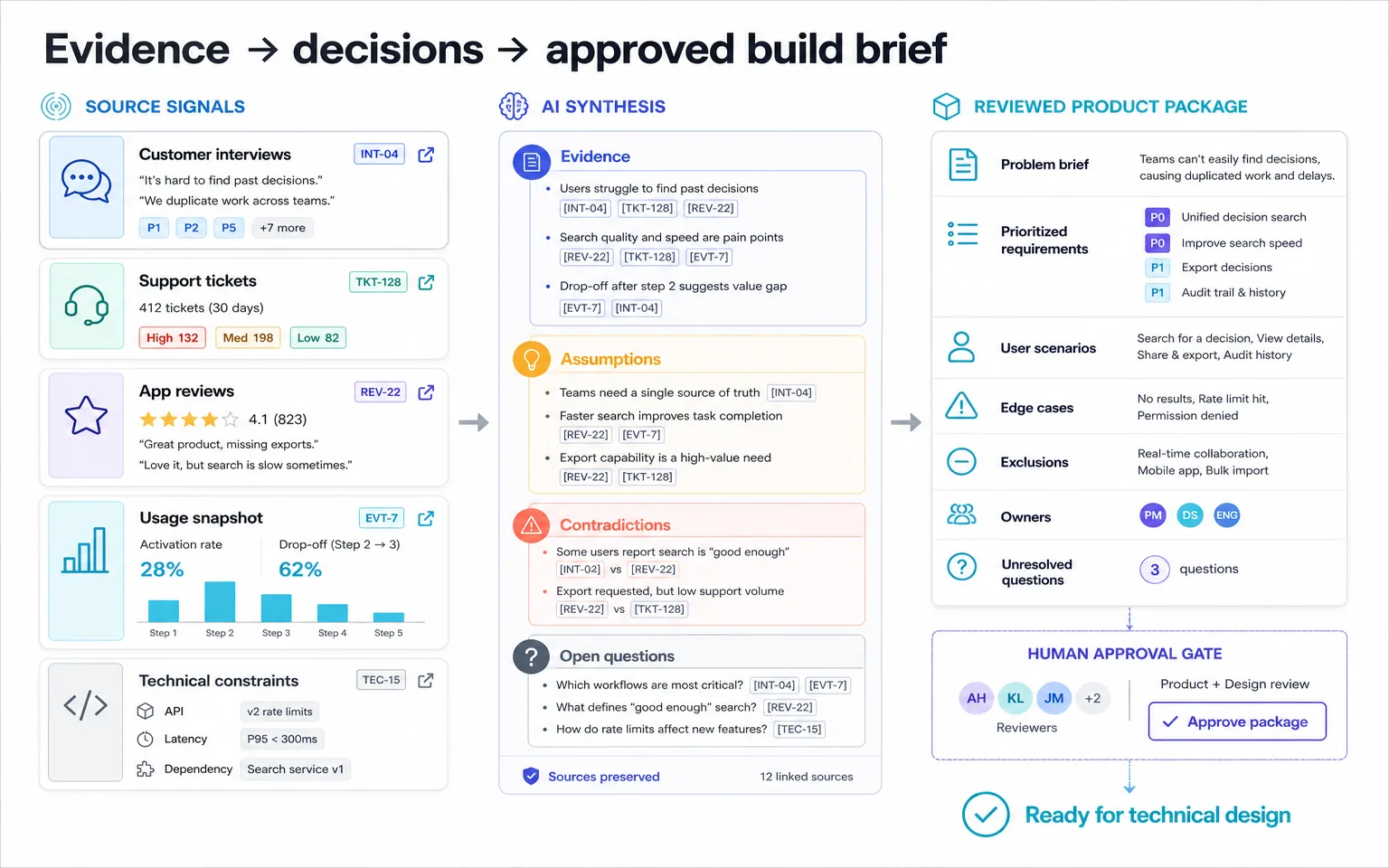
1. Synthesize user interviews and feedback
Upload interview notes, survey responses, support conversations, sales observations, and app reviews.
Chat Master can group evidence into user situations, desired outcomes, pain points, workarounds, objections, and recurring language. Ask it to preserve source references and show contradictory evidence rather than forcing every customer into one narrative.
The result can support a product decision, but it should not manufacture demand that the source material does not demonstrate. For deeper evidence workflows, explore AI Research Use Cases.
2. Analyze competing products
AI can organize publicly verified information about competitors and alternatives into a structured comparison.
Useful fields include target user, positioning, core workflow, onboarding, pricing model, integrations, strengths, limitations, and unanswered questions. Verify every changing fact from current primary sources.
The goal is not to copy a feature list. It is to understand how different products solve the same user problem and where an unmet need may exist.
3. Turn a vague idea into a problem brief
“Build an AI dashboard” is not yet a product problem.
Ask Chat Master to separate the proposed solution from the user situation. A useful brief includes the affected user, current behavior, friction, desired outcome, evidence, constraints, assumptions, and a measurable signal of improvement.
This short step can prevent days of discussing implementation before the team agrees on what should change.
4. Draft a product requirements document
Provide approved research, business goals, constraints, and technical context. AI can create a first PRD containing scope, users, scenarios, functional requirements, non-functional requirements, dependencies, exclusions, risks, and success metrics.
Treat the document as a discussion surface, not an automatically approved specification. Product, engineering, design, security, legal, and operational owners should confirm the sections relevant to them.
5. Create user stories and acceptance criteria
AI can translate an approved requirement into user stories, jobs-to-be-done statements, scenarios, and acceptance criteria.
Ask it to include the normal path, permission differences, empty states, errors, interruptions, and recovery. Avoid generating dozens of decorative stories that add no new behavior.
A strong output is testable and specific enough to reveal disagreement before implementation begins.
6. Identify assumptions, edge cases, and open questions
Every specification contains invisible assumptions.
Ask AI to challenge the document from several perspectives: first-time user, returning user, administrator, mobile user, low-bandwidth user, international user, support agent, security reviewer, and someone using assistive technology.
The result should be a question list for humans to resolve—not invented answers presented as requirements.
7. Build a feature-prioritization brief
AI can structure candidate features by user impact, strategic relevance, evidence strength, implementation effort, operational cost, risk, dependency, and reversibility.
It can also show how priorities change under different goals: retention, activation, revenue, reliability, or learning speed. The model should make the trade-offs visible; accountable product owners make the decision.
UX, interface content, and product design support
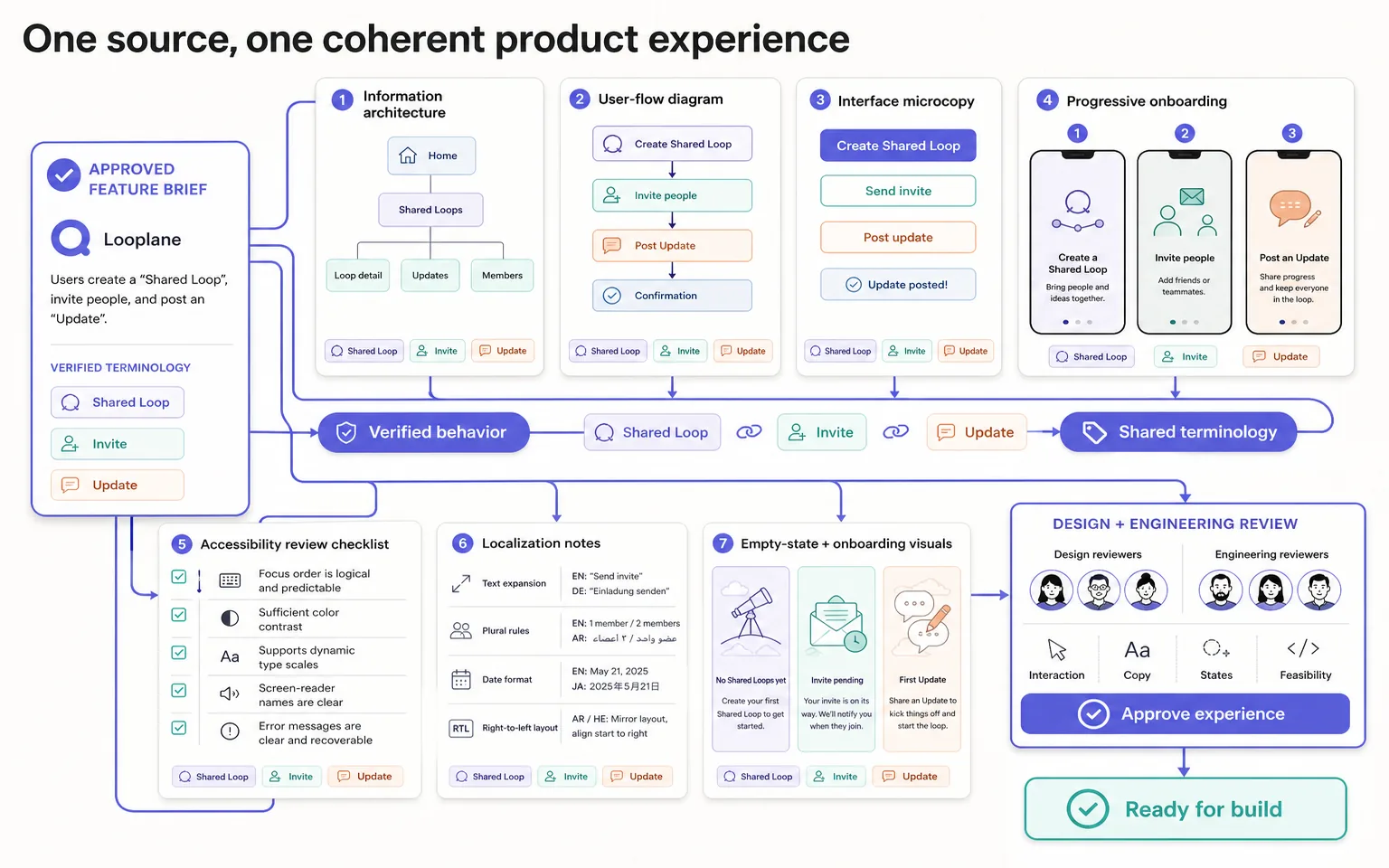
8. Map information architecture
Provide the product's content, objects, user roles, top tasks, and navigation constraints.
AI can suggest categories, labels, hierarchy, and alternative navigation models. Ask it to explain what each structure optimizes for and where users may become confused.
The output is a hypothesis for design and usability testing, not proof that the information architecture works.
9. Create user-flow drafts
AI can turn a scenario into a step-by-step flow containing entry points, decisions, system responses, errors, recovery, and completion.
This is useful before visual design because it exposes missing states and unclear ownership. Image Master can then convert the reviewed flow into a presentation-ready diagram for product, engineering, and stakeholders.
10. Write interface microcopy
Buttons, labels, empty states, validation messages, permission requests, confirmations, and error messages shape the product experience.
Give Chat Master the user goal, system state, available action, risk, and voice guidelines. Ask for concise alternatives and explain the trade-off between clarity, reassurance, and brevity.
Never let friendly copy hide a serious consequence or imply that an action succeeded before the system confirms it.
11. Design onboarding content
AI can create a progressive onboarding sequence rather than one long product tour.
Start with the user's first desired outcome. Then define what must be explained before action, what can appear contextually, and what belongs in optional help. The same approved onboarding logic can become tooltips, emails, a checklist, a video script, and a help-center article.
12. Prepare an accessibility review checklist
AI can turn recognized accessibility requirements and product context into a structured review checklist covering keyboard access, focus order, labels, contrast, motion, error identification, captions, transcripts, and alternative text.
It cannot certify compliance or replace testing with people who use assistive technology. Use current standards, specialist review, automated checks, and real user testing where appropriate.
13. Prepare interface text for localization
Before translation, AI can identify ambiguous strings, embedded variables, pluralization issues, screenshots containing text, cultural references, character-length constraints, and context missing from the localization file.
This reduces avoidable translator questions. Qualified reviewers remain essential for legal, medical, financial, safety-critical, or highly visible copy.
14. Explore visual directions and moodboards
Image Master can turn a product brief into several distinct visual directions for discussion.
For example, a finance dashboard might explore “calm and trustworthy,” “technical and precise,” and “accessible consumer product” directions. Keep the concepts clearly fictional and avoid copying another product's protected identity.
15. Generate supporting UI assets
Developers and small product teams often need illustrations, empty-state graphics, onboarding visuals, placeholder content, icon concepts, backgrounds, and marketplace images before a dedicated creative team is available.
Image Master can generate coherent starting assets and variants. Review consistency, licensing requirements, text accuracy, accessibility, and performance before shipping them.
Technical documentation and knowledge
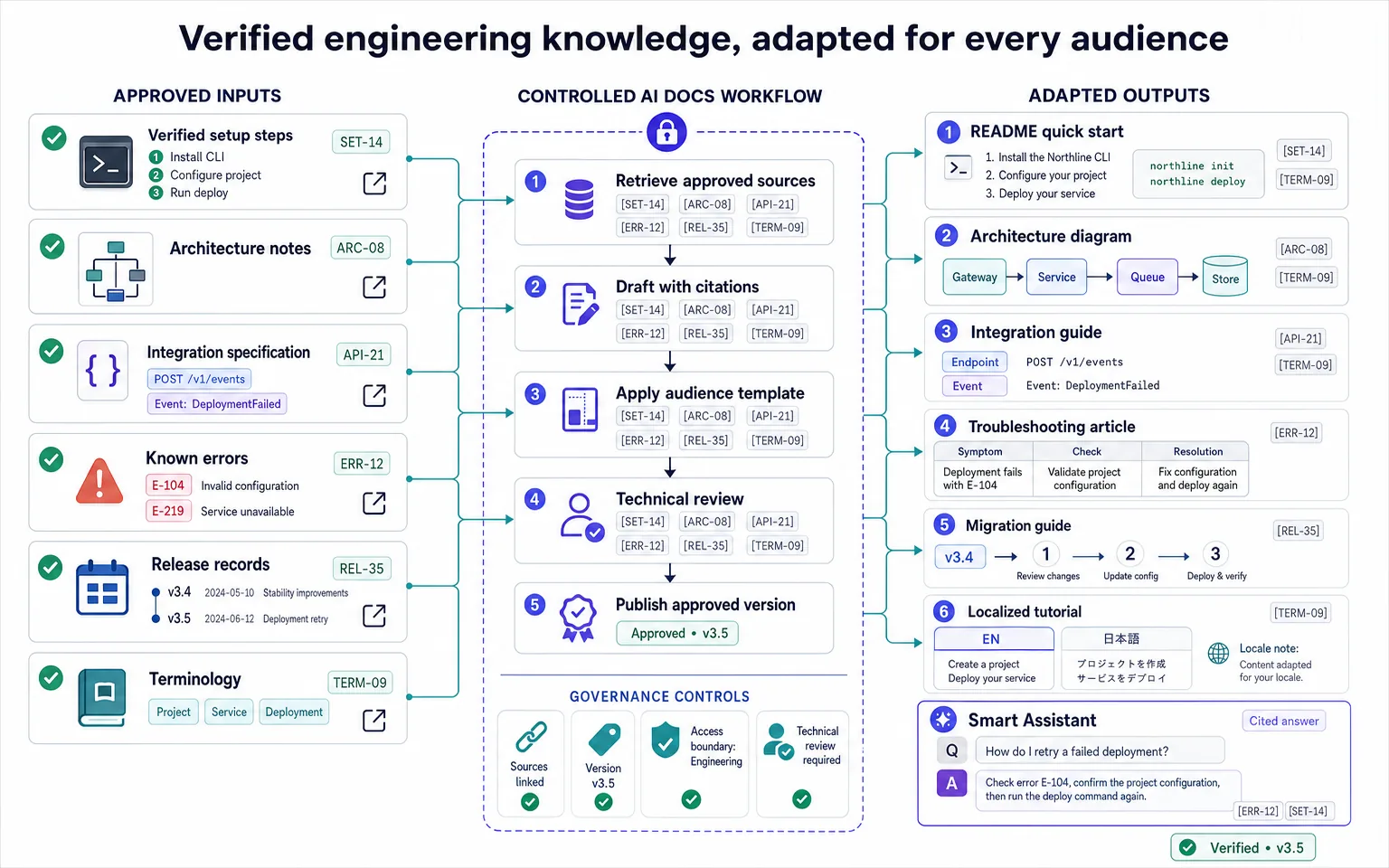
16. Draft a README and quick-start guide
Provide the actual setup steps, supported environments, dependencies, configuration, and known limitations.
AI can organize them into a clear README with prerequisites, installation, first successful action, examples, troubleshooting, and next links. A developer must run every command and confirm the result before publication.
17. Explain architecture to different audiences
The same system needs different explanations for a new developer, an engineering leader, a customer security team, support, and a non-technical stakeholder.
Chat Master can adapt an approved architecture description without changing the underlying facts. Image Master can produce separate context, container, sequence, or data-flow diagrams from the reviewed source.
18. Improve API and integration documentation
AI can restructure existing endpoint descriptions, parameters, authentication notes, examples, errors, rate-limit explanations, and integration sequences.
This is an editing and organization workflow, not a source of truth. Generate documentation from approved specifications and test all examples. Avoid publishing credentials, internal endpoints, or security-sensitive implementation details.
19. Create troubleshooting guides
Combine confirmed support cases, logs that have been safely redacted, known failure modes, and engineering explanations.
AI can turn them into symptom → likely cause → safe check → resolution → escalation guides. Clearly distinguish customer-safe steps from actions requiring an administrator or engineer.
20. Build an internal product knowledge assistant
Approved specifications, architecture notes, release records, support policies, and help articles can become the source package for a Smart Assistant.
Team members can ask, “When was this behavior introduced?” or “Which plan includes this capability?” The assistant should cite its sources, disclose uncertainty, respect access boundaries, and avoid answering from outdated drafts.
21. Turn technical notes into diagrams
Image Master can convert a reviewed process into a sequence diagram, architecture overview, data-flow map, release workflow, or operational runbook graphic.
Diagrams help cross-functional teams find misunderstandings quickly. Keep labels readable, avoid decorative complexity, and update the visual when the system changes.
22. Create migration and upgrade guides
AI can organize breaking changes, prerequisites, before-and-after behavior, migration steps, compatibility notes, rollback considerations, and verification checks.
Engineering owners must validate every instruction. For significant migrations, include an estimate of effort ranges, known risks, and a path for customers who cannot migrate immediately.
23. Maintain changelogs and release-note sources
Pull-request titles and ticket names rarely make good customer communication.
AI can group approved changes into added, improved, fixed, deprecated, and security-related categories. It can also generate separate internal and customer-facing versions while preserving links to the original records.
24. Localize documentation and tutorials
Once the English source is approved, Chat Master can create draft translations while preserving headings, code blocks, variables, links, and terminology.
Audio Master and Video Master can help produce localized narration and tutorial variants. Human review remains important for technical accuracy, natural language, and market-specific expectations.
QA, release readiness, and operational communication
25. Generate test-scenario ideas from requirements
AI can examine acceptance criteria and propose normal, boundary, permission, error, interruption, compatibility, accessibility, and recovery scenarios.
This expands the team's thinking but does not replace a test strategy, exploratory testing, automation, security testing, or domain expertise. Link each scenario to an approved requirement so unsupported behavior is easy to spot.
26. Structure high-quality bug reports
Give AI safely redacted notes, environment information, expected behavior, actual behavior, reproduction steps, frequency, impact, screenshots, and logs.
It can turn these into a consistent report and identify missing details. Do not let it invent reproduction steps or declare a root cause that has not been verified.
27. Create a regression checklist
After a feature or fix is defined, AI can map related workflows, roles, devices, integrations, notifications, analytics events, and existing behavior that may require retesting.
A reusable Smart Assistant can preserve the team's checklist format while each release supplies different scope and risk.
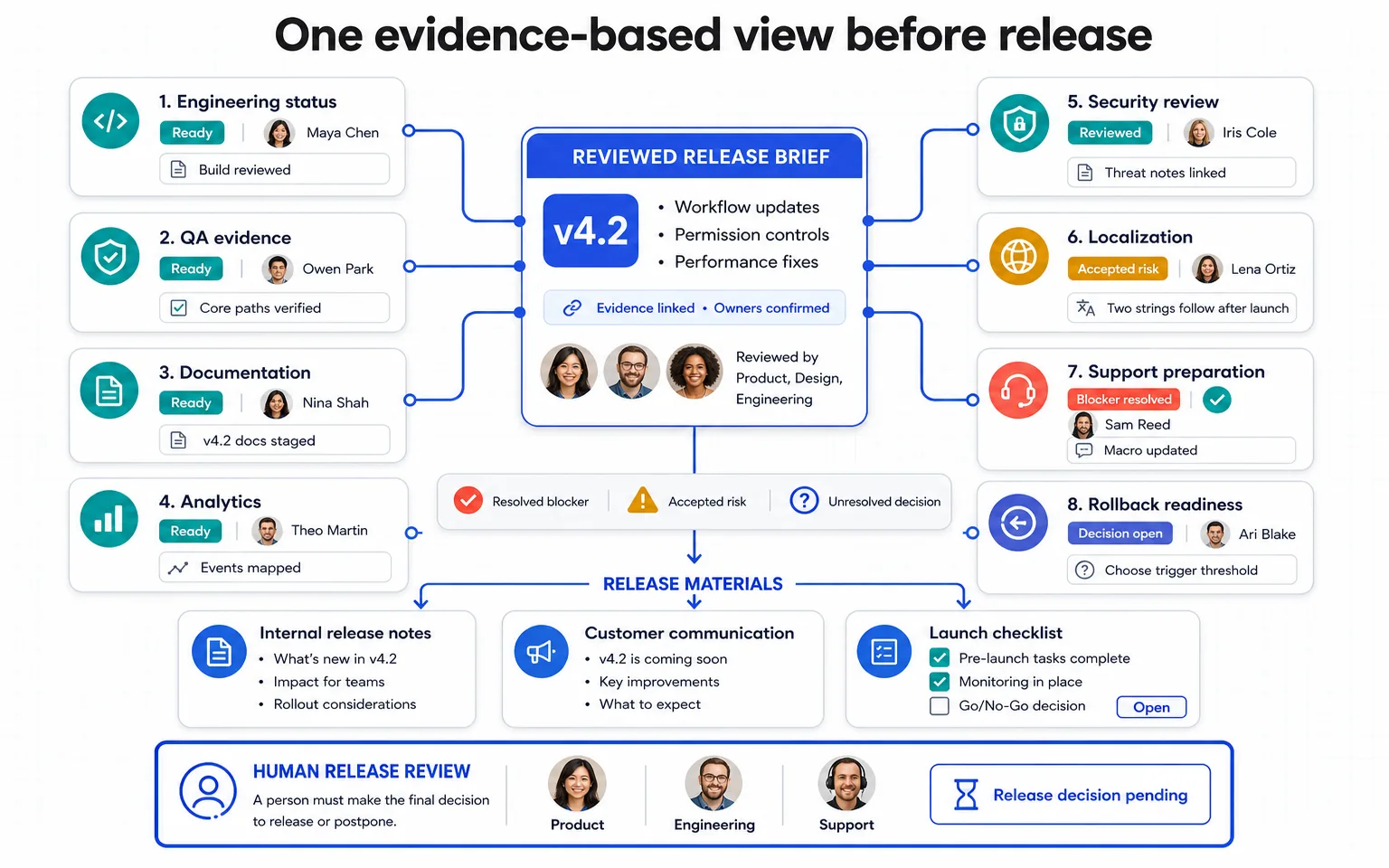
28. Prepare a release-readiness review
AI can organize status from engineering, QA, design, documentation, security, analytics, support, localization, marketing, and operations into one decision brief.
The brief should show evidence, owners, blockers, accepted risks, rollback readiness, and unresolved questions. It should not make the release decision automatically.
29. Draft incident communication
During an incident, teams need accurate and calm updates for internal stakeholders, status pages, support, and customers.
Chat Master can adapt confirmed facts into audience-specific drafts while maintaining a timeline and avoiding speculation. Every update requires approval from the responsible incident role before publication.
30. Structure a blameless postmortem
AI can organize a verified incident timeline, impact, detection, response, contributing conditions, what helped, what failed, and corrective actions.
Ask it to focus on systems and decisions rather than personal blame. Engineering and operational owners must confirm causality and action items.
31. Triage post-release feedback
After launch, combine app reviews, support tickets, sales notes, usage observations, and internal reports.
AI can classify them into bugs, confusion, feature requests, adoption barriers, documentation gaps, and positive signals. Preserve severity and source evidence; do not treat the loudest comment as representative without supporting data.
Product packaging, demos, and launch
32. Create polished product screenshots
Raw development screenshots often contain inconsistent data, empty areas, private information, or unfinished visual states.
Image Master can help prepare fictional demo data, coherent device mockups, background treatments, annotations, and marketplace-ready compositions. The final image should represent real product behavior and must not advertise features that do not exist.
33. Build a demo-video storyboard
Start with the audience, problem, product promise, real workflow, and desired next action.
Chat Master can create a shot-by-shot structure. Image Master can develop key frames, Video Master can animate supporting scenes, and Audio Master can produce narration. Keep the actual interface legible and avoid using cinematic effects to hide an unclear product story.
34. Write a product-demo script
A good demo does not tour every menu.
AI can build a script around one user situation: before state, key action, meaningful result, supporting capability, and next step. Create short, standard, and deep-dive versions for different audiences.
35. Package an app-store or marketplace listing
AI can draft the product name support line, short description, long description, feature highlights, screenshot sequence, update notes, keywords, FAQ, and review-response templates.
Verify every platform rule, character limit, price, availability statement, and claim before submission. Image Master can turn approved screenshots into a consistent listing set.
36. Create a launch page and product messaging
Combine customer evidence, positioning, product capabilities, proof, objections, and the release brief.
Chat Master can produce a landing-page structure with clear hierarchy rather than generic superlatives. Image Master can create supporting visuals and Video Master can produce the hero demo. For acquisition workflows, see How to Build an AI Marketing and Sales Funnel.
37. Generate release visuals for social channels
One release can become a launch image, feature card, carousel, before-and-after explanation, short video, thumbnail, and community update.
38. Create launch emails and stakeholder updates
The same release requires different communication for beta users, existing customers, prospects, partners, internal teams, and investors.
AI can adapt the approved source without rewriting the facts independently for every audience. Include what changed, why it matters, who is affected, what action is required, and where to get help.
39. Produce onboarding and tutorial media
Turn approved documentation into a tutorial script, annotated screenshots, a short video, voiceover, captions, transcript, and localized versions.
This is one of Neurohelper's strongest complements to coding tools: the same platform can move from technical source material to customer-ready text, visuals, video, and audio.
40. Prepare the support handoff
Before launch, support needs product behavior, eligibility, known limitations, troubleshooting, escalation paths, screenshots, response templates, and examples of expected customer questions.
AI can package these inputs into a concise support brief and a source-grounded Smart Assistant. Support and engineering owners must approve the final material and define which issues require escalation.
Four complete Neurohelper workflows for developers
Workflow 1: Product discovery to build-ready brief
- Collect safely prepared interviews, support tickets, reviews, and product metrics.
- Use Chat Master to identify user situations, evidence, contradictions, and unanswered questions.
- Draft the problem brief, requirements, scenarios, and exclusions.
- Challenge the document from different user and operational perspectives.
- Create a reviewed user-flow diagram in Image Master.
- Export a concise decision brief for product, design, and engineering.
This workflow improves the material entering the coding process. It does not replace technical design or implementation.
Workflow 2: Technical change to customer-ready documentation
- Gather the approved specification, verified behavior, configuration, limitations, and test evidence.
- Draft the internal technical explanation.
- Adapt it into a quick start, help article, troubleshooting guide, and migration notes.
- Generate diagrams from reviewed system descriptions.
- Create localized drafts while preserving technical terms and code.
- Build a Smart Assistant grounded only in approved documentation.
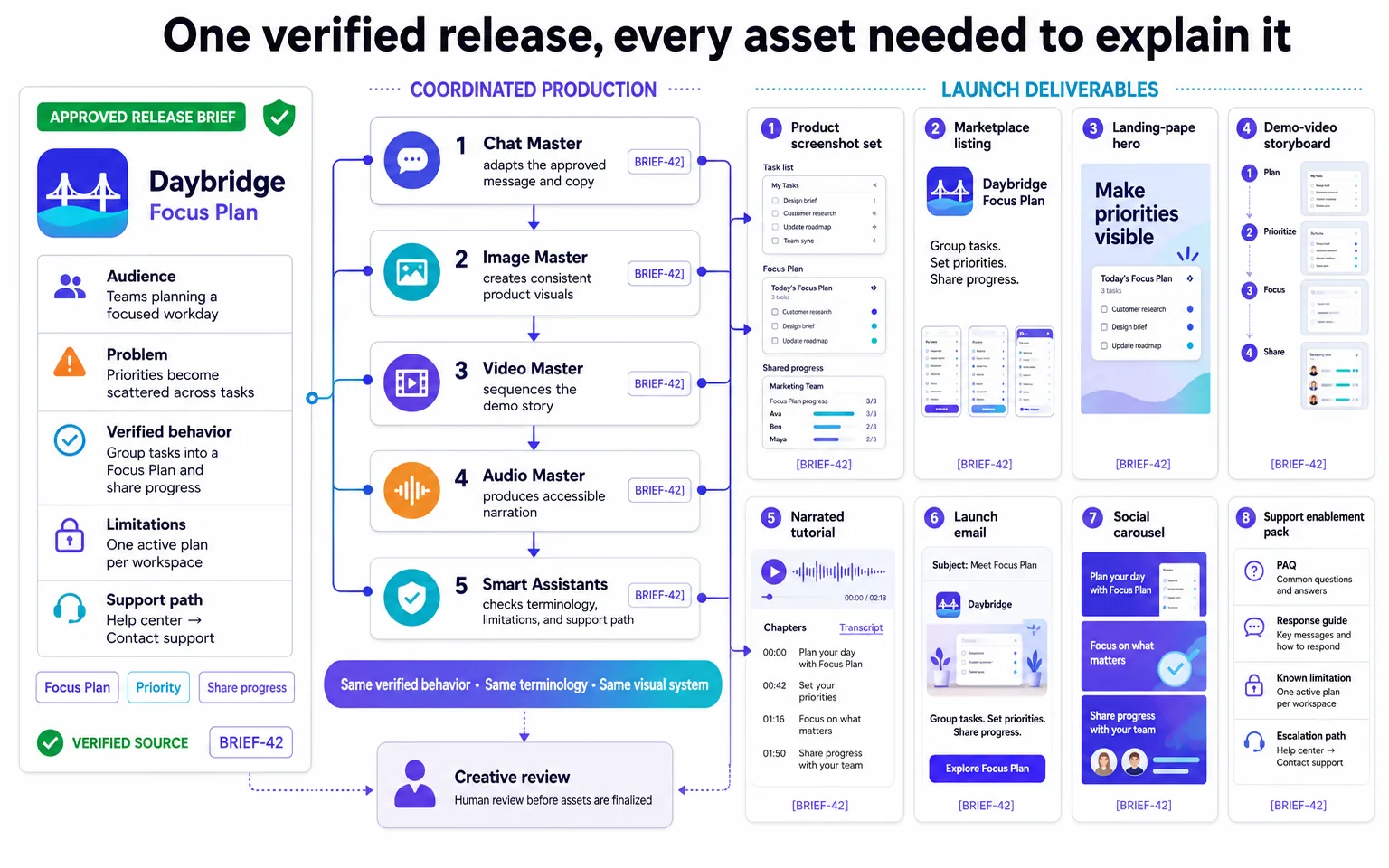
Workflow 3: Feature release to multi-format launch
- Create one approved release brief containing audience, problem, behavior, proof, limitations, and support path.
- Draft release notes, landing-page copy, marketplace text, and launch emails.
- Prepare real product screenshots with fictional demo data.
- Build a demo storyboard and narration.
- Produce social visuals, a short video, captions, and localized variants.
- Review every public claim against the shipped product.
Workflow 4: Launch feedback to the next product decision
- Combine support issues, app reviews, customer conversations, adoption signals, and incident notes.
- Classify bugs, confusion, missing documentation, feature requests, and positive outcomes.
- Preserve links to source evidence and confidence levels.
- Prepare separate briefs for engineering, product, support, and marketing.
- Update the knowledge base and Smart Assistant.
- Feed verified insights into the next discovery cycle.
A reusable prompt for development-adjacent work
Act as a cross-functional software product assistant.

Task:
[What needs to be created or reviewed]

Audience:
[Developer, product manager, designer, support agent, customer, stakeholder]

Approved source material:
[Requirements, verified behavior, research, release brief, documentation]

Desired output:
[PRD, flow, diagram brief, release notes, tutorial, launch asset, support pack]

Constraints:
[Scope, deadline, platform rules, terminology, privacy, accessibility, localization]

Requirements:
- separate supplied facts from assumptions;
- preserve links to source evidence;
- flag missing or contradictory information;
- do not invent product capabilities, metrics, compatibility, or security claims;
- identify what requires engineering, legal, security, accessibility, or human review;
- adapt detail and terminology to the audience;
- make the next action clear.
Save the structure as a Smart Assistant when the same team repeatedly produces release notes, documentation, product briefs, or support materials.
How to choose the right AI model for each task
Different tasks reward different model strengths.
| Task | Useful model behavior |
|---|---|
| Interview synthesis | Handles long context and preserves evidence |
| Product requirements | Structured reasoning and explicit assumptions |
| Microcopy | Concision, tone control, and alternatives |
| Documentation | Technical clarity and instruction following |
| Release communication | Audience adaptation without changing facts |
| Visual briefs | Strong spatial and descriptive reasoning |
| Research organization | Source handling and uncertainty |
Neurohelper allows developers and product teams to compare leading models in one subscription. You can use a faster model for routine restructuring, a deeper reasoning model for ambiguous planning, and specialist image, video, or audio models when the output moves beyond text.
Security, privacy, and responsible use
Development materials may contain source code, credentials, customer data, security findings, architecture details, contracts, and unreleased product information.
Before using any AI system:
- classify the information;
- remove secrets, tokens, credentials, and unnecessary identifiers;
- follow employer and client policies;
- understand provider and platform processing terms;
- limit access to approved people and tools;
- separate public documentation from restricted internal material;
- require review for security, legal, compliance, financial, and privacy claims.
Use fictional or sanitized demo data for screenshots and public examples. Never paste live credentials into a prompt. Do not ask AI to conceal a vulnerability, bypass access controls, or generate misleading evidence that a requirement has been met.
How to measure the value of AI beyond coding
Do not count only generated documents or media files.
Measure whether the workflow improves delivery:
| Area | Example signal |
|---|---|
| Discovery | Fewer unresolved questions entering development |
| Requirements | Less rework caused by missing states or assumptions |
| Documentation | Faster time to publish verified help content |
| QA | Better coverage of relevant scenarios and dependencies |
| Release | Fewer last-minute missing assets and approvals |
| Support | Faster access to accurate product information |
| Launch | More complete and consistent product packaging |
| Localization | Fewer context questions and broken assets |
Compare the new process with a previous release. Include time saved, review time, corrections, missing deliverables, customer confusion, support volume, and adoption of the released capability.
Common mistakes
Trying to replace the development environment
Use repository-aware coding tools for repository work. Neurohelper adds the most value when the task crosses product, documentation, media, communication, and audience boundaries.
Generating from an unapproved source
If the release brief is wrong, every downstream asset may repeat the same mistake. Establish one reviewed source before producing variants.
Publishing plausible but unverified technical details
Commands, compatibility, limits, performance, security claims, and product behavior must be tested or confirmed by responsible owners.
Treating diagrams as architecture truth
A beautiful diagram can still be incorrect. Generate from approved descriptions and keep the visual versioned with the system it explains.
Producing too many launch assets
Start with the customer journey and distribution plan. Create the formats that serve a real channel and audience rather than generating every possible asset.
Forgetting accessibility and localization until the end
Captions, transcripts, alt text, readable contrast, interface context, text expansion, and cultural adaptation are easier when planned before final production.
Allowing AI to invent evidence
Generated testimonials, customer logos, metrics, reviews, compatibility claims, and security assurances can damage trust and create legal risk. Use verified evidence only.
A practical 60-day adoption plan
Days 1–15: choose one delivery bottleneck
Select documentation, release notes, demo production, support handoff, product research, or another repeated problem. Record the current time, quality, rework, and missing information.
Days 16–30: establish the approved source
Create a standard brief and review checklist. Test several leading models on the same inputs. Keep the output format that is easiest for the responsible team to verify.
Days 31–45: add one creative or communication stage
Turn the approved source into a diagram, screenshot set, narrated demo, localized tutorial, or launch asset. Track the additional review required.
Days 46–60: standardize the workflow
Save the prompt as a Smart Assistant, define owners and boundaries, document the process, and connect only the stages that consistently create value.
For organization-wide implementation, governance, and operational workflows, see AI for Business: 30 Practical Use Cases.
Final verdict
AI for software development is much larger than AI code generation.
Dedicated coding agents and IDE assistants should remain the primary tools for repository-aware implementation, testing, and refactoring. Neurohelper does not need to replace them to become valuable to developers.
Its strongest role is the connected layer around development: turning research into specifications, technical knowledge into clear documentation, product behavior into diagrams and tutorials, and a finished feature into screenshots, video, audio, release communication, localization, and support enablement.
That combination is especially useful for solo developers, startups, small teams, technical founders, developer advocates, product engineers, and anyone responsible for both building software and explaining it to the world.
Frequently asked questions
How is AI used in software development beyond coding?
AI can support user research, requirements, user flows, UX copy, accessibility preparation, documentation, diagrams, test scenarios, release readiness, incident communication, product screenshots, demo videos, localization, launch content, and support enablement.
Is Neurohelper a replacement for a coding agent or IDE assistant?
No. Repository-aware coding agents and IDE tools are better suited to persistent code context, multi-file changes, terminal work, and direct test execution. Neurohelper complements them with reasoning, documentation, visual, video, audio, launch, and cross-functional workflows.
What are the best Neurohelper use cases for developers?
Strong starting points include release notes, technical diagrams, README improvements, troubleshooting guides, demo storyboards, product screenshots, onboarding tutorials, support handoffs, and source-grounded product assistants.
Can AI write technical documentation?
AI can draft and restructure documentation from approved source material. Developers must verify commands, examples, compatibility, configuration, security details, and actual product behavior before publication.
Can AI help with product requirements?
Yes. AI can organize research, scope, scenarios, requirements, exclusions, dependencies, assumptions, edge cases, and open questions. Product and engineering owners remain responsible for approving the specification.
Can Neurohelper create product screenshots and demo videos?
Yes. Image Master can help create polished screenshot compositions and supporting visual assets. Chat Master can prepare the story and script, Video Master can produce scenes, and Audio Master can create narration, captions, or localized audio.
How can AI improve software releases?
AI can consolidate release evidence, identify missing deliverables, prepare checklists, draft changelogs and migration guidance, create audience-specific communication, and package launch and support assets from one reviewed source.
Can AI help with QA?
AI can suggest scenarios, structure bug reports, map regression areas, and organize release readiness. It does not replace test execution, automated testing, exploratory testing, security review, or accountable QA decisions.
Is it safe to upload source code and product data to AI tools?
That depends on the data, platform, provider, configuration, and organizational policies. Remove credentials and unnecessary identifiers, classify information, understand processing terms, and use only approved tools and access controls.
Why use several AI models for development workflows?
Different models may be better at long-context synthesis, deep reasoning, concise writing, instruction following, research organization, or visual prompting. Neurohelper lets teams compare leading models and use specialist media tools within one subscription.
Who benefits most from these workflows?
Solo developers, technical founders, startups, product engineers, developer advocates, documentation teams, product managers, support leaders, and small cross-functional teams benefit when they must both build a product and package it for users.
