
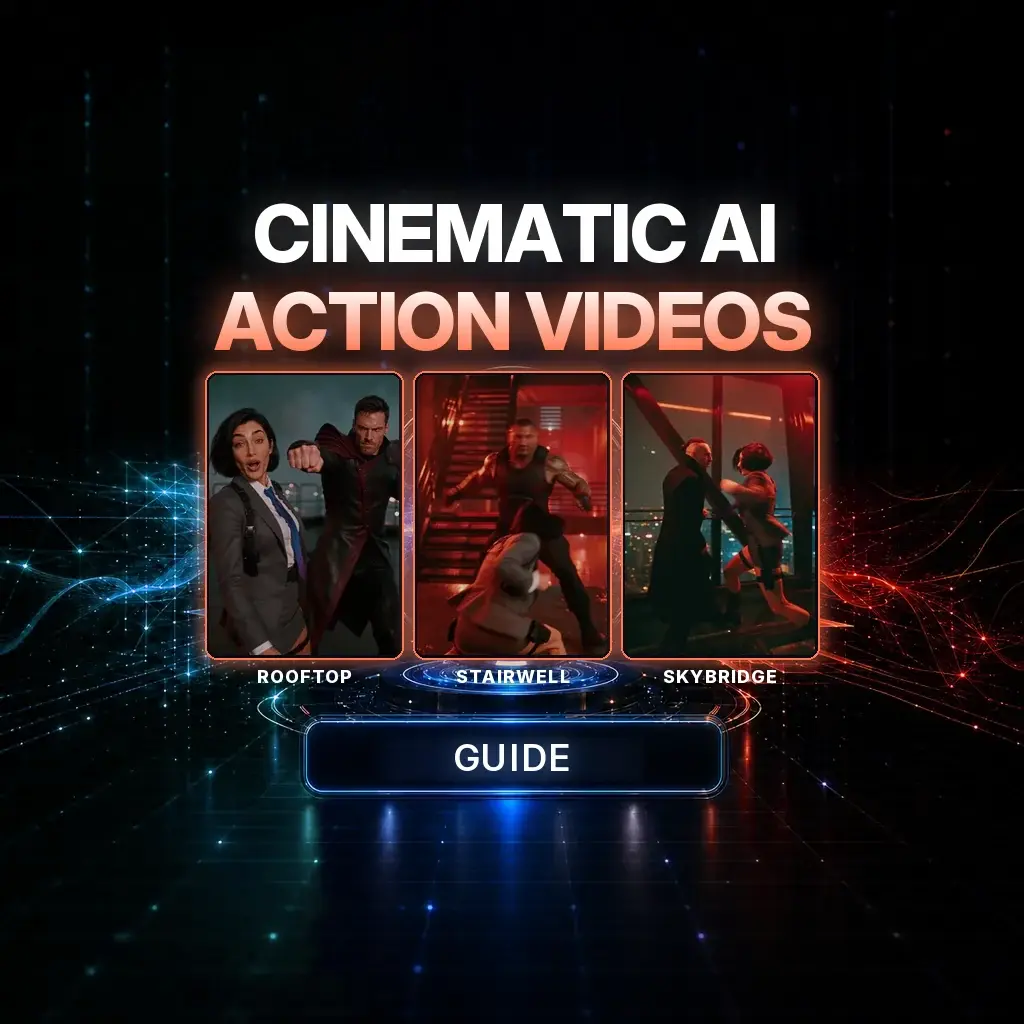
Great cinematic AI action is not a longer prompt with more adjectives. It is direction: a specific physical event, a camera that has a job, and a shot that ends in a pose the next clip can inherit.
That is the difference between “make an epic fight” and a short film the viewer can actually follow. We used this method in NeuroHelper AI to produce a vertical action piece — a rooftop exchange, a descending stairwell chase, and a glass skybridge finish. The same logic works for chases, sports, and AI ads — see also our creative use cases.
Watch the finished film first. The rest of this guide explains how it is directed and joined, and how to run the same workflow in one workspace.
What the finished film is
The case study is one connected story told in three locations, each with its own color and camera problem. The storyboard frames below are taken from the final film:
Case study / Storyboard frames from the final film
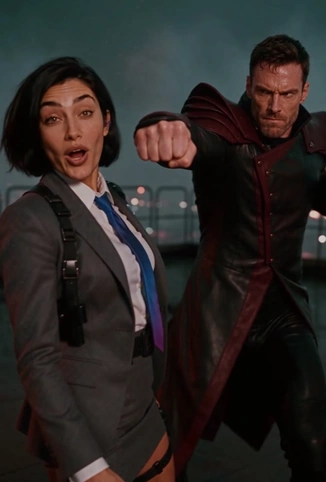 01 Rooftop
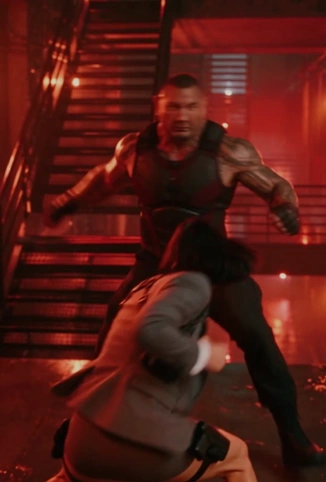 02 Stairwell
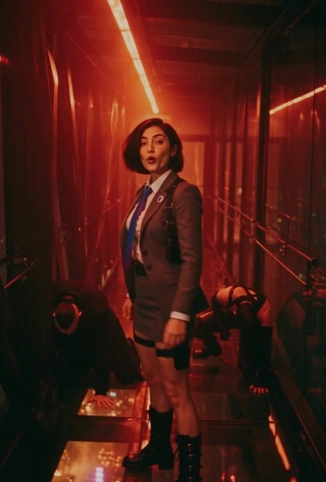 03 Skybridge
The heroine stays visually constant: short dark bob, gray suit, blue-to-purple tie, boots. Opponents can change with the location, but the geography must not. Stairs only go down. The skybridge stays glass. Each clip should answer four questions before a model starts inventing: what is the one beat, where people are standing, how the camera moves, and how the shot ends.
The workflow: Write the story and the beats → design character and location references → generate one readable clip at a time → edit, mix, and connect the last good frame to the next shot.
The production pipeline
Use four stages so a failed clip does not force you to rewrite the whole film.
1. Write
Define the story, the main action, the duration, the camera move, and the desired end frame. If a stunt performer could not visualize the move from your brief, a video model probably cannot either. Replace “epic” and “cinematic” with visible verbs and cause and effect.
2. Design
Build consistent character sheets and environment stills before you ask for complex motion. A face, a full-body view, and an approved empty background will do more for continuity than another paragraph of style language.
3. Generate
Animate one readable beat at a time. Keep the last successful frame as the start frame of the next clip. If only the footwork is wrong, change the footwork — do not throw away a face and a lighting setup that already work.
4. Finish
Join the clips, refine any dialogue, layer sound effects, and duck music under speech. Picture, sound, and movement should explain the same physical event.
In NeuroHelper AI those stages map to Chat Master, Image Master, Video Master, and Audio Master. The method is model-agnostic; Seedance 2.5, Kling 4.0, and Wan 3.0 differ in duration, references, and audio, so check the picker first. For a wider view, see best AI video generators, head-to-heads such as Seedance vs Kling, Kling vs Veo, and Wan vs Seedance, and how we test AI models.
The seven-piece action prompt
When a prompt fails, it is usually missing a piece, not missing adjectives. Use this as a checklist, then delete any line that does not change the shot:
- Who — character identity and costume.
- What — one specific action beat, not a montage.
- Where — environment and geometry: railings, stairs, glass, exits.
- Camera — shot size and a real trajectory, plus who the move is following.
- Light — sources, color, and direction. “Cinematic lighting” is not a source.
- Physics — weight, inertia, contact, and how the body reacts.
- Time — duration and the ending pose the next clip can pick up.
Make the end frame explicit: does she finish standing, turn toward an exit, or leave the opponent off balance? A defined endpoint is what the next shot inherits.
Write actions, not adjectives
A vague request forces the model to invent the fight, the camera, and the ending at once: “Make an epic cinematic fight.” A directed request gives it a physical event to simulate:
On a rain-soaked rooftop, a man throws a right-handed strike. A woman in a gray suit ducks, pivots outside his arm, and counters once. A lateral camera tracks beside them; red industrial lamps reflect on wet concrete.The second version is not more “creative.” It is more filmable: it names the surface, the strike, the evasion, the camera path, and the light.
Direct the camera on purpose
Name a real camera move, its direction, its subject, and when it begins. A short shot usually supports one dominant move. A pan rotates in place; a dolly or tracking shot changes position and creates parallax. If you ask for an orbit, say the camera travels a physical arc — otherwise you often get a zoom or a hidden cut.
- Lateral tracking: “The camera tracks left to right beside both fighters.”
- Follow: “Follow directly behind her down the metal staircase.”
- Orbit: “Make one smooth 120-degree orbit around both fighters.”
- Dolly-in: “Slowly push in as she turns to address the viewer.”
- Low angle: “Film the counterattack from a low three-quarter angle.”
- POV: “Show the approaching strike from her eye-level POV.”
Also name the subject: follow the heroine, hold both fighters, or reveal the environment. Without that, a move can be dynamic and still confusing.
Give each short clip a time budget
Five seconds will not hold ten stunts. “Ten punches, three jumps, a door explosion, and a sprint” usually skips beats. A better brief has a beginning, a peak, and a stable end: one strike, a duck and pivot, then a balanced stance. If a longer fight needs three ideas, split them — and check the duration range in Video Master.
Block the exchange like a stunt scene: initiate, react, reposition, counter, resolve. Track who stands left or right and whether they can actually reach each other. A simple floor plan — entry at camera-left, exit behind the opponent, railing to the right — prevents people from teleporting between takes.
Make the body obey physics
Convincing action depends on contact, momentum, feet, and object interaction. Useful clauses to reuse:
Professional stunt choreography, accurate anatomy, natural weight transfer, precise foot placement, plausible acceleration, momentum and contact reactions. Clothing and hair respond realistically. No sliding feet, awkward backward walking, extra limbs or impossible body mechanics.Prop details beat extra style words. For a door, say which hand grips the handle and how the hinges swing. For a stair, say “DOWN one complete flight toward a LOWER floor,” because “runs the stairs” is how models invent an ascent.
Lock identity and geography
Sequential clips feel like one movie when the reference stack is small and ranked:
- Start frame — the last frame of the prior clip, so position, direction, and camera carry over.
- Environment — an approved empty background for architecture, light, floor, and exits.
- Character sheet — front, back, and a close-up for face, silhouette, hair, and clothes.
- Next location — only when a doorway or transition has to reveal a real destination.
Then say so in the prompt:
Continue directly from the supplied starting frame. Preserve the heroine's facial identity, short dark bob, gray blazer, blue-purple tie and boots. Maintain the same left/right positions, door geometry, movement direction and red-orange practical lighting. The next shot begins where the prior shot ends.If the model gets confused, reduce references and describe secondary characters in text.
Light the scene with intent
Depth comes from motivated sources, not from the word “cinematic.” Name a key light that keeps faces readable, a rim that separates hair and shoulders, practical lamps that explain the color, and atmosphere — mist, wet floors, a skyline — that the camera can travel against.
Keep a simple color script so cuts feel like the same night: rooftop in cool blue with red accents, stairwell in dense red industrial glow, skybridge in crimson against deep blue city light. If faces disappear into colored shadow, add a soft neutral key for the eyes. Do not let the “sun” jump sides between shots.
Direct a time-freeze only when you can define it
A time-dilation beat works when three things are explicit: the trigger, who is still allowed to move, and when time returns.
At the moment the opponent's strike nears her shoulder, the world slows to 0.1% speed. The opponent, clothes and environment move almost imperceptibly. Only the heroine and camera move normally. She snaps her head sharply toward the lens and speaks directly to the viewer. After the final word she returns to the fight and time resumes instantly.Avoid an accidental full freeze. “Almost imperceptibly” is safer than “completely frozen,” because her lips have to move. Also check subtitle settings: the prompt cannot always turn off automatic captions.
Edit for clarity, mix for impact
Cut on action, between readable moves, not during a vital contact. Preserve screen direction: a run down the stairs should not become a run up in the next shot. Layer footsteps and impacts under the picture, duck music when she speaks, and in a time-dilation beat muffle the environment so the line stays clear. If the model invents on-screen words, forbid typography in both the prompt and the settings.
Generate, diagnose, then change one thing
Do not rewrite a successful scene because one movement is wrong. Name the failing second and adjust that variable:
- The hero slides backward: “She plants her left foot, sidesteps, rotates her hips and pivots around the outside of the strike. No straight-line backpedaling.”
- The camera does not orbit: “One continuous 120-degree physical arc around both fighters, with strong background parallax. No angle cuts within the orbit.”
- A stair chase goes up: “Follow behind her DOWN one complete flight toward a LOWER floor. The opponent follows on the same steps.”
- Extra words appear: “Absolutely no subtitles, captions, typography, labels or visible text; disable auto-captioning in the interface.”
Find the exact second of failure, change one or two variables, compare, and keep the best result. Regenerate only the failed beat, then connect the shots in the edit.
Copy-ready prompts from the case study
These are production briefs, not magic spells. Adapt wardrobe, location, and timing; keep one beat, one camera path, and one end state. The examples are vertical 9:16; change that line for 16:9.
Prompt 1. Rooftop: attack and counter (5 seconds)
Create a 5-second photorealistic cinematic action shot, vertical 9:16.
On a wet skyscraper rooftop at night, a male opponent in a black tailored coat throws one fast right-handed strike toward a woman in a gray suit. She ducks beneath his arm, pivots to his outside shoulder and delivers one controlled counterstrike. He reacts and steps back.
CAMERA: One smooth lateral tracking movement parallel to both fighters, medium-wide framing showing footwork.
LIGHT: Red practical lamps, cool blue city haze, natural wet-floor reflections.
PHYSICS: Realistic weight, inertia, balance, body reactions, hair and fabric movement.
End with both characters clearly separated and grounded. No extra actions.
The location, strike, evasion, camera path, and ending are all explicit, so the model can concentrate on one physical event.
Prompt 2. Stairwell: chase the hero (5 seconds)
Create a 5-second photorealistic chase shot inside a red-lit industrial stairwell, vertical 9:16.
A woman in a gray suit turns forward and rapidly runs DOWN one complete metal stair flight. A muscular male opponent pursues her several steps behind on the SAME staircase.
CAMERA: Tight stabilized follow shot directly behind her at shoulder height, matching her downward movement around one natural turn.
Show actual descending metal steps and railings, accurate footfalls, natural acceleration, moving tie and jacket.
No reverse walking, no upstairs movement, no teleportation or impossible staircase geometry.
End as she reaches a wide lower landing with the opponent still behind.
“DOWN” and “the SAME staircase” prevent two common failures: inverted geography and a staircase that cannot exist.
Prompt 3. Skybridge: decisive victory (6 seconds)
Create a 6-second photorealistic cinematic action shot on a narrow glass skybridge high above a nighttime city.
A man in a long black coat launches one sweeping strike. The heroine in a gray suit ducks beneath his arm, pivots past his outside shoulder and redirects his momentum with ONE decisive controlled counteraction. He stumbles and drops to one knee, safely inside the bridge.
CAMERA: ONE uninterrupted low-angle 120-degree physical orbit around both fighters, with strong architectural background parallax.
ENVIRONMENT: Red-orange ceiling lights, dark steel beams, reinforced transparent floor showing city lights far below.
Realistic contact, weight transfer and reactions. No broken glass, falls or extra strikes.
One orbit, one counter, a clear defeated pose. The glass floor is part of the composition, not an excuse for an impossible stunt.
For a time-dilation hook inside the fight — including the spoken line from the case study — use the brief in the time-freeze section above. Keep any new line short enough to finish before time resumes.
A universal template you can reuse
Fill the brackets, then delete any section that does not change the shot. Shorter is usually better on a five-second clip.
Create a [DURATION]-second photorealistic cinematic action video, [ASPECT RATIO].
STYLE: [Genre and tone — do not copy protected characters]
CHARACTERS: [Exact appearances, clothing, positions]
LOCATION: [Architecture, materials, weather, entry and exit]
ACTION: [Who initiates; one main move; reaction; clear ending]
CAMERA: [Shot size, angle, physical trajectory, timing]
LIGHT: [Key light, rim light, practical light, color contrast]
PHYSICS: [Weight transfer, footwork, inertia, contact]
TIMELINE: [0–2 seconds: ... / 2–5 seconds: ...]
AUDIO: [Dialogue, ambience, sound design]
REFERENCES: [Start frame, location, hero sheet, next location]
FINAL FRAME: [Who is where and which direction they face]
RESTRICTIONS: [Specific unwanted artifacts, only if needed]
Remove contradictions — do not ask for an unbroken take and three cuts at once — and confirm duration, references, and audio in the Video Master picker.
How to do this in NeuroHelper AI
You do not need a separate subscription for each stage. In NeuroHelper AI the path is:
- Chat Master. Describe the film: locations, heroine, one beat per clip. Ask a current chat model for a shot list, constraints, and a filled-in template. Attach a sketch or still if you have one.
- Image Master. Build a character sheet and, if needed, empty location stills. Keep wardrobe and lighting consistent. These files are references, not the finished movie.
- Video Master. Choose a current video model, set duration and aspect ratio, and attach the start frame plus approved references in the order the model supports. Paste one clip’s prompt, review the second that fails, and revise only that part. Carry the last good frame into the next clip.
- Audio Master, then an edit. Add music, a spoken line, or sound effects if native audio is not enough, and join the clips so screen direction and geography hold.
Browse current models from the models hub, or go straight to Seedance 2.5, Kling 4.0, and Wan 3.0. We are not claiming any one of them produced every frame of the case study; the directing method is what travels. If you are coming from Higgsfield, Runway, or Pika, start at the alternatives hub — including Higgsfield, Pika, and Hedra — or read Higgsfield vs Runway. Other guides in this series will go deeper on hooks, start-and-end frames, and camera-angle workflows.
Mistakes that flatten AI action
- Asking for a genre instead of a beat. “Epic fight” is a mood; “one strike, a duck, one counter, she finishes standing” is a shot.
- Overloading a short clip. If a viewer cannot name the main action, the brief was too dense.
- Forgetting the camera’s subject. “Orbit” without “around both fighters” often becomes a zoom.
- Letting geography reset. Stairs that go down and then up, or doors that swap sides, break the film.
- Changing identity mid-sequence. A new haircut between clips is usually a missing character sheet.
- Rewriting a whole take to fix one second. Change one clause; keep the face that already works.
- Ignoring captions. If you do not want on-screen text, say so in the prompt and the settings.
- Copying protected characters. Direct original costumes and faces.
A preflight checklist
Review after each generation and the edit:
- Action — Can a viewer tell who attacked, how the hero reacted, and what changed?
- Timing — Does each beat have time to read? Do speeches and movements finish?
- Camera — Is the requested move visible, or did the model merely pan, zoom, or cut?
- Physics — Are hands, feet, contact, and reactions plausible?
- Space — Do doors, stairs, railings, and exit directions stay consistent?
- Characters — Are faces, hair, clothing, and props stable across shots?
- Light — Can you read the faces? Is the color palette coherent?
- Audio — Is dialogue intelligible, and is music ducked during teaching moments?
- Ending — Is the victory, transition, or final pose unambiguous?
- Brand — Are there unwanted captions, logos, or recognizable third-party marks?
Watch the result again, then start your own
The finished film is the test of the method: one heroine, three locations, readable beats, and a camera that has a reason to move. Watch it once more, then adapt the prompts to a chase, a sport, or a product scene of your own.
Great AI action is not chaos. It is direction.
Frequently asked questions
Which AI video model is best for cinematic action scenes?
There is no single best model for every action job. The method in this guide is model-agnostic: write one readable beat, name the camera move, and lock identity and geography. In NeuroHelper AI, start in Video Master and compare current options such as Seedance 2.5, Kling 4.0, and Wan 3.0. Check each model’s duration, reference, and audio controls in the picker before you generate.
How long should each AI action clip be?
Treat a short clip as a time budget. A five-to-eight-second shot usually supports one primary action, one camera move, and a clear end pose. If the sequence needs several goals, generate distinct shots and join them. Exact limits depend on the model you select in Video Master.
Do I need reference images to make a multi-scene AI action film?
They help a great deal once you move past a single test shot. Use the last good frame as the next start frame, keep a character sheet in the stack, and add an environment still when architecture or lighting must stay consistent. If the model becomes confused, reduce references and describe secondary characters in text.
Can I create a time-freeze or slow-motion reveal in an AI action prompt?
Yes, if you define the trigger, who is allowed to move, and when time returns. A useful pattern is: the world and opponent almost stop, only the heroine and camera move normally, she addresses the lens, then she turns back and action resumes. Write “almost imperceptibly” rather than “completely frozen,” so mouths can still move.
How do I keep the same characters across several AI action clips?
Build a simple character sheet before you animate: a clear face, a full-body view, and consistent wardrobe. Repeat the same identity language in every prompt and carry the last successful frame forward as the next start frame. When only one beat fails, regenerate that beat instead of rewriting the whole scene.
Can I run this whole action workflow in NeuroHelper AI?
Yes. Use Chat Master to turn an idea into a shot list and prompts, Image Master to build character and location references, Video Master to generate and revise the clips, and Audio Master for music, dialogue, or sound effects. The models on this page sit in one workspace with one credit balance. Start with a $1 trial, then choose Basic $19 or Pro $49.
How much does an AI action video cost in NeuroHelper AI?
It depends on the model, duration, resolution, and references you choose. Video Master shows the current estimate before you generate. You can start with a $1 trial, then choose Basic $19 or Pro $49.
