
MiniMax H3 video, references, dialogue, and sound in one model
Create short-form AI video with native stereo audio from at least one source image plus a written motion brief. Add further visual, video, or audio references when a product campaign, creator ad, cinematic story, dialogue scene, or branded motion piece needs tighter creative control inside Neurohelper AI.




MiniMax H3 is available inside the same Neurohelper AI workspace as Chat Master, Image Master, Video Master, Audio Master, and Smart Assistants. Develop the brief, prepare source frames, generate picture and sound, and continue into voice, music, social content, or a complete campaign without maintaining another separate subscription.
MiniMax H3 overview
A reference-led video model that treats the entire audiovisual brief as context
MiniMax H3 starts from at least one source image, then interprets the written direction and any additional visual, motion, or audio references as connected context. That makes it useful when a project needs more than an attractive moving image: recognizable products, controlled characters, native dialogue, campaign elements, and sound that belongs to visible events.
Establish the opening state
Supply a clear source image that defines the subject, environment, framing, lighting, and details the video should preserve.
Direct motion and performance
Describe timing, camera behavior, physical actions, spoken lines, and the final state without contradicting the reference.
Generate an audible world
Connect voices, ambience, impacts, Foley, silence, and music to the moments that appear on screen instead of adding generic sound afterward.
Three practical MiniMax H3 workflows
Choose how the required image should guide the result
Every generation begins with at least one image. Use a single opening frame for focused animation, several images when identity or design must remain consistent, or combine the required image with motion and audio references when timing, voice, sound, or performance needs tighter control.
Animate one approved frame
Best for UGC setups, products, characters, campaign keyframes, title cards, and environments whose opening composition is already established.
Protect identity and design
Add supporting views when the same product, character, wardrobe, visual system, or environment must remain recognizable during motion.
Combine appearance, motion, and sound
Keep at least one image as the visual anchor, then add video or audio references when movement, voice, music, rhythm, or editing behavior needs a clearer target.
Creative and marketing use cases
Six production briefs designed around MiniMax H3
The examples balance practical marketing work with original creative production. Each brief keeps the visible action focused enough to review identity, motion, dialogue, audio, typography, and continuity rather than hiding the model behind random spectacle.
Sell the use case without complicated product handling
Begin with the projector already placed and switched on, then let the creator's performance, projected light, and native voice carry the ad.
View source-image and video prompts
Source image: Photorealistic vertical 9:16 smartphone UGC opening frame in a cozy modern living room at blue hour. One original fictional female creator who does not resemble a real person sits naturally on the edge of a sofa and looks toward the phone camera. A small invented matte-cobalt pocket projector with a circular amber lens and one tiny abstract mint symbol rests stationary on a low table beside her. The projector is already switched on and casts a warm cinematic landscape onto the blank wall behind the sofa. Product fully visible, relaxed home atmosphere, natural skin texture, casual clothing, no hand touching the projector, no readable text, no real logo, no second person.
Video: Use the supplied image as the exact first frame and immutable creator, product, room, projection, and composition reference. Create a 12-second vertical creator-style advertisement. Preserve the exact face, hair, clothing, cobalt projector, amber lens, mint symbol, table, sofa, projected image, lighting, and framing. She makes one natural blink, glances briefly toward the projection, returns to camera, and says warmly: “This little projector is how movie night finally fits in my carry-on.” Keep the projector fixed and already switched on. Let the projected landscape move subtly and cast realistic changing light across the room. Add restrained smartphone micro-motion, clean close speech, quiet room tone, and a soft projector fan. No touching, lifting, switching on, opening, product transformation, text change, extra hand, cut, caption, music, or real brand.
Test typography, atmosphere, and narrative direction together
Start from an approved title keyframe so the model can build mood without having to invent the typography during motion.
View source-image and video prompts
Source image: Cinematic 16:9 title keyframe for an entirely fictional mystery drama. Predawn macro view of one dark red apple resting on an old wooden table beside a frost-covered orchard window. A weathered cream paper label is tied securely to the apple stem and faces the camera. The exact title “THE LAST ORCHARD” appears centered on the label in large, perfectly readable black serif capitals. Deep burgundy, charcoal, frost blue, and one distant warm amber work light; restrained analog film grain; no person, subtitle, logo, or other readable text.
Video: Use the supplied image as the exact first frame and immutable apple, label, title, table, window, orchard, typography, palette, and composition reference. Create a 12-second cinematic 16:9 opening-title shot with no cuts. Frost slowly spreads across the apple skin and the lower edge of the window; fog drifts behind the bare trees; the distant amber light brightens slightly; the label makes one restrained movement in a cold draft but remains front-facing and fully readable. Use a very slow 70 mm dolly-in that ends on the original title. Native stereo audio: winter wind outside, one branch creak, distant footsteps, a low cello phrase, then near-silence for the final three seconds. Keep “THE LAST ORCHARD” unchanged and readable throughout. No new words, spelling change, fruit deformation, loose label, person, jump scare, camera shake, logo, or cut.
Animate an approved landing-page hero without losing the design
Start from a finished interface keyframe so the model can focus on hierarchy, product motion, and campaign atmosphere.
View source-image and video prompts
Source image: Premium 16:9 desktop website hero for a completely fictional modular travel-bag system named “FIELDNOTE 24.” One sand-colored technical carry-on bag is centered on a pale stone plinth against a deep forest-green background. The exact headline “PACK ONE. MOVE FURTHER.” appears large and readable on the left, with a restrained cream button reading “EXPLORE THE SYSTEM.” A small row of three modular accessories sits below the hero product. Refined editorial grid, realistic materials, no real company, no copied logo, no browser chrome.
Video: Use the supplied website hero as the immutable design reference. Create a 10-second 16:9 product-website motion film. Preserve the exact bag, sand color, seams, straps, modules, FIELDNOTE 24 name, headline, button, layout, green background, typography, spacing, and camera. Begin on the complete hero page. The bag turns only eight degrees while soft directional light travels across its fabric; the three accessories rise a few pixels into alignment and settle; one restrained topographic line animates behind the product; the button receives one subtle glow. Finish on the original full composition with every word readable. Native audio: soft fabric movement, one magnetic click, restrained low pulse, and a clean tonal resolve. No page scroll, cursor, hands, extra product, layout redesign, spelling change, new text, real logo, or cut.
Build a repeatable protagonist around one clear story beat
Lock the character and environment in a keyframe, then test controlled movement, material continuity, and scene-specific sound.
View source-image and video prompts
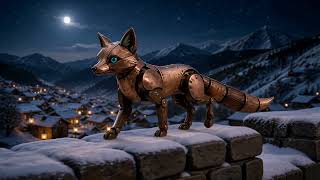
Source image: Cinematic 16:9 opening keyframe of an entirely original palm-sized mechanical fox standing on a snow-covered stone wall above a quiet mountain village at night. The fox has brushed copper plates, dark walnut joints, two small teal glass eyes, a segmented tail, and no resemblance to a known character. Warm paper lanterns glow below; light snow falls across deep indigo mountains. Tactile miniature realism, visible metal scratches and wood grain, character fully visible in three-quarter profile, no people, text, or logo.
Video: Use the supplied image as the exact character and world reference. Preserve the fox's copper plates, walnut joints, teal eyes, segmented tail, scale, village architecture, lantern positions, mountains, snow, color palette, and camera height. Over 12 seconds the fox hears a faint three-note signal from the valley, raises both ears, takes four careful steps along the wall, and pauses as its teal eyes brighten slightly. The camera tracks beside it with one restrained movement; snow gathers naturally on the metal and one lantern below sways in the wind. Native stereo audio: soft gears, metal feet on snowy stone, mountain wind, distant lantern paper, and the same three-note signal moving from right to left. No transformation, running, jumping, speech, extra animal, weapon, magic blast, text, logo, or cut.
Turn an approved look into a concise multi-shot product story
Use one reference frame to lock the garment and talent before asking for changing environments, motion, and sound.
View source-image and video prompts
Source image: Photorealistic vertical 9:16 fashion campaign keyframe of one original fictional male model standing under a glass tram shelter in light rain. He wears a distinctive invented slate-blue commuter coat with a high asymmetric collar, matte waterproof fabric, diagonal chest seam, concealed pockets, and one tiny abstract amber symbol near the left cuff. Full garment visible, neutral dark trousers, wet modern city street, cool daylight, no umbrella, no readable signage, no real logo.
Video: Use the supplied image as the immutable talent, coat, symbol, color, material, and campaign reference. Create a 12-second vertical fashion film with three connected shots. Shot 1: the same model waits at the shelter while rain beads naturally on the slate-blue fabric. Shot 2: side tracking view as he walks at a steady pace beside a passing tram, keeping the exact coat, collar, seams, pockets, cuff symbol, face, and body proportions. Shot 3: closer waist-up hero frame as he stops beneath an overhang and turns slightly toward camera. Preserve cool daylight, wet street reflections, restrained editorial realism, and consistent wardrobe. Native audio: rain on glass, distant tram bell, footsteps, fabric movement, and one minimal electronic pulse. No wardrobe change, umbrella, duplicated model, readable sign, extra accessory, exaggerated slow motion, cutaway product, or real brand.
Coordinate identity, turn-taking, room tone, and dramatic restraint
A compact two-person exchange reveals whether speech, reactions, spatial sound, and character continuity belong to the same scene.
View source-image and video prompts
Source image: Cinematic 16:9 opening keyframe inside a small independent radio observatory after midnight. Two entirely fictional adults sit across a narrow analog console: a calm female host in a burgundy wool cardigan on the left and a tired male signal engineer in a charcoal overshirt on the right. One warm desk lamp, green instrument lights, rain on the dark window, two microphones already fixed in place, realistic faces with no resemblance to public figures, no readable labels or logos.
Video: Use the supplied image as the exact identity, wardrobe, seating, console, microphone, lighting, and composition reference. Create a 15-second cinematic dialogue scene with restrained performances and no cuts. The host watches one waveform settle and says quietly, “You said the signal was gone.” Leave a one-second pause. The engineer looks from the console to her and answers, “It was. Then it answered.” After the line, both listen as three faint pulses move across the room from the right speaker to the left. Preserve the same two people, faces, clothing, positions, microphones, console, lamp, rain, and camera. Natural lip sync, distinct voices, subtle breathing and reactions. Native stereo audio: close dialogue, low equipment hum, rain on glass, one chair creak, and three spatial radio pulses. No overlap, shouting, narrator, subtitle, extra person, camera cut, supernatural visual effect, readable text, or logo.
Controlled model comparison
MiniMax H3 vs Seedance 2.5 on the same creative brief
This comparison sits outside the six core cases. Use the same source image, duration, format, prompt, and review criteria to compare motion, identity, camera control, visual detail, and the usefulness of each finished result.
One image and prompt, two production decisions
The goal is not to declare one universal winner. It is to show how both models animate the same visual anchor and where each result is more useful for a real creative workflow.
Use the same source image, duration, aspect ratio, motion direction, sound brief, and review criteria for both generations.
How to prompt MiniMax H3
Write relationships between the required image, performance, and sound
Begin by stating exactly what the source image defines and what must remain unchanged. Then describe the visible timeline, performance, camera, spoken lines, and sound. Add more references only when they have a clear role.
Define the image anchor
Identify the subject, product, character, wardrobe, environment, framing, lighting, and text that the required source image must preserve.
Sequence the visible events
Write the opening state, chronological actions, dialogue turns, camera behavior, and final frame instead of listing unrelated visual wishes.
Attach sound to the screen
Connect speech, Foley, impacts, ambience, music, and silence to specific visible moments so the soundtrack supports the scene.
A clear source frame and a precise timeline are often better than many conflicting inputs. Add more images, video, or audio only when identity, motion, voice, rhythm, or sound needs an additional target.
Practical model selection
Where MiniMax H3 is especially useful
Strong uses
- reference-led short-form video with native dialogue, ambience, effects, and music;
- campaigns that combine product, character, motion, and audio references;
- opening titles, animated posters, product websites, and brand motion;
- UGC, e-commerce, fashion, social, gaming, and original storytelling;
- single-image, multi-image, first-frame, last-frame, and mixed-reference workflows;
- multilingual dialogue and controlled audiovisual scene direction.
Review carefully when
- small packaging text or interface copy must remain legally exact;
- several people speak quickly, overlap, or perform intricate hand actions;
- many references disagree about identity, lighting, style, or movement;
- a 15-second scene contains too many unrelated locations and events;
- the output depicts a real person or could mislead viewers about reality;
- educational or commercial claims require factual and legal approval.
MiniMax H3 specifications
Compact model reference
The page describes the reference-to-video mode currently available in Neurohelper AI. Broader capabilities published by MiniMax may differ from the controls exposed in this integration. Last reviewed August 22, 2026.
Frequently asked questions
MiniMax H3 FAQ
What is MiniMax H3?
MiniMax H3 is a multimodal video model that can generate moving scenes and native stereo sound from reference material and written direction. In Neurohelper AI it is available as reference-to-video, so every generation starts with at least one image.
Does MiniMax H3 require a reference image?
Yes. The mode currently available in Neurohelper AI requires at least one source image. The image establishes the opening appearance and composition; the prompt explains what should move, happen, sound, and remain unchanged.
Can MiniMax H3 generate dialogue and sound?
Yes. H3 can jointly generate dialogue, ambience, Foley, effects, and music with the video. For more controlled output, quote spoken lines exactly, define who says each line, and connect sound cues to visible events.
How long can a MiniMax H3 video be?
The model supports output from 4 to 15 seconds. That is enough for a compact ad, UGC performance, dialogue beat, title sequence, product film, or short multi-shot story.
Can MiniMax H3 use additional references?
Yes, when the selected controls allow them. Keep at least one image as the visual anchor, then add other images, video, or audio only when each reference has one explicit purpose.
What is the difference between MiniMax H3 and Seedance 2.5?
Both can support ambitious reference-led creative video workflows, but they may interpret motion, identity, camera direction, references, and audio differently. The comparison block above is designed to show both results under the same controlled brief rather than treating one model as universally better.
Is MiniMax H3 available in Neurohelper AI?
Yes. MiniMax H3 is available through Video Master alongside other video, image, chat, voice, sound, and music models. Available settings and usage limits depend on the selected plan and active integration.
From a reference image to a complete audiovisual scene
Build motion, performance, and sound inside one connected workspace.
Prepare an opening frame, animate it with a precise production brief, add richer references when needed, and continue into editing, voice, music, creative content, or a complete marketing campaign inside Neurohelper AI.
