

Guides & Tutorials · Ads & Product Videos
An AI UGC ad is a creator-style vertical video made without a shoot: one person, one product, one believable reason to care. Done well, it looks like a recommendation in the feed, not a compressed TV spot.
This guide walks through the workflow behind six real NeuroHelper AI UGC ads. You write the script in Chat Master, build creator and product references in Image Master, generate the clip in Video Master, and add a separate voice or music track in Audio Master only when the clip needs one. Two of the examples include the brief published on the model page, so you can copy the structure instead of guessing. Start with a $1 trial, then choose Basic $19 or Pro $49.
What a good AI UGC ad looks like
The UGC ads that work follow the same three beats creators use: a hook in the first two or three seconds, proof the viewer can see, and a short close. AI does not change that structure. It changes how quickly you can produce and test versions of it.
Our own examples fall into six formats. Pick one before you write anything, because each format needs different inputs.
| Format | Real example | Length | Use it when |
|---|---|---|---|
| Personal recommendation | Beauty creator applies a complexion product at a vanity table (Seedance 2.5) | 30 s · 9:16 | The product is used on the body or face and the creator’s reaction is the proof. |
| Fast product proof | Skincare cream macro, then the creator applies it (Seedance 2.5) | 15 s · 9:16 | Texture, finish, or a visible result sells it faster than a story. |
| Hands-on demo | Creator packs everyday items into a backpack (Seedance 2.5) | 15 s · 9:16 | The buyer’s question is practical: what fits, how it opens, how it works. |
| Routine / lifestyle | Melo Air headphones worn through a café work session (Seedance 2.5) | 30 s · 9:16 | The benefit (comfort, calm, focus) shows up over time, not in one moment. |
| Spoken hook test | Creator holds CALMORA tea and says one line (Veo 3.1 Fast) | 8 s · 9:16 | You want to test opening lines while the product shot stays identical. |
| Food reaction | Frozen raspberries in chocolate, close-ups and a reaction (made with Seedance 2.0) | 15 s · 9:16 | Appetite appeal and the first bite carry the ad. |
The rule behind every example: one identity, one room, one product, one camera relationship. Each extra person, location, or product action is another thing the model can get wrong.
Before you start: four inputs
- The product, exactly. A clean photo or pack shot showing shape, color, and label. If the label must be readable in the ad, the reference must show it clearly.
- One creator. A fictional identity: face, hair, outfit, and personality in a few words (“easygoing”, “warm, relaxed, conversational”).
- One location. A vanity table, a kitchen, a café table. Real-looking and lived-in beats a studio set for UGC.
- One claim and the exact words. What the viewer should believe after watching, and the one or two lines the creator says out loud.
Step 1. Write the script in Chat Master
Use Chat Master to turn the product and the claim into a timed script that a video model can follow. Ask for second-by-second beats, the exact spoken lines in quotes, the camera framing for each beat, and a “do not” list. Any current chat model works. Our Frozen Raspberries project brief was written with GPT 5.6 Terra Pro. Today, use GPT-6.1 Terra Pro or a Claude or Gemini model from the same picker.
Example Chat Master prompt (written for this guide)
You are a UGC ad scriptwriter. Product: [product name], [what it is], [one key benefit].
Audience: [who buys it]. Format: 15-second vertical 9:16 creator video, one creator, one location: [location].
Write:
1. Three alternative hook lines (max 10 words each) the creator says to camera in the first 3 seconds.
2. A timed beat sheet (0–3s, 3–9s, 9–13s, 13–15s): framing, what the hands do, what the product does.
3. The exact spoken lines in quotes, under 35 words in total.
4. A "do not" list for the video model: product changes, extra objects, text on screen, logos.
Keep it natural, like a real recommendation, not an announcer.
Two lines from the Melo Air headphones ad show the tone to aim for. The opening line names a real annoyance: “I wanted headphones I could wear past the first three songs.” The proof line answers it in the creator’s own words: “No pressure points, no constant adjusting—just my playlist.” That is about 20 spoken words across 30 seconds. The rest of the ad is the product being used.
If you are short on hook ideas, the AI video hooks guide covers five-second openings in detail.
Step 2. Build the references or the first frame in Image Master
Video models keep identity and packaging far better when each one has its own reference image. Our examples use two different setups.
Option A: a reference package (Seedance 2.5)
Separate images for the creator, the product, and the location. This is the Melo Air reference package as published on our Seedance 2.5 page:
Image 1: male creator identity, short dark curls, warm complexion, green overshirt, white T-shirt, and cream trousers; Image 2: exact Melo Air over-ear headphones with sky-blue headband, cream earcups, coral inner accent, stable left-right orientation, and no readable logo; Image 3: one bright café table beside a large window with yellow chair, pale wood, plants, and colorful street reflections. Generate all speech, café ambience, Foley, and music from the prompt.Notice what each image is for. The creator image carries identity and outfit only. The product image carries exact geometry and color. The location image fixes the room. The prompt in Step 3 repeats those roles, so the model never mixes them up.
Option B: one approved first frame (Veo 3.1 Fast)
A single vertical image with the creator already holding the product, with the packaging and composition final. The video model only animates it. This is the source image description published with the CALMORA tea example on our Veo 3.1 Pro + Fast page:
Use the supplied vertical kitchen portrait of the fictional creator holding the matte sage-green CALMORA Evening Tea box beside her face. The approved package, crescent-leaf symbol, typography, hand position, and composition are already final.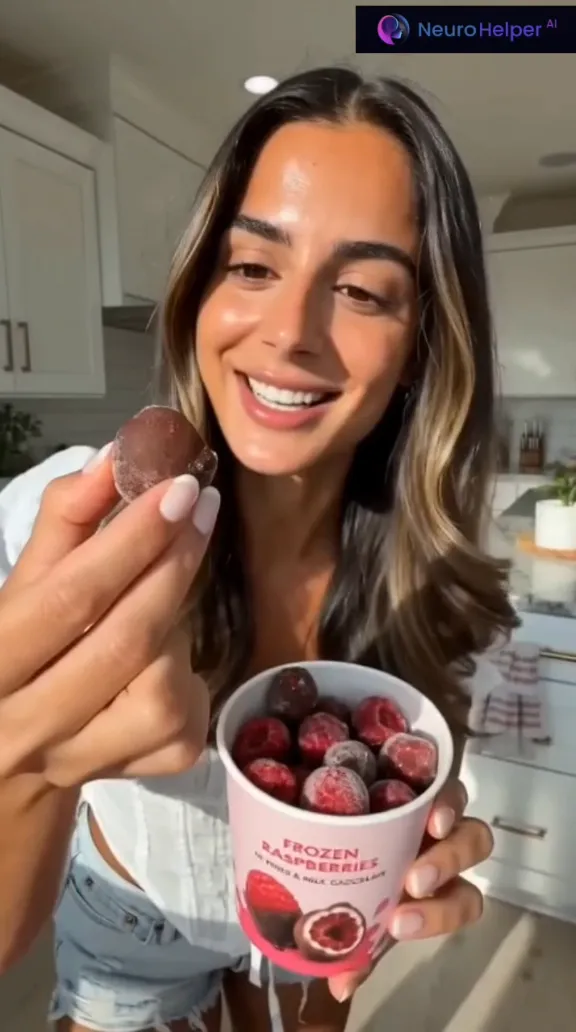
Which image model to use. For packaging with lettering and multi-turn edits, start with GPT Image 2.6. To combine several references (creator, product, room) into one frame, use Nano Banana 2.1 (up to 14 reference images, 1K–4K) or Seedream 5.5 (up to 10 reference images). Attach your real product photo every time rather than describing the product from memory.
Example Image Master prompt for a creator reference (written for this guide)
Vertical photo of a fictional woman in her late twenties, natural skin texture, shoulder-length brown hair, light grey T-shirt, standing in a bright everyday kitchen in soft morning window light. Neutral friendly expression, looking at camera, hands relaxed and empty. Smartphone-photo realism, no makeup glamour, no text, no logos.Generate the creator reference first and keep it. Then produce the first frame with the creator and your attached product photo. If you are building a recurring creator for many ads, the AI influencer guide shows how to make a consistent character sheet.
Step 3. Generate the video in Video Master
Choose the model by the format you picked, not by reputation. These are the documented ranges on our live model pages.
| Model | What it gives a UGC ad | Inputs | Our example |
|---|---|---|---|
| Seedance 2.5 | Up to 30 seconds in one generation, native speech, music, and sound, multi-shot beats | Text plus several image references | Beauty, skincare proof, backpack, Melo Air |
| Veo 3.1 Fast | 4–8 second shots with native audio, 9:16 or 16:9; quick to iterate on spoken hooks | Text or an image to use as the first frame | CALMORA tea |
| Kling 4.0 | 3–30 seconds at 720p or 1080p from your first frame, optional last frame; clips come with sound (native audio) | First frame required | — |
| Gemini Omni 1.2 Flash | 3–15 seconds with native synchronized speech, music, and sound effects | 1–10 reference images required | — |
The brief published on the Seedance 2.5 model page for the Melo Air ad
This is the 30-second brief published on the Seedance 2.5 model page for the Melo Air example. It is long on purpose. Every clause prevents a specific failure.
Create a 30-second vertical 9:16 upbeat male creator advertisement for fictional Melo Air over-ear headphones. Use Image 1 only for the creator’s exact face, hair, body proportions, green overshirt, white T-shirt, cream trousers, and easygoing personality. Use Image 2 only for the exact sky-blue headband, cream earcups, coral inner accent, cushion thickness, proportions, and left-right orientation. Use Image 3 as one fixed bright café location and table layout. Never show reference sheets, product turnarounds, borders, or generated text. Generate all synchronized audio from this prompt; no audio reference. Give the creator one consistent natural adult male voice: warm mid baritone, conversational, lightly amused, never an announcer. Use an original optimistic 106 BPM groove with muted drums, rounded bass, bright guitar chops, and no vocals; duck it beneath speech. 0–6s: handheld seated selfie in the sunlit café; the creator holds the folded headphones beside the unobstructed face and says exactly, “I wanted headphones I could wear past the first three songs.” 6–10s: stable medium shot; with both hands he places the headphones onto his head once in one continuous natural action, earcups covering both ears correctly. Do not cut during placement. 10–17s: same table and outfit; one side close-up shows cushion fit and headband position, then a front medium shot shows him working with a relaxed small head nod while café activity stays soft in the background. No visible laptop screen or button pressing. 17–23s: handheld selfie while still wearing the same headphones; he says exactly, “No pressure points, no constant adjusting—just my playlist.” Keep both hands below frame and the product fully visible. 23–27s: two simple bright lifestyle cuts in the same café—one natural smile toward the window and one shoulder-level profile with colorful street reflections; no product removal. 27–30s: hard cut to the exact headphones resting closed on the same table, fully visible and stationary, with the same creator softly out of focus behind them; one musical resolve and clear space for copy added later. No dark mood, isolation narrative, projector, device beam, product redesign, duplicate headphones, reversed earcups, floating product, repeated placement, touching controls, warped ears, identity or outfit change, visible UI, generated subtitle, real logo, second speaker, aggressive sales gesture, or loud music.What to copy from it:
- Reference roles are stated up front. “Use Image 1 only for… Use Image 2 only for…” stops the model from mixing the creator’s outfit into the product, or the reverse.
- The voice is cast like an actor. Age, pitch, tone, and “never an announcer.” The music is described and ducked under speech.
- Beats are timecoded, and each one has one action. The product goes on once, “in one continuous natural action,” with “do not cut during placement.”
- Spoken lines are quoted exactly, so the model does not improvise sales talk.
- The ending leaves room for copy (“clear space for copy added later”). Add captions and the offer in your editor, not inside the generation.
- The negative list is specific: reversed earcups, duplicate headphones, visible UI, generated subtitles. These are the failures that actually happen with this product type.
Melo Air, a fictional headphones brand. Creator-led product ad, 30 seconds, 9:16, Seedance 2.5.
The brief published on the Veo 3.1 Fast model page for the CALMORA hook
This is the opposite approach. The frame is already approved, so the brief published on the model page only adds a line of dialogue and almost no motion. That makes it ideal for testing hooks, because the product shot never changes between versions.
Use the supplied image as the exact first frame. Preserve the woman's exact identity, face, hair, skin texture, clothing, necklace, hands, finger positions, pose, tea box geometry, sage-green color, crescent-leaf symbol, CALMORA and EVENING TEA lettering, kitchen, lighting, camera angle, and vertical framing. She looks directly into camera and says in a warm, relaxed, conversational voice: “This is the tea that finally replaced my late-night scroll.” During the line she makes one natural blink and a very small friendly smile. Her raised hand, fingers, wrist, and the tea box remain completely still and locked together for the entire video. The package never moves, rotates, opens, bends, changes size, changes color, or changes its lettering. Use one continuous smartphone shot with an extremely subtle slow camera push-in, natural breathing, quiet kitchen room tone, and soft outdoor birds through the window. No product interaction, no second object, no cup, no loose tea, no pouring, no steam, no music, no cuts, no gestures, no additional text, and no logo changes.CALMORA Evening Tea, a fictional brand. Spoken recommendation from one approved first frame, 8 seconds, 9:16, Veo 3.1 Fast.
Step 4. Add sound in Audio Master when the clip needs it
Seedance 2.5 and Veo 3.1 generate the creator’s voice, room tone, and music together with the video, and all the examples above were made that way. Kling 4.0 clips come with sound as well. Use Audio Master when:
- You want a scripted voiceover over a Kling 4.0 clip. Kling 4.0 clips come with sound; for exact words, write the voiceover in ElevenLabs v3 and keep it within the clip length.
- You want a music bed under several ad variants. Generate one with Suno v6, MiniMax Music 3, or ElevenLabs Music, and use it across every version for a consistent sound.
- A beat needs a specific sound effect (a zip, a cap click, a pour). Use ElevenLabs Sound Effects V2.
Two Advertising Studio tools sit next to this workflow. AI Dubbing localizes a finished ad into other languages. AI Presenter Studio turns a script into a video with a ready-made AI presenter when you want a presenter-style ad rather than a generated scene. Both are listed on the Pro plan. See Advertising Studio.
Three more real examples, and what to copy
These outputs were all made with Seedance 2.5. No generation prompts were saved for these three, so take the structure, not the exact wording.
Beauty creator: personal recommendation (30 s)
The creator opens with a direct line to camera, then handles and applies the product at a bright vanity table. Copy: one room and one camera relationship for the whole ad, small pauses, direct eye contact, and a visible application moment. Those details make it read as a recommendation, not a commercial.
Skincare: 15-second product proof
A tactile cream macro first, then the creator applying it. Copy: the order product → texture → person → result. The product earns attention before anyone speaks, which suits short placements where viewers decide in a second or two.
Backpack: hands-on demo (15 s)
A creator opens the backpack and packs everyday items into it. Copy: answer one buying question (“what fits?”) with the product open, correctly oriented, and easy to inspect. There is no scripted sales monologue and no effects.
Test hooks without rebuilding the ad
- Lock the references and, for Veo 3.1 Fast or Kling 4.0, the first frame. Do not regenerate them between variants.
- Ask Chat Master for three hook lines for the same product and claim.
- Change only the opening line, or only the opening action, in the video prompt. Keep everything else word for word.
- Generate one clip per hook, keep the same music bed if you add one, and publish the variants side by side.
- Keep the hook that holds viewers longest, then rewrite the proof beat the same way.
Changing one variable at a time is what makes the result readable. If you change the creator, the room, and the line at once, you cannot tell which change worked. For the full ad workflow beyond UGC, see How to Create AI Ads.
Common problems and fixes
| Problem | Fix |
|---|---|
| The product changes shape, color, or lettering | Give it a dedicated reference image, say “use Image N only for the exact product,” keep handling to one simple action, and add “no product redesign, no changed lettering” to the negatives. |
| Hands or fingers look wrong | Reduce what the hands do. One placement, then hands below frame or still. The brief published on the Veo 3.1 Fast model page for CALMORA keeps the hand and box locked for the whole clip. |
| The creator sounds like a TV announcer | Describe the voice like casting notes (warm, conversational, lightly amused) and add “never an announcer.” Keep lines short and quoted exactly. |
| Random text or subtitles appear | Add “no generated text, no subtitles, no logos” and leave clean space at the end. Add captions in your editor. |
| It looks like a studio commercial | Use handheld selfie framing, a lived-in location, natural light, and a pause or small reaction. Drop dramatic camera moves. |
| The ad tries to say too much | One claim per ad. Split extra benefits into separate variants. |
Before you publish
- Watch at full size. Check the product label, product orientation, hands, and lip sync on every spoken line.
- Make sure every claim in the script is one you can back up. A fictional creator does not change advertising rules on claims.
- Do not present an AI creator as a real customer. Follow each platform’s rules for labeling AI-generated content.
- Add captions, the offer, and the logo in your editor, in the clean space you left at the end.
- Export 9:16 for Reels, TikTok, and Shorts. If you also need a 16:9 cut, generate it as its own take rather than cropping.
FAQ
Can AI really make UGC ads?
Yes. Current video models can generate a creator-style vertical video with a person, a product, natural movement, and synchronized speech. The examples in this guide are real NeuroHelper AI outputs. The results hold up best when the brief is narrow: one creator, one product, one room, and one or two spoken lines.
Which NeuroHelper AI model is best for AI UGC ads?
Start with Seedance 2.5 when you need up to 30 seconds, several reference images, and native speech. Four of our five examples were made with it. Use Veo 3.1 Fast for short 4–8 second spoken hooks from one approved first frame. Use Kling 4.0 when you need a 3–30 second image-to-video take from your first frame; its clips come with native audio.
How long should an AI UGC ad be?
Our examples run 8, 15, or 30 seconds in 9:16. Use about 8 seconds to test a single spoken hook. Use 15 seconds for one product proof, such as texture, fit, or what goes inside. Use 30 seconds when the creator needs to set up a problem, show the product, and react. Spoken lines run at about two to three words per second, so a 15-second ad carries roughly 30–40 spoken words at most.
Do I need product photos or a real creator?
You need accurate product images. The model can only keep your packaging, colors, and proportions if it sees them. The creator can be generated in Image Master as a fictional identity reference. Do not present an AI creator as a real customer, and follow each ad platform’s rules for AI-generated content and testimonials.
How do I stop the product from changing shape or label?
Give the product its own reference image, and in the video prompt say what that image is for: exact geometry, color, and lettering. Keep product handling simple, and list what must not happen (redesign, duplicate product, floating product, changed lettering). The CALMORA example goes further and keeps the hand and the box completely still.
Can I make the same AI UGC ad in other languages?
Yes. You can generate a new take with the line written in the target language, or localize a finished ad with AI Dubbing in Video Master. AI Dubbing is listed on the Pro plan.
How much does it cost to make an AI UGC ad in NeuroHelper AI?
It depends on the model, duration, resolution, and inputs. Video Master shows the current estimate before you generate. Start with a $1 trial, then choose Basic $19 or Pro $49.
