
Guides & Tutorials
These 25 AI video prompts come from real NeuroHelper AI projects, not from a generic swipe file. You will see the paste-ready text we used for a three-location action short, a bullet-time fashion film, a billboard ad, a rhinestone-car trend remake, a start-and-end-frame lake film, and the sheets that keep a face consistent. The workflow is the same every time: write the brief in Chat Master, lock references in Image Master, generate in Video Master, then check the sound.
The workflow: Chat Master, Image Master, Video Master, then sound
A prompt fails most often because the job was dumped into Video Master in one step. Split it:
- Chat Master — the script. Describe the story, duration, aspect ratio and ending. For a hard film, ask the chat model to return only the final Video Master prompt. GPT-6.1 Terra Pro and Claude Sonnet 5 are solid everyday choices; step up to GPT-6.1 Sol Pro or GPT-6 Astra Pro when the brief is long and the continuity rules are strict. Prompts 1–3 below are the adapter briefs we actually use.
- Image Master — the references. Make a character sheet, a product still, a first frame, or a last frame before you animate anything. GPT Image 2.6 can generate or edit a selected area; Nano Banana 2.1 and Seedream 5.5 are the other current options we used on related guides. Attach each still with one job: face, outfit, product, or location — not all of those in one image if you can avoid it.
- Video Master — the shot. Pick the model, set duration and aspect ratio, attach the stills in the order the prompt names, and paste one clip's prompt. Review the second that fails; do not rewrite the whole film at once.
- Sound. Seedance 2.5 and Veo 3.1 can generate native audio with the picture. Kling 4.0 clips also come with sound. If you need a different voice, score or effect, finish in Audio Master with current tools such as ElevenLabs v3 or Suno v6.
Which model to paste the prompt into
| Model | Use it when | What to attach |
|---|---|---|
| Seedance 2.5 | Stories, ads and trend remakes up to 30 seconds, with native audio and reference images. Most films on this page were made with it. | Named reference stills (@Image1, @Image2, and so on), each with one job. |
| Kling 4.0 | A first frame, or a first and last frame, turned into one take, 3–30 seconds, at 720p or 1080p. Kling 4.0 Flash is a 3–20 second, 720p, first-frame-only draft. | Required first frame; optional last frame on Kling 4.0. |
| Veo 3.1 Pro and Fast | A locked first frame with one spoken line and sound. Veo 3.1 Lite is the lighter draft option. | The exact first frame. Keep the action to one beat. |
For more on image-to-video, see How to Turn a Photo into a Video with AI. For Seedance vs Veo, see Seedance 2.5 vs Veo 3.1.
Prompts 1–3 — write the brief in Chat Master
These three prompts do not generate the film. They ask a chat model to write, or rewrite, the Video Master prompt for you. Paste them in Chat Master with the stills attached.
Prompt 1 — Start and end frame brief (lake film)Write a detailed prompt for a photorealistic 9:16 viral AI video concept. I need two still images: a START FRAME and a FINAL FRAME. Keep the same character, face, outfit, lighting and environment in both images. Make the first frame instantly attention-grabbing and the final frame visually surprising. Give me a separate image-generation prompt for each frame.
Prompt 2 — Swap the driver from a photo (rhinestone film)Replace the description of the man's appearance in this prompt with a description of the man in my photo. Keep all other scene details, actions, camera instructions, rhinestones, and the driver's emotional reaction unchanged. Return the complete updated prompt in English, ready to paste into Seedance 2.5, without references to attached files.
Prompt 3 — Kling 4.0 image-to-video briefLook at the attached image. I want to turn it into a [5]-second [9:16] video with [Kling 4.0].
Write one image-to-video prompt that:
- uses the image as the exact first frame;
- keeps the same subject, face, clothes, product details, setting and light;
- describes one main action in time order;
- names one camera move;
- says exactly how the shot ends;
- describes the sound and ties it to visible actions;
- ends with what must not happen (no new people, no text, no cuts, no morphing).
Keep it under 120 words.
Prompts 4–5 — lock references in Image Master
From the AI Realism Playbook. Generate the sheet first, then keep the skin line in later prompts so faces do not turn waxy.
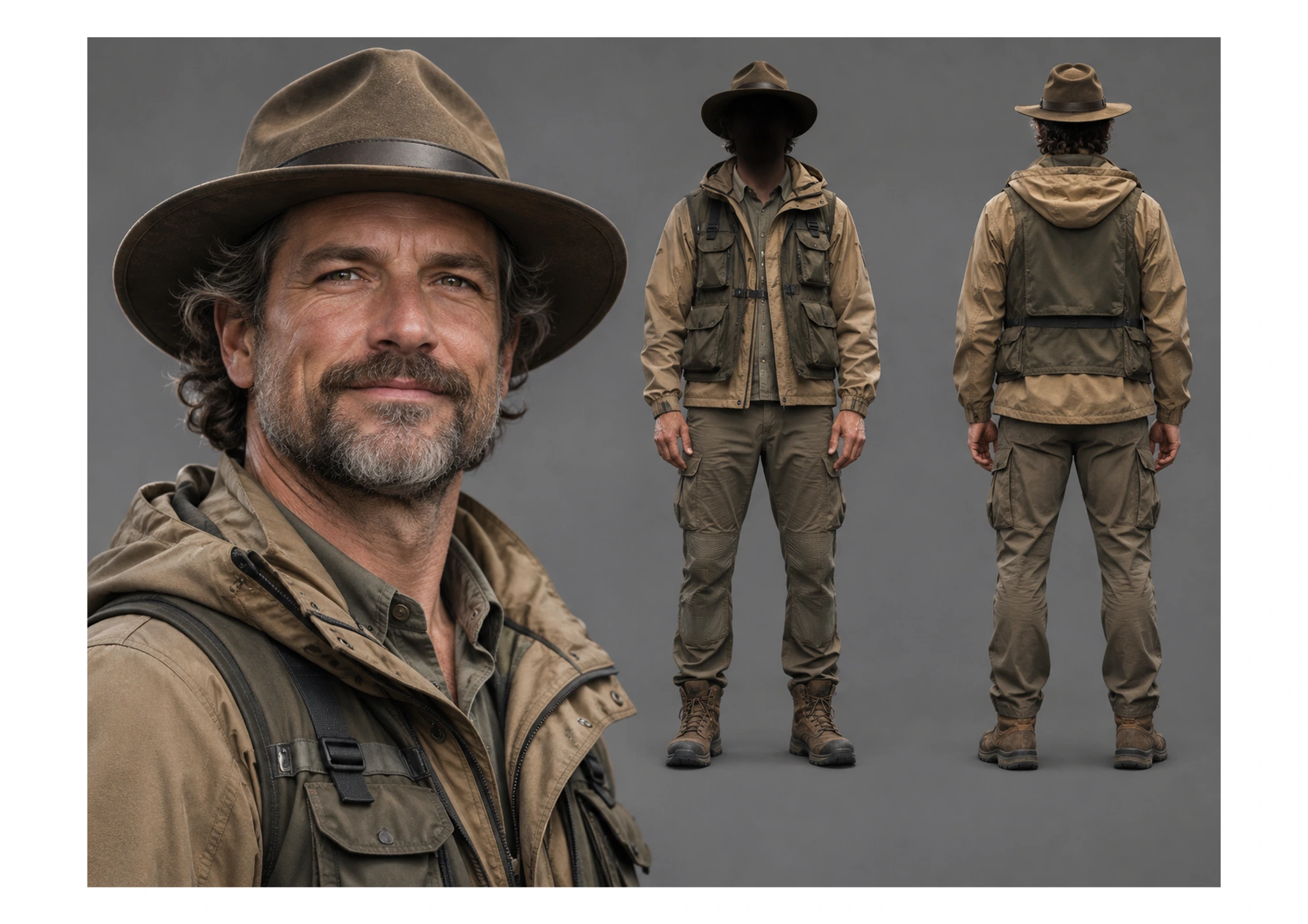
Prompt 4 — Character reference sheetCreate a horizontal 16:9 character reference sheet on a neutral gray background. Exactly three views of the SAME person: one large detailed facial portrait, one full-body front view with the small face hidden, and one full-body back view. Identical clothes, shoes and hairstyle in all three. Neutral, even lighting. No extra face angles, no text, no logos, no collage decorations.
Prompt 5 — Natural skin, keep the same faceNatural unretouched human skin, realistic irregular pores, fine lines, subtle uneven skin tone, authentic under-eye texture, tiny imperfections, slight facial asymmetry, natural lip texture, individual hair strands and realistic eye catchlights. Preserve the exact face and age. No beauty filters or waxy skin.
Prompts 6–13 — cinematic action (three-location short)
From How to Direct Cinematic AI Action Videos. The method is model-agnostic; today, start in Video Master with Seedance 2.5 or Kling 4.0. One readable beat per clip, one camera move, and a continuity line between shots.
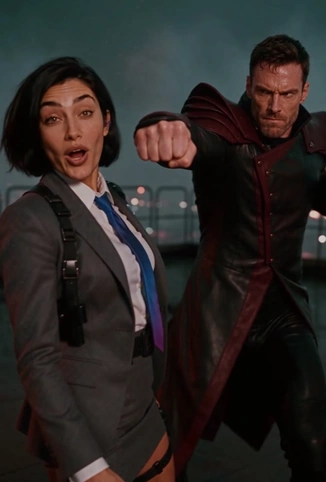
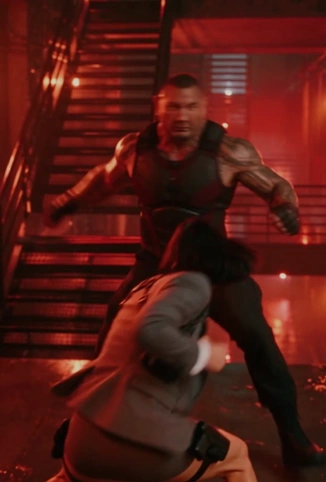
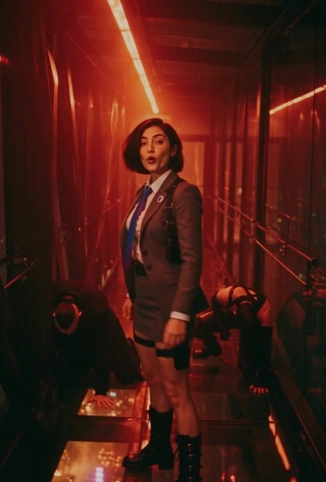
Prompt 6 — Rooftop beat, short formOn a rain-soaked rooftop, a man throws a right-handed strike. A woman in a gray suit ducks, pivots outside his arm, and counters once. A lateral camera tracks beside them; red industrial lamps reflect on wet concrete.
Prompt 7 — Physics and anatomy lockProfessional stunt choreography, accurate anatomy, natural weight transfer, precise foot placement, plausible acceleration, momentum and contact reactions. Clothing and hair respond realistically. No sliding feet, awkward backward walking, extra limbs or impossible body mechanics.
Prompt 8 — Continuity into the next shotContinue directly from the supplied starting frame. Preserve the heroine's facial identity, short dark bob, gray blazer, blue-purple tie and boots. Maintain the same left/right positions, door geometry, movement direction and red-orange practical lighting. The next shot begins where the prior shot ends.
Prompt 9 — Time-dilation address to cameraAt the moment the opponent's strike nears her shoulder, the world slows to 0.1% speed. The opponent, clothes and environment move almost imperceptibly. Only the heroine and camera move normally. She snaps her head sharply toward the lens and speaks directly to the viewer. After the final word she returns to the fight and time resumes instantly.
Prompt 10 — Rooftop clip, 5 secondsCreate a 5-second photorealistic cinematic action shot, vertical 9:16.
On a wet skyscraper rooftop at night, a male opponent in a black tailored coat throws one fast right-handed strike toward a woman in a gray suit. She ducks beneath his arm, pivots to his outside shoulder and delivers one controlled counterstrike. He reacts and steps back.
CAMERA: One smooth lateral tracking movement parallel to both fighters, medium-wide framing showing footwork.
LIGHT: Red practical lamps, cool blue city haze, natural wet-floor reflections.
PHYSICS: Realistic weight, inertia, balance, body reactions, hair and fabric movement.
End with both characters clearly separated and grounded. No extra actions.
Prompt 11 — Stairwell chase, 5 secondsCreate a 5-second photorealistic chase shot inside a red-lit industrial stairwell, vertical 9:16.
A woman in a gray suit turns forward and rapidly runs DOWN one complete metal stair flight. A muscular male opponent pursues her several steps behind on the SAME staircase.
CAMERA: Tight stabilized follow shot directly behind her at shoulder height, matching her downward movement around one natural turn.
Show actual descending metal steps and railings, accurate footfalls, natural acceleration, moving tie and jacket.
No reverse walking, no upstairs movement, no teleportation or impossible staircase geometry.
End as she reaches a wide lower landing with the opponent still behind.
Prompt 12 — Skybridge orbit, 6 secondsCreate a 6-second photorealistic cinematic action shot on a narrow glass skybridge high above a nighttime city.
A man in a long black coat launches one sweeping strike. The heroine in a gray suit ducks beneath his arm, pivots past his outside shoulder and redirects his momentum with ONE decisive controlled counteraction. He stumbles and drops to one knee, safely inside the bridge.
CAMERA: ONE uninterrupted low-angle 120-degree physical orbit around both fighters, with strong architectural background parallax.
ENVIRONMENT: Red-orange ceiling lights, dark steel beams, reinforced transparent floor showing city lights far below.
Realistic contact, weight transfer and reactions. No broken glass, falls or extra strikes.
Prompt 13 — Universal action templateCreate a [DURATION]-second photorealistic cinematic action video, [ASPECT RATIO].
STYLE: [Genre and tone — do not copy protected characters]
CHARACTERS: [Exact appearances, clothing, positions]
LOCATION: [Architecture, materials, weather, entry and exit]
ACTION: [Who initiates; one main move; reaction; clear ending]
CAMERA: [Shot size, angle, physical trajectory, timing]
LIGHT: [Key light, rim light, practical light, color contrast]
PHYSICS: [Weight transfer, footwork, inertia, contact]
TIMELINE: [0–2 seconds: ... / 2–5 seconds: ...]
AUDIO: [Dialogue, ambience, sound design]
REFERENCES: [Start frame, location, hero sheet, next location]
FINAL FRAME: [Who is where and which direction they face]
RESTRICTIONS: [Specific unwanted artifacts, only if needed]
Prompt 14 — bullet-time fashion film (Seedance 2.5)
From How to Make an AI Bullet-Time Fashion Video with Seedance 2.5. Four stills, each with one job: character, street, sunglasses, phone.
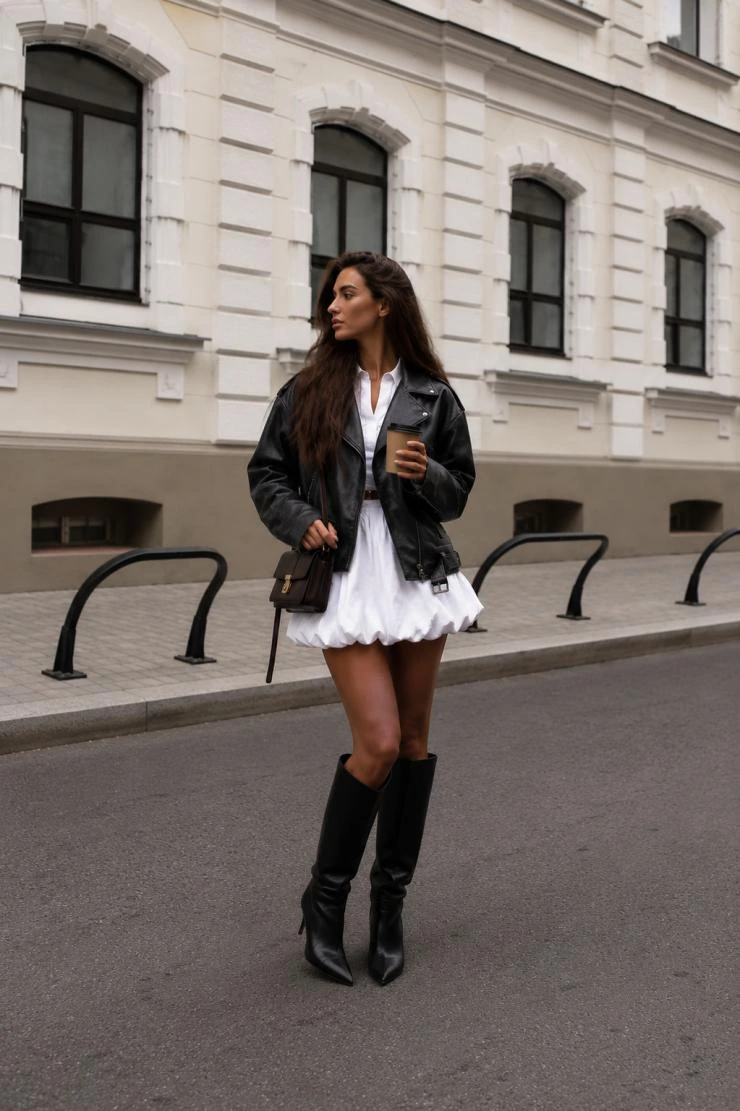
Prompt 14 — NYC bullet-time fashion film, 15 secondsCreate one continuous 15s vertical 9:16 ultra-photorealistic LIVE-ACTION luxury fashion film in daytime New York.

@Image1 = CHARACTER ONLY. Preserve the exact woman: face, eyes, hair, body proportions, black leather jacket, voluminous white mini dress/skirt, black knee-high boots, handbag. Stable identity and outfit. Handbag stays on the body.
@Image2 = ENVIRONMENT ONLY. Believable Manhattan intersection: asphalt, zebra crossing, sidewalks, NYC architecture, yellow taxis, traffic, pedestrians, natural daylight.
@Image3 = SUNGLASSES ONLY. Reproduce the exact glossy black angular sunglasses, dark lenses, proportions, thick temples, gold side hardware. The SAME pair when worn, released, in macro, and after landing. No redesign or duplication.
@Image4 = PHONE ONLY. Use the exact realistic modern smartphone and screen from Image4: metal frame, glass display, active call interface and call controls. The SAME phone throughout.

Exactly ONE woman, ONE male passerby, ONE Labrador on a leash, ONE pair of sunglasses, ONE coffee cup with lid, ONE phone.
Before the collision: sunglasses on her face, RIGHT HAND = phone at her ear, LEFT HAND = coffee.

0.0–2.8s: Start EXTREMELY LOW on the boots walking across the zebra. Camera tracks backward and cranes up continuously: boots → legs → white skirt → leather jacket → bag → coffee → phone → face → sunglasses. No cut. She walks confidently and talks naturally on the phone.
2.8–4.8s: Frontal tracking. ONE man with a Labrador approaches FROM THE OPPOSITE DIRECTION. She continues crossing.
4.8–5.6s: As they pass, his elbow accidentally clips her arm or torso. A small, believable impact. He does NOT stop or turn back. She recoils, takes one balancing step, but DOES NOT FALL. The collision releases: sunglasses leave her face; the cup leaves the left hand, tilts, lid partially opens, coffee spills only through the real opening; the phone leaves the right hand outward and up. BOTH HANDS EMPTY. Preserve her exact face.
5.6–6.5s: Time slows to 2–3%. Medium-wide frozen tableau. She REMAINS STANDING, slightly leaned back, looking at the suspended objects with surprise. The man continues away with the Labrador. Sunglasses, cup, coffee droplets and phone almost frozen near their real release points. OBJECTS STAY IN WORLD SPACE. THE CAMERA MOVES.
6.5–8.4s: Camera dollies to the SAME sunglasses for a restrained 20–30° orbit. Macro of the exact Image3 geometry, glossy frame, dark lenses, gold detail, real reflections, shallow depth of field.
8.4–10.3s: Camera travels to the SAME cup. Real paper cup, lid displaced on one edge. Dark coffee pours only through physically honest openings.
10.3–12.5s: Find the SAME phone in mid-air, still showing the active call, then begin easing out of the freeze.
12.5–15s: Time returns to normal. She recovers her balance, objects complete their real-world falls or she catches the glasses if that reads cleanly, and she continues across the street. No cut, no new characters, no redesigned props.

Sound: city air, footsteps, a short impact, suspended-time hush, then traffic again. No wall-to-wall music unless it stays under the action.
Prompt 15 — billboard ad (Seedance 2.5)
From How to Make an AI Billboard Ad with Seedance 2.5. Two stills only: the woman, and a fictional skincare jar (NEURA is a demo product).
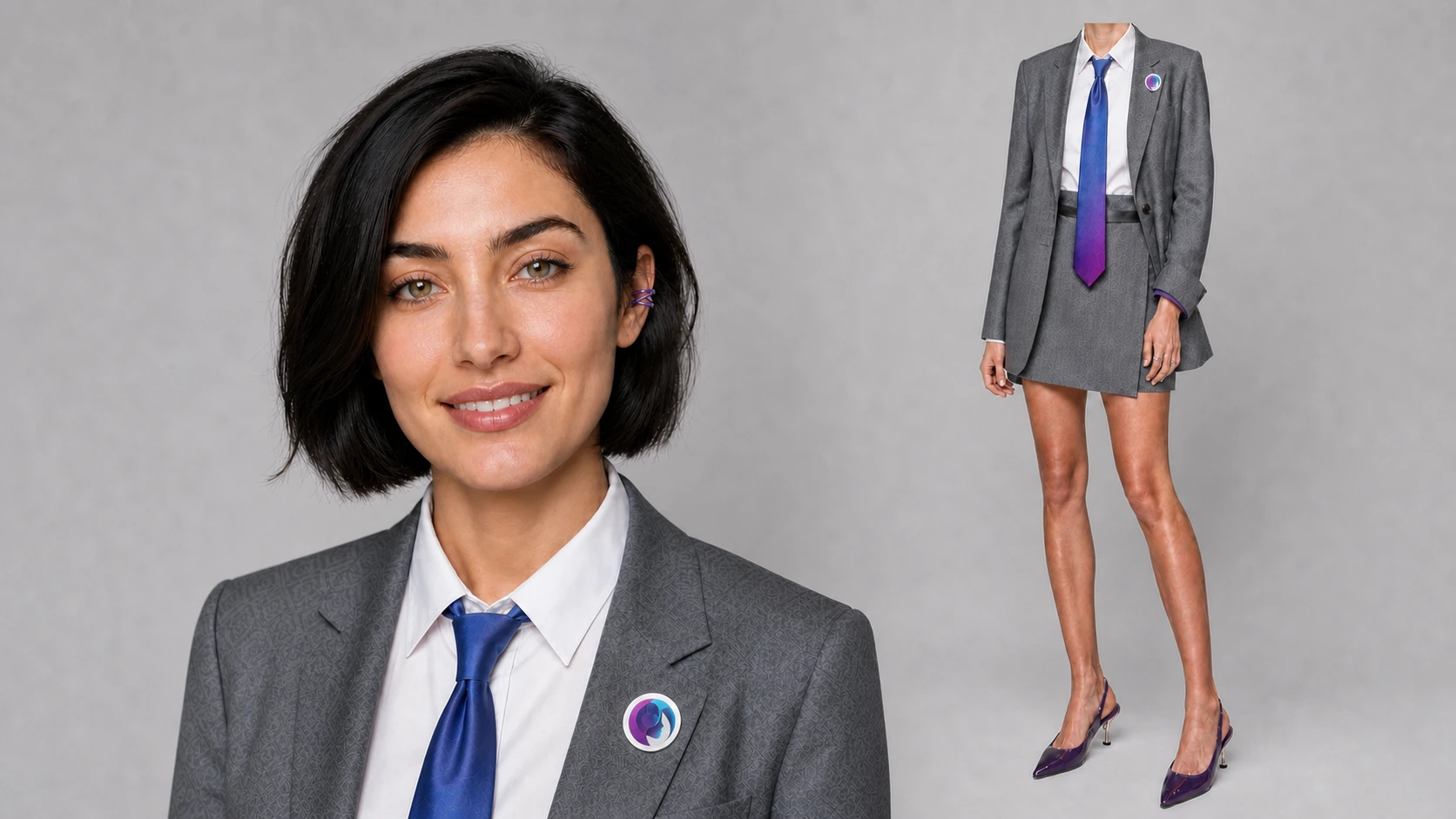
Prompt 15 — Billboard comes to life, 10 secondsCreate one continuous 10-second ultra-photorealistic vertical 9:16 advertising video.

@Image1 = CHARACTER + OUTFIT. Use ONLY the exact woman from @Image1. Preserve her face, short glossy black bob with side part, hazel-green eyes, skin tone, body proportions, and the exact outfit: dark charcoal-gray oversized patterned blazer, white button-up shirt, blue-to-purple gradient tie, matching charcoal mini skirt, dark purple pointed slingback heels, small blue-purple lapel pin, purple ear accessory. No face, hair, or outfit change; no added jewelry; no body distortion.

@Image2 = PRODUCT. Use the exact NEURA PEPTIDE 8 skincare jar: frosted cool-white cylindrical glass, soft lavender-purple gradient near the bottom, wide polished silver chrome lid, same proportions, recognizable branding (NEURA / PEPTIDE 8 / BARRIER REPAIR CREAM). Never redesign it; never turn it into a bottle, tube, or a different jar.

LOCATION: Downtown Manhattan. A huge luxury digital billboard on a modern facade. The street stays ACTIVE for the entire video: pedestrians walk and cross, yellow taxis, sedans and SUVs move. No frozen people or vehicles, no teleported or duplicated cars. Soft late-afternoon / golden-hour daylight.

CAMERA: Real handheld smartphone footage from street level, looking slightly upward. Subtle natural shake, tiny autofocus breathing, realistic exposure. No artificial cinematic camera moves.

BILLBOARD STYLE: Premium luxury skincare, pearl-white and pale cool-gray with soft silver and blue-violet accents. No extra text, subtitles, or floating typography.

0–2s BILLBOARD: Wide shot of the entire board. The woman from @Image1 appears full-body inside it, lying elegantly on her side (forearm supporting her, legs extended, both purple heels visible), looking at camera with a subtle confident smile. The NEURA jar sits separately beside her and must NOT overlap her body, clothes, or shoes. She and the jar first read as flat advertising imagery. Below, the street stays in motion.

2–4s COME TO LIFE: Without a cut, she slowly becomes a realistic three-dimensional person — subtle and physical, no glow, particles, magic, or obvious morph. Fabric gains depth, hair moves slightly. She sits upright on the lower billboard edge, crosses one leg over the other, and gently swings the upper leg. Full body remains visible; face, hair, and outfit stay identical. The jar stays in its original position. The street stays active.

4–5.5s TAKE PRODUCT: She looks at the jar, reaches, and picks it up. The exact moment she lifts it, the original product disappears from the board — that area becomes empty background. There must never be two jars. The jar now exists only in her hand as a real 3D object, same shape, lid, glass, gradient, and branding. She briefly presents the front toward camera.

5.5–7.5s THROW: She smiles and throws the jar OUT OF THE BILLBOARD toward the camera. It physically enters the real street space, follows natural physics, and becomes larger as it approaches, with only a slight rotation, branding generally facing camera. No deformation, missing lid, duplicate, color change, or new proportions. The camera operator reacts with a small handheld jolt and a brief autofocus shift. Pedestrians and traffic remain visible.

7.5–9s CATCH: A clearly feminine adult hand enters from the bottom foreground (slender fingers, natural manicure, elegant wrist — not a masculine or bulky hand) and catches the jar just before it reaches the camera. Fingers wrap naturally. Hold the product close to the lens, large and sharp. In the background she remains seated on the board, smiling, one leg gently swinging, and the original product location stays EMPTY. People walk; taxis move.

9–10s FINAL HOLD: Same hand, same jar, same woman on the board with small natural micro-movements (smile, breath, hair, leg swing). The city remains active. No cut, transition, or freeze-frame.

AUDIO: No music, dialogue, or voice-over. Only subtle realistic ambience — traffic, pedestrians, fabric, a soft whoosh on the throw, a natural catch.

CRITICAL: one woman, one jar at every moment (on the board, then in her hand, then in the catching hand — never two). Natural anatomy, grip, throw, trajectory, gravity, and catch. Ultra-photorealistic premium skincare advertising that should look like genuine phone footage of a real anamorphic billboard, not an AI fantasy.
Prompt 16 — rhinestone-car trend remake (Seedance 2.5)
From How to Recreate the Rhinestone Car Trend with Seedance 2.5. Use Prompt 2 first if you are swapping the driver from a photo; then paste this film prompt in Video Master.
Prompt 16 — Rhinestone cabin, one continuous takeNatural, highly realistic smartphone footage filmed entirely inside a slowly moving, left-hand-drive Bentley Bentayga Mulliner at night. A woman in the front-right passenger seat films with her right hand while her left hand adds rhinestone stickers to the already heavily decorated cabin and then to the driver's cheek. The driver responds with quiet, accustomed resignation. One continuous handheld take, no cuts or exterior shots.

The defining visual fact: the interior is ALREADY densely covered with bright multicolored rhinestones from the first frame. Hundreds of individual gems cover both front doors, the entire dashboard, console, steering-wheel trim, instrument and vent surrounds, screen frame, glovebox, pillars, headliner, sun visors, panoramic-roof border, and seat edges. Use hot pink, red, turquoise, blue, green, purple, yellow, and clear gems in flower, heart, star, oval, square, and round shapes. Small gaps reveal leather and wood. Every newly revealed surface is already densely decorated, never mostly bare. The woman adds finishing touches, not the initial decoration.

The same adult woman's left hand appears throughout: slender fingers, realistic skin, neat cuticles, very long glossy neon-pink almond nails, and a thin gold bracelet. She grips gems with her thumb and index-finger pads, angling the long nails away from the contact surface. Only her hand, forearm, and part of her lap appear; her face stays outside the frame.

The driver is a fictional rugged European-looking man around forty, heavily built, broad shoulders, thick neck, square jaw, pronounced cheekbones, short dark hair, and dense stubble, with visible pores and fine eye creases. He wears a fitted black shirt, a metal watch, and lightly tinted aviators that still reveal his eyes. His appearance remains consistent.

Exactly three small rhinestones are already attached to the driver's right cheek before the camera reveals him: a blue round crystal, a pink flower, and a clear star, loosely below his right cheekbone. They remain fixed. During the scene the woman adds a fourth gem next to them. Three on the cheek before this contact, four afterward.

The cabin has cream-beige quilted leather, dark wood, metal trim, round vents, a central display, and a panoramic glass roof. Night scenery moves continuously outside. Light handheld tremor and road vibration stay in the footage.

The camera starts on the already decorated passenger-door trim and dashboard, then crosses the console. It briefly dips enough to reveal a white backing sheet of unused rhinestone stickers on the woman's lap. Her left hand peels one small gem from this sheet; the sheet flexes with the peel and trembles with the car. This selected gem remains visibly held for the cheek application; it does not appear from nowhere. The pan continues to the decorated screen frame, vents, console, and steering-wheel trim, then settles into a medium three-quarter view of the driver from the passenger's right-side position. His right cheek faces the camera, with the three existing rhinestones clearly visible. He sits in the left driver's seat, left hand on the wheel making small steering corrections, right forearm near the console, watching the road, unsurprised.

The woman's left hand rises from the lower foreground carrying the peeled gem. She reaches toward his right cheek without blocking his vision. The camera leans slightly closer with a small imperfect handheld movement but stays in the right passenger seat. Autofocus briefly shifts from his face to her fingers. She places the new gem beside the existing cluster, presses gently, and withdraws. Skin compresses slightly; stubble, glasses, and the original three gems stay unchanged. Exactly FOUR rhinestones remain on the right cheek.

The driver pauses, still looking ahead, used to this, quietly accepting it. He exhales softly through his nose, lowers his chin, and briefly glances toward her retreating hand. One corner of his closed mouth tightens, then relaxes. No anger, shock, broad smile, or exaggerated eye roll. While continuing slowly along a straight empty road, he turns his head slightly right toward the passenger, chin lowered, torso facing forward, eyes lifting toward the lens — patient resignation and faint affection, conveyed only through his face, not spoken or written. Finish on a brief medium-close view of that lowered-chin glance. The four cheek gems stay visible and fixed. The cabin behind him is still densely covered. Preserve light hand tremor and road vibration through the final frame. End naturally, with no cut, freeze-frame, or fade.

Sound only: quiet muffled engine and tire noise, low ventilation, distant nighttime road, a soft rustle as a gem is peeled, a light nail tap, a quiet nasal exhale. No dialogue, no background music, no subtitles, no on-screen text.

Continuity: left-hand drive; the woman and camera stay in the front-right seat; his left hand stays on the wheel; her hand always has five correct fingers and the same long neon-pink nails; existing gems never disappear, multiply, slide, or float; only one gem is added to the cheek (three become four); the hand physically transfers that gem once.

Do not: a bare or sparsely decorated cabin, decoration appearing gradually, a loose glitter cloud, floating gems, changing rhinestone counts, a masculine hand, short or changing nails, extra fingers, a right-hand-drive car, a duplicate steering wheel, a changing brand, a warped dashboard, a changing face, waxy skin, a static road, sudden acceleration, camera teleportation, exterior shots, cuts, or excessive stabilization.
Prompt 17 — start and end frame (Seedance 2.5)
From How to Make Viral AI Videos with a Start and End Frame. Write the two stills with Prompt 1, generate them in Image Master, then animate the pair with this prompt.
Prompt 17 — Lake film from start and end frame, 15 secondsCreate one continuous 15-second ultra-photorealistic vertical 9:16 cinematic video.

@Image1 = START FRAME. Use it as the exact opening composition, character, helicopter, lake, lighting and oversized bath bomb.
@Image2 = FINAL FRAME. Finish as close as possible to this image: the same woman relaxing in a large pink flamingo float on the foamy lake.

The woman in both images is the SAME person. Preserve her face, proportions, short glossy black bob, skin tone, and black one-piece swimsuit with white trim. After she enters the water, her hair can be wet but must stay the same bob. Do not redesign the swimsuit.

Setting: a realistic alpine lake, forest, rocky shore and mountains. The water starts clean turquoise-blue. The helicopter flies LOW over the open water, not over the forest. Natural daylight, realistic reflections, rotor wind in her hair and on the water.

0–2.5s: Begin from @Image1. She stands at the open helicopter doorway holding ONE oversized pastel bath bomb (round, matte powder texture, pink/lavender/blue, no fuse, sparks or metal). She looks down and prepares to release it.
2.5–4s: She extends her hand and drops the bomb straight down toward the center of the lake. She stays in the helicopter. The camera briefly follows the fall. Real gravity, light rotation, rotor and wind only — no music.
4–5.5s: The bomb hits, fizzes, and dissolves into white, pink and lavender foam. Do not show the bomb again after it dissolves.
5.5–8s: Aerial view as realistic wet foam spreads until the lake reads as an enormous outdoor bubble bath. Some turquoise water may remain. Do not make the foam look like clouds, cotton, snow or paint.
8–12s: Cut back to her as she leaves the helicopter and enters the water naturally.
12–15s: Arrive at @Image2 — she relaxes in the flamingo float on the foamy lake.

No identity change, no extra characters, no visible typography or map markings.
Prompts 18–19 — coverage from the realism playbook
Also from the AI Realism Playbook. Use these when you already have character and location references and you need a planned set of camera sizes, not a single trick shot.
Prompt 18 — Three-size coverage pattern0–3s: 35mm medium two-shot, woman screen-left, man screen-right.
3–6s: 50mm over-the-shoulder shot from behind the man, focusing on the woman.
6–9s: 85mm close-up of her reaction.
Preserve eyelines, camera axis, facial identity and the winter background.
Prompt 19 — Dinner-table scene, 9 secondsCreate a 16:9 photorealistic live-action shot. Use the attached character and environment references. Preserve the exact faces, clothing, furniture, lighting direction and positions.
0–3s: static 35mm wide shot, all four guests in clear focus.
3–6s: eye-level 50mm medium shot of one guest looking toward another.
6–9s: close-up of both hands carefully opening a paper envelope; realistic contact and paper motion.
Authentic blinking, breathing and small gestures. Deliberate hard cuts, natural room ambience, sharp faces, no anatomy errors or identity changes.
Prompt 20 — Kling 4.0 motion template
From How to Turn a Photo into a Video with AI. This is the Video Master template that follows Prompt 3. Replace the bracketed parts; do not leave the brackets in the paste.
Prompt 20 — Kling 4.0 first-frame motion templateUse the attached image as the exact first frame.
Keep [the subject], [details that must not change] and the lighting exactly as they are.
0–2 s: [a small first motion: a blink, steam, fabric moving].
2–4 s: [the main action].
4–5 s: [the ending beat], then hold the final composition.
Camera: [one move, for example a slow push-in].
Sound: [ambience and effects tied to what we see].
Do not add new people, objects or text. No cuts, no morphing, no face or product changes.
Prompts 21–24 — camera moves from the action field guide
Short camera lines from the same action playbook as Prompts 6–13. Drop one of them into a clip prompt. For a 5–8 second shot, use one dominant move.
Prompt 21 — Lateral tracking (action field guide)The camera tracks left to right beside both fighters.
Prompt 22 — Chase / follow (action field guide)Follow directly behind her down the metal staircase.
Prompt 23 — Orbit (action field guide)Make one smooth 120-degree orbit around both fighters.
Prompt 24 — Dolly-in (action field guide)Slowly push in as she turns to address the viewer.
Prompt 25 — Veo 3.1 first-frame dialogue template
From our Seedance 2.5 vs Veo 3.1 comparison. This is the starter pattern we publish for a locked first frame with one spoken line, not a transcript of one finished commercial. Replace the brackets, attach the still, and run it in Veo 3.1 Pro or Fast.
Prompt 25 — Veo 3.1 first-frame dialogue templateUse the supplied image as the exact first frame.
Keep [the face, hands, product, label and lighting] exactly as they are.
One action only: [she looks into the camera and says exactly: "..."],
with [one natural blink and a small smile].
Camera: [one very slow push-in]. Format: 9:16, 8 seconds.
Sound: [quiet room tone and one specific background sound]; [no music].
No cuts, no new objects, no extra text, no logo or label changes.
Mistakes that waste a generation
- Asking for ten stunts in a five-second clip. Split beats, as in Prompts 10–12.
- Attaching one still and hoping it covers face, product and street. Give each reference one job, as in Prompts 14 and 15.
- Skipping the continuity line. Prompt 8 exists because the next clip otherwise invents a new face or a new doorway.
- Leaving bracket placeholders in a template (Prompts 13, 20 and 25).
- Fighting native audio with a second score before you have listened to the take.
Where to go next
If you are starting from a still, use the image-to-video guide. For a longer method on one of the films above, open the dedicated pages for action, bullet time, the billboard ad, the rhinestone remake or the realism playbook.
Frequently asked questions
What makes a good AI video prompt?
Name the subject, the one main action, the camera move, the light, how the shot ends, and what must not happen. Write actions, not adjectives. If you already have a still, say that it is the first frame and list the details that must not change.
Which model should I use: Seedance 2.5, Kling 4.0 or Veo 3.1?
Use Seedance 2.5 for longer clips, up to 30 seconds, with native audio and image references — the billboard, bullet-time, rhinestone and start-end films on this page were made with it. Use Kling 4.0 when you want a first frame, or a first and last frame, turned into a 3–30 second take at 720p or 1080p. Use Veo 3.1 Pro or Fast when the shot needs a spoken line and sound from a locked first frame.
How do I write prompts for Seedance 2.5?
Write the story in time blocks, attach one job per reference image, and say what must stay identical. The billboard, bullet-time and start-end prompts below are the paste-ready versions from those projects.
Do I need a start frame and an end frame?
Not always. Kling 4.0 requires a first frame and accepts an optional last frame. Seedance 2.5 can start from references without that pair. A start and end frame is the right method when the opening and the finish are already designed, as in the lake film on this page.
How do I keep the same character in every shot?
Build a character sheet in Image Master first, attach it to every clip, and put a continuity line in the prompt: same face, hair, clothes, positions and light. Prompt 5 and Prompt 8 on this page are the sheet and the continuity line from our published guides.
Where should I write the script and the video prompt?
Write the script and the adapter prompt in Chat Master. Generate or edit reference stills in Image Master. Paste the final video prompt in Video Master. If the model did not give you the sound you need, finish in Audio Master.